













AI Ease

AI-powered tools for efficient photo editing, including background removal and image enhancement.
Aiease.ai
Is this your tool?
Follow for updates & deals
Get alerts for AI Ease discounts, feature releases & pricing changes
Similar Tools

OpenArt
Enhance and transform images with an array of AI tools for quality and creativity.

Graphis
Collaborate on an infinite canvas to create and enhance images, videos, and text seamlessly.
PixNova AI
Generate and edit images with AI, including headshots, face swaps, and baby predictions.

LuminaBrush
Interactive tool for precise lighting adjustments using intuitive brush strokes.
Pixlio AI
Create and edit professional images using advanced AI models and intuitive editing tools.

AI Ease Media Gallery

AI Ease (review) video
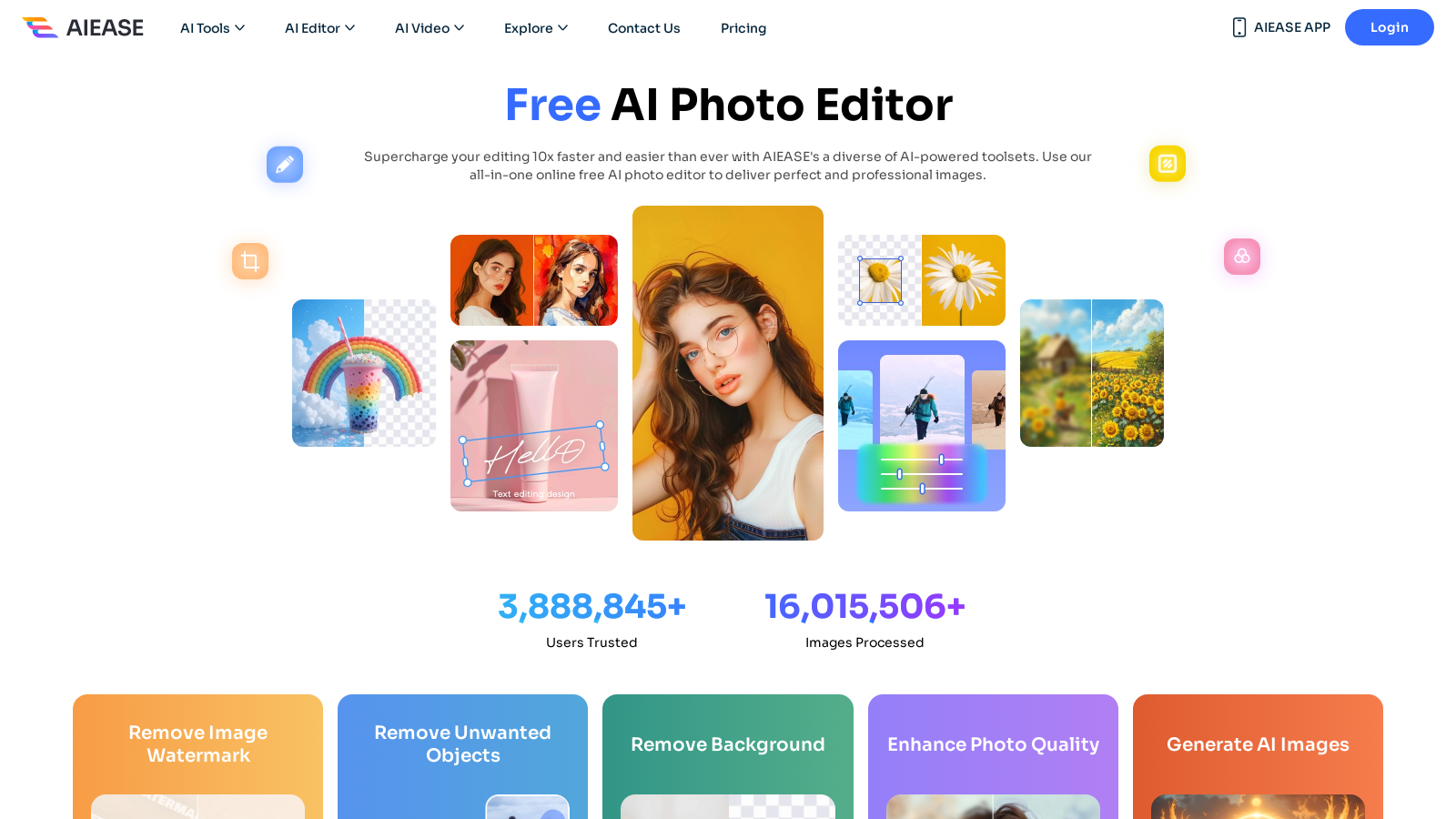
Screenshot of AI Ease
What is AI Ease?
AI Ease is a cutting-edge platform that utilizes artificial intelligence to enhance and simplify the photo editing process, offering a highly versatile range of AI-powered tools designed for users at any skill level. With AI Ease, creating breathtaking visuals becomes a breeze, allowing anyone—from amateurs to professional photographers—to access advanced editing features.
This innovative tool has made a significant impact on the way users approach photo editing. Its primary focus on ease of use means that complex image adjustments are now achievable in just a few clicks. The recent advancements at AI Ease highlight its commitment to providing an all-in-one editing solution that can supercharge your workflow considerably.
Features of AI Ease
AI Ease boasts a comprehensive set of features equipped with multiple advanced tools that cover all aspects of photo editing:
- AI Image Generator: This tool transforms simple text prompts into intricate images, making it perfect for those seeking to create unique and artistic visuals effortlessly.
- Background Remover: AI Ease's background removal technology operates at impressive speed, allowing users to obtain clean, professional-grade images with transparent backgrounds in mere seconds.
- Face Swapping: A fun feature that lets users seamlessly replace faces in photos, adding an element of enjoyment to image editing.
- Photo Retouching: Enhance portraits easily by removing blemishes, smoothing skin tones, and improving overall photo quality with minimal effort.
- Watermark Removal: In just a few clicks, users can rid their images of unwanted watermarks, enhancing the final output without any specialized skills.
- Batch Processing: Designed for users with high-volume editing needs, the batch processing tool allows multiple images to be edited simultaneously, saving both time and effort.
- Mobile Accessibility: AI Ease offers user-friendly applications for desktop and mobile devices, ensuring editing is possible wherever you are.
Freemium Model
AI Ease employs a freemium model, allowing users to access select editing tools for free, while offering additional features and unlimited access through various paid subscription plans. The free tier includes powerful basic functionalities ideal for casual users, while the monthly plan starts at NULL.99, and an annual subscription is available for NULL.99, providing additional benefits like batch processing and higher resolution downloads. Users not only receive ongoing updates and functionality expansions but can also leverage the platform's community feedback to continually enhance their editing experience.
Community and Support
The platform fosters a strong community that emphasizes user feedback in developing new tools and features. AI Ease supports its users with detailed FAQs and customer service to address any challenges while ensuring continuous improvement and adaptability to the evolving digital landscape.
Conclusion
In summary, AI Ease is transforming the photo editing landscape through empowerment and innovation. With artificial intelligence at its core, this platform simplifies complex editing tasks, enabling users to produce stunning visuals effortlessly. Whether you’re a hobbyist looking to share your creativity or a professional aiming for high-quality outputs, AI Ease provides an ideal toolkit to unleash your potential in photo editing.
Pros & Cons
Pros
- Offers a wide range of AI-powered photo editing tools for various tasks.
- Allows users to create and customize images effortlessly with AI techniques.
- Free to use with no registration required, enhancing accessibility.
Cons
- Limited features in the free version may lead to the need for subscriptions for full access.
Frequently Asked Questions
AI Ease is free to start, with paid plans from 0 to 59.99 USD per month.
According to our latest information, this tool does not seem to have a lifetime deal at the moment, unfortunately.
AI Ease offers a wide array of photo editing tools, including an AI headshot generator, photo enhancer, background remover, image enlarger, object remover, and more. Additionally, you can utilize features such as skin retouching, watermark removal, and various creative filters to enhance and customize your images effortlessly.
Yes, images edited using AI Ease can be used for commercial purposes without limitations. However, it's recommended to acknowledge AI Ease (aiease.ai) as the source of your AI-powered creativity when using these images for commercial endeavors.
AI Ease allows you to upload images up to 2MB in size. This ensures that you can work with high-resolution images while maintaining quality during editing processes, allowing for detailed adjustments and enhancements.
AI Ease is committed to user privacy and security. The platform does not store original images or edited results after the editing session ends. All images are processed by their privacy policy to ensure confidentiality and data protection.
AI-generated images from AI Ease can be utilized for various creative projects, including social media posts, e-commerce product listings, marketing materials, and personalized gifts. Whether you're creating professional headshots or whimsical digital art, the tools provided can significantly enhance your projects.
While the free version of AI Ease allows access to a range of features, it comes with limitations on daily usage and download quality (watermarked images). The Pro subscription, on the other hand, offers unlimited access to all features, higher-resolution downloads without watermarks, and additional functionality, such as batch processing.
AI Ease currently focuses on enhancing user experience through its online platform. While it does not offer direct integrations with other software, the platform's intuitive design allows for easy import and export of images, making it convenient for users to handle images across various applications.
To achieve the best results with AI Ease tools, ensure you upload high-quality images and utilize the specific settings available in each editing tool. Experiment with various features, such as filters and retouching options, and remember that incorporating AI-generated backgrounds and artistic styles can significantly enhance your creative projects.



