
Follow for updates & deals
Get alerts for Ami discounts, feature releases & pricing changes
Similar Tools

Fireworks
Easily build and customize generative AI applications using open-source models without extensive setup.

LangChain
A framework for building and deploying applications powered by large language models.

Browser Use
Automate web task management, including sessions and files, with user-friendly browser automation features.

Cline
AI assistant for VS Code that plans and implements complex coding tasks while enhancing productivity.

Letta
Build and manage stateful AI agents with advanced memory capabilities for enhanced interaction.

Ami Media Gallery

Ami (review) video
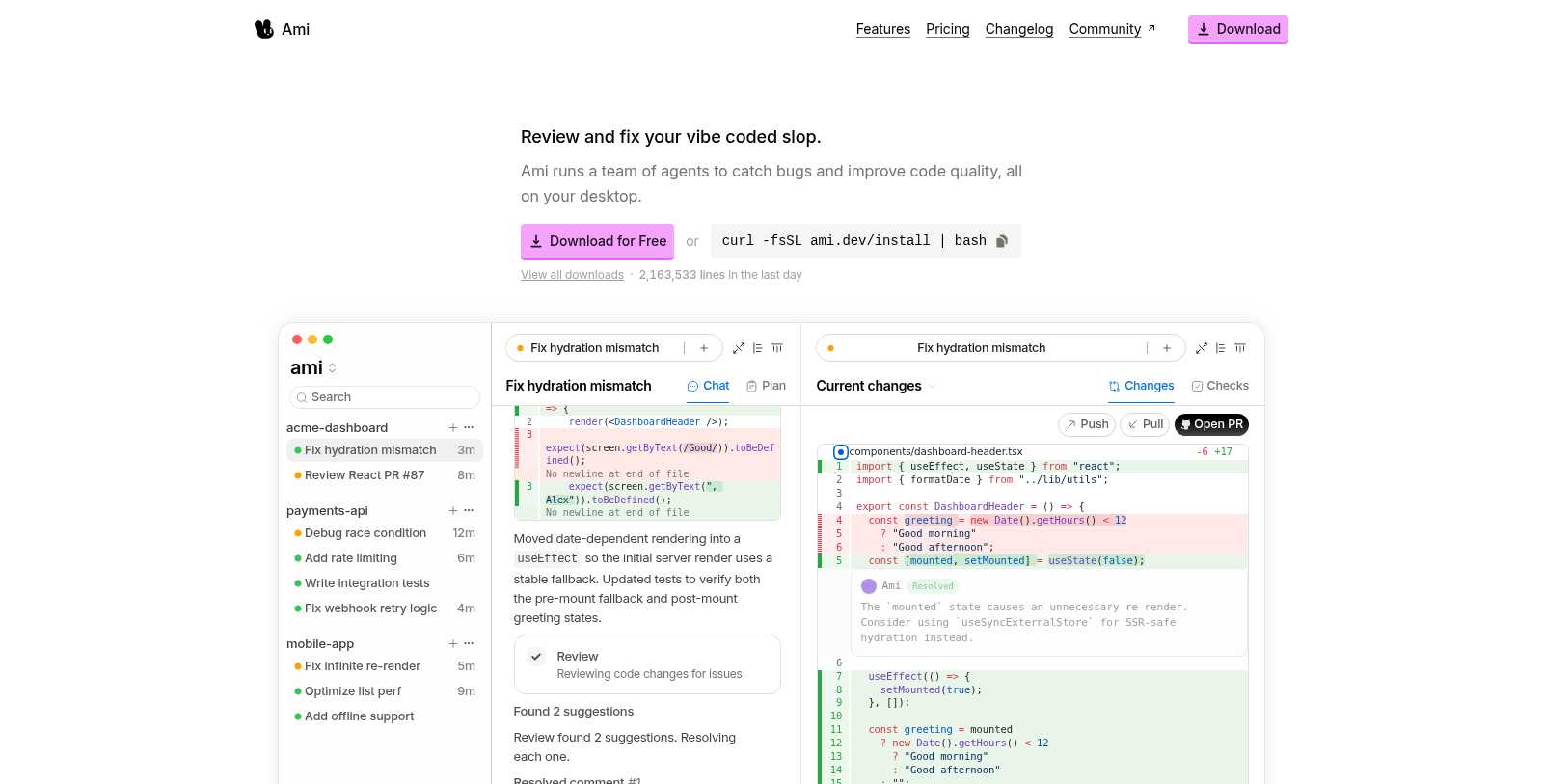
Screenshot of Ami
What is Ami?
Ami is an innovative tool designed to run coding agents directly on your desktop, providing a seamless integration with your development workflow. The core idea behind Ami is that agents need full access to your machine and context to be truly effective. This local functionality ensures that the experience feels native and integrated into your everyday tasks.
One of the standout features of Ami is its flexibility. Whether the task at hand takes mere seconds or stretches over several hours, Ami is equipped to handle it efficiently. Users can interact with their codebase in plain English. This allows for real-time changes as you describe what you need, enhancing productivity through immediate feedback.
Ami tracks every alteration made, ensuring that users can review and commit their code changes with confidence. Transparency and tracking are at the forefront of the user experience, allowing developers to navigate their workflow with ease and assurance.
Additionally, Ami operates on a flexible pricing model, which starts free: users can pay as they grow based on their usage. Pricing is structured around API costs, with users able to choose models such as Claude and GPT, which have varying costs based on input and output. This pay-per-use model aligns with how users engage with Ami's capabilities, ensuring costs remain manageable while users enjoy robust features.
Ami is compatible with multiple platforms, including macOS, Windows, and Linux. This cross-platform support allows a wider audience to integrate Ami into their coding environment, regardless of their preferred operating system. For developers eager to improve their workflow, Ami offers a compelling reason to adopt a new coding approach.
With a strong emphasis on data privacy, Ami ensures that users' code is handled responsibly. Privacy settings can be adjusted, allowing users to control what data is stored and how it is used, thereby enhancing trust in the tool. Moreover, the ability to switch to 'Privacy Mode' ensures sensitive data remains secure while still taking advantage of Ami's powerful features.
The changelog feature in Ami tracks its evolution over time. Users can view significant updates incrementally through a clear and straightforward interface. This transparency in the development process fosters a deeper connection with users as they see how their feedback is being used to shape the tool.
In summary, Ami is more than just a coding assistant; it is designed to seamlessly integrate into your existing workflow, offering powerful features while prioritizing user control and data privacy. Whether you're collaborating on projects, tracking changes, or leveraging AI capabilities to speed up your coding endeavors, Ami provides the tools to enhance productivity without interrupting the creative process.
Pros & Cons
Pros
- Runs coding agents locally, providing full access to your machine and context.
- Real-time code editing allows users to see changes instantly and review them confidently.
- Supports multiple operating systems, including macOS, Windows, and Linux.
Cons
- Code data may be stored unless 'Privacy Mode' is enabled.
Frequently Asked Questions
We have no pricing information available now, so please check the Ami's website.
According to our latest information, this tool does not seem to have a lifetime deal at the moment, unfortunately.
Ami is designed to tackle a variety of challenging bugs, including React infinite re-render loops, SSR hydration mismatches, performance bottlenecks, race conditions in streaming responses, and code that functions incorrectly. By reproducing issues with real runtime data, itenablesr targeted diagnosis and effective solutions, making it a valuable tool for developers seeking to optimize code quality.
To run Ami on your device, ensure you meet the following system requirements: macOS 12 (Monterey) or later; Windows 10 or later; and Linux compatible distributions such as Ubuntu 20.04 or Debian 10. Additionally, a minimum of 4GB of RAM is required, with 8GB recommended for optimal performance.
Ami provides flexibility regarding data privacy with a 'Privacy Mode' option. When enabled, Ami does not retain any data, ensuring your code is never used for training. If Privacy Mode is off, Ami may store code snippets and telemetry for enhancing AI functionality. However, any data used for processing is temporarily stored and encrypted, with no permanent retention of code unless explicitly authorized by you.
To utilize Ami for bug fixing, start by downloading the desktop app. Once installed, you can paste a bug report or Sentry alert into the app. Ami will then reproduce the issue and employ its team of agents to diagnose root causes and validate fixes before you incorporate the changes into your codebase, streamlining the debugging process.
While the website does not specify integrations, Ami operates as a standalone desktop application on macOS, Windows, and Linux. Users can input their code or bug reports directly into Ami, making it compatible with existing development environments. For specific integration capabilities or third-party compatibility, checking the official documentation or reaching out to their support may provide further insights.
Recent updates to Ami have included enhancements such as better review processes, new subagent capabilities, and overall design improvements. Notable releases include support for the Claude Opus 4.6 model and other optimization updates. For a comprehensive history of changes, users can refer to the changelog provided on Ami's website.
Yes, if you encounter any issues or have questions while using Ami, you can reach out to the team at founders@million.dev. Additionally, the official website provides documentation that may offer further help regarding installation, usage, and troubleshooting.
While Ami is tailored to a specific debugging approach, alternatives include other bug-tracking and debugging tools such as Sentry, Bugsnag, or Rollbar. Each tool comes with its own set of features and pricing models, so depending on your specific needs—such as real-time error tracking or more extensive integration capabilities—exploring these options could be worthwhile.