Dark Reader

Apply customizable dark themes to any website for reduced eye strain and a comfortable browsing experience.
Darkreader.org
Is this your tool?
Follow for updates & deals
Get alerts for Dark Reader discounts, feature releases & pricing changes
Similar Tools

OneTab
Save memory and reduce tab clutter in browsers.

Resume.co
Build professional, customizable resumes quickly with an easy-to-use online tool.

WAVE Evaluation Tool
Assess web content accessibility directly in your browser with visual feedback and human evaluation.
Radial
Automate Repetitive Tasks on Mac
FileFaker
Quickly generate various realistic test files for development and testing needs.

Dark Reader Media Gallery
What is Dark Reader?
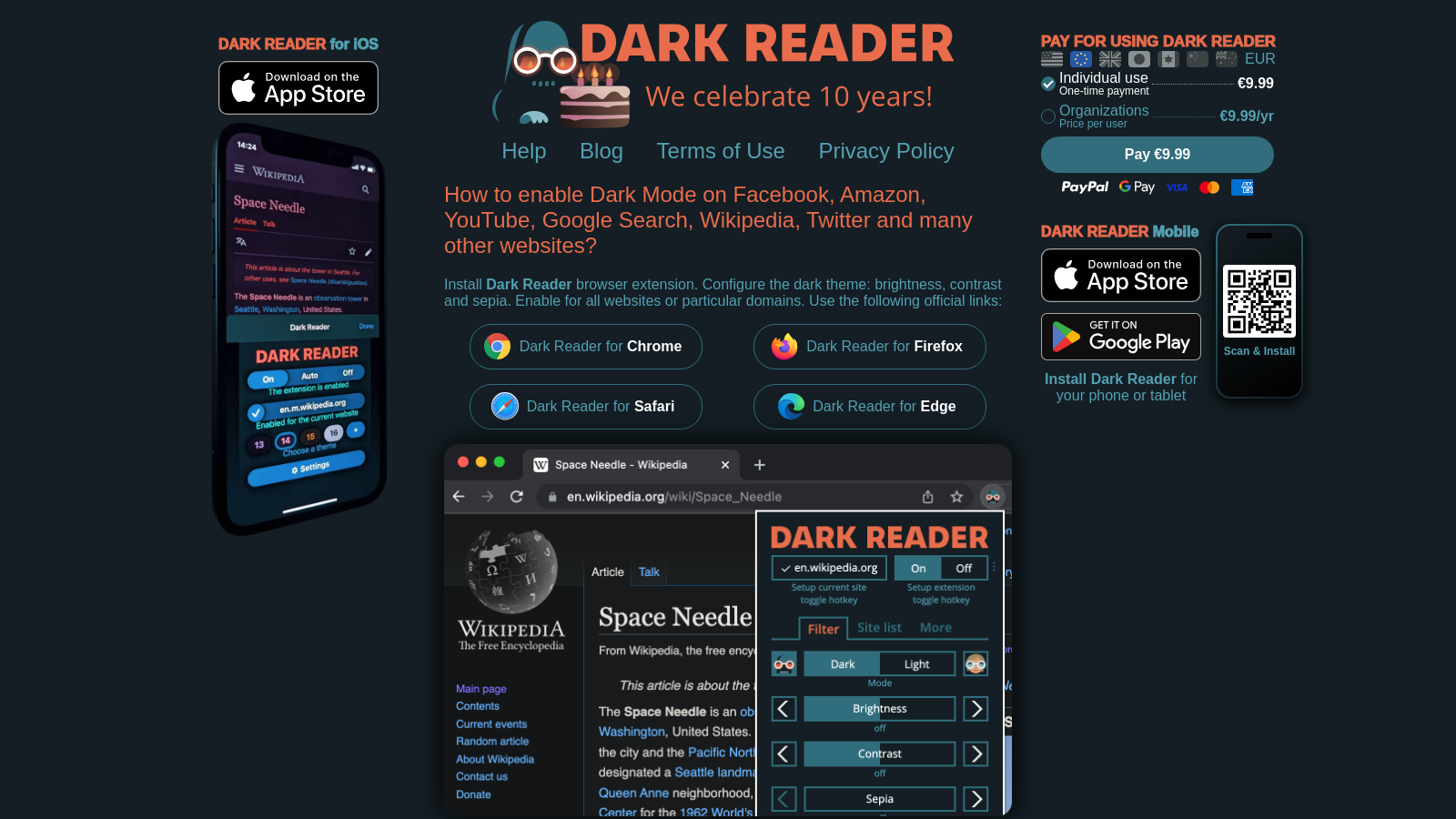
Dark Reader is an innovative open-source browser extension that transforms your web experience by applying a dark theme to web pages. This feature aims to significantly reduce eyestrain, making it particularly beneficial for extended browsing sessions, especially at night. Since its debut in 2014, Dark Reader has garnered trust from over 10,000,000 users globally, solidifying its status as an essential tool for modern internet navigation, particularly for those sensitive to bright screens.
Installation and Configuration
Setting up Dark Reader is a breeze. Users can easily install the extension from major browser platforms, including Chrome, Firefox, Safari, and Edge. After installation, the extension provides options to configure various settings according to personal preferences. Users can modify brightness, contrast, and apply sepia tones to create a more customized browsing experience. Importantly, Dark Reader allows activation for all websites at once or selectively for specific domains, which offers unprecedented control over the browsing environment.
Features That Enhance User Experience
Dark Reader is not merely a basic dark mode extension; it boasts a range of features designed to fulfill various user needs. Among its most prominent features is the ability to create customizable themes tailored to individual preferences. Such flexibility allows users to mitigate glare effectively, enabling comfortable browsing for prolonged periods without any discomfort. Users can also enjoy the option to automatically adjust the theme based on their device's light or dark mode settings, enhancing the overall adaptability of this tool.
Privacy and Security
Privacy remains a paramount concern for Dark Reader. The extension adheres to a strict no-data-collection policy, ensuring that users' browsing activities remain confidential. This commitment to privacy is a significant factor for many users, who take comfort in knowing that their personal data is not being tracked or sold, further amplifying the tool's appeal.
Community Trust and Support
Since its launch, Dark Reader has fostered a vibrant community of engaged users. Developed and maintained by contributors who are passionate about enhancing web usability, users are encouraged to give feedback and suggest new features. This collaborative approach not only drives innovation but also ensures that the tool continues to evolve in response to user needs. Furthermore, the developers actively maintain a blog showcasing updates, bug fixes, and user tips to maximize the Dark Reader experience.
Mobile Compatibility
Recognizing the widespread use of mobile devices, Dark Reader has successfully expanded its functionality to include mobile platforms, specifically catering to iOS devices. This extension highlights their dedication to providing effective eye-care solutions across various devices, making the tool accessible regardless of how users engage with the web.
Improved Functionality and Features
In its continuous pursuit of excellence, Dark Reader continually refines its features based on user suggestions and technological advances. Notably, users can now easily enable dark mode on popular sites such as Facebook, Amazon, YouTube, Google Search, Wikipedia, and Twitter effortlessly through their custom settings. These improvements signify a broadened commitment to making web pages more user-friendly and visually comfortable.
Conclusion
In a digital age that increasingly demands our attention for longer periods, Dark Reader stands out by providing a more visually comfortable way to browse. Its popularity spans students, professionals, and anyone who spends hours reading content online. Featuring customizable settings, robust privacy measures, and ongoing community support, Dark Reader transforms user interactions with web pages and serves as an essential tool for eye-care in today’s online landscape.
Pros & Cons
Pros
- Offers customizable dark mode with adjustable brightness, contrast, and sepia settings.
- Open source and does not track user data, ensuring privacy and trust.
- Widely trusted with over 9 million users and consistently recognized on popular platforms.
Cons
- Limited functionality on some websites due to browser security restrictions.
Frequently Asked Questions
Dark Reader is free to start, with a paid plan for 9.99 EUR as a one-time purchase.
According to our latest information, this tool does not seem to have a lifetime deal at the moment, unfortunately.
Dark Reader enables you to customize various settings to enhance your eye comfort while browsing. You can adjust brightness, contrast, and sepia levels according to your preference. This customization can be applied to all websites or specific domains, ensuring a personalized experience tailored to your needs.
Yes! Dark Reader is compatible with major browsers, including Chrome, Firefox, Safari, and Edge. You can download the browser extension from the respective store, such as the Chrome Web Store or Firefox Add-ons. Ensure you are using a supported version of these browsers for optimal performance.
To enable Dark Reader on restricted pages in Firefox, you first need to change Dark Reader's settings to allow it on those pages. Click on the Dark Reader icon, go to Advanced, and enable 'Enable on restricted pages'. Then, adjust Firefox's settings by entering 'about: config' in the address bar and modifying the necessary preferences. This process exposes a security risk, so proceed with caution.
Yes, Dark Reader is available for mobile devices! You can install Dark Reader for iOS, which works on iPhones, iPads, and Macs. The mobile extension is designed to provide the same eye comfort features as the desktop versions, allowing you to browse comfortably on your phone or tablet.
If Dark Reader doesn't function on certain websites, you can try enabling the 'Synchronize sites fixes' setting. Access the Dark Reader extension, click on "Dev Tools," then go to "Advanced" and allow the setting. You can also manually adjust settings in the extension to troubleshoot specific issues or refer to the Dark Reader help page for guidance on resolving problems with problematic sites.
Dark Reader is open-source, and contributions from users are always welcome! You can contribute by providing feedback, reporting bugs, or even coding. Visit the GitHub repository for Dark Reader to find information about contributing, building the extension from source, or suggesting new features through community discussions.
While Dark Reader is robust, some limitations include its performance on particular webpages with heavy graphics or specific design frameworks that may not respond well to dark mode. Additionally, certain websites may have restrictions that could hinder Dark Reader's functionality unless manually adjusted in browser settings, especially in Firefox.
If you're seeking alternatives to Dark Reader for dark mode browsing, you might consider extensions like 'Night Eye' or 'Super Dark Mode'. Both provide similar functionalities, allowing for adjustments to the dark theme across various websites. However, they may have differing customization options and performance, so exploring user reviews could help determine the best fit for your needs.