Director

Automates web tasks using natural language prompts, generating code for users without programming experience.
Director.ai
Is this your tool?
Follow for updates & deals
Get alerts for Director discounts, feature releases & pricing changes
Similar Tools

Godmode
Web platform that automates tasks using advanced AI models like GPT-3.5 and GPT-4.

Ripplica
Automate browser tasks with context-aware execution and remote triggers for improved workflow efficiency.
Synta
Automates n8n workflows through natural language interaction for streamlined deployment and debugging.

FiveTimesFaster
Create and deploy AI agents to automate repetitive tasks and streamline your workflow without coding.

FlowBot
Automate customer interactions and support processes for teams using WhatsApp.

Director Media Gallery

Director (review) video
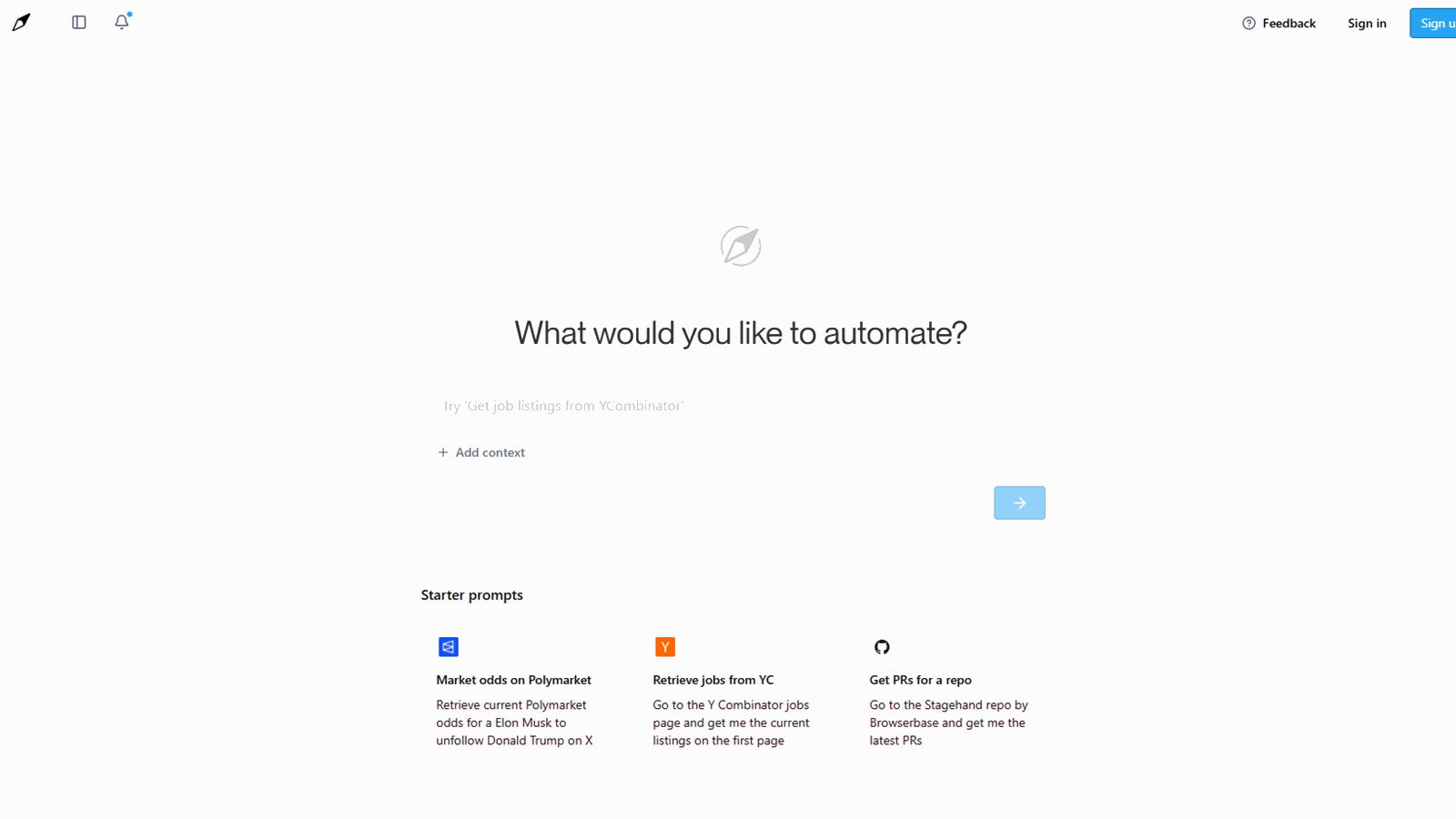
Screenshot of Director
What is Director?
Director is an innovative product from the Browserbase family that empowers users to automate web tasks effortlessly using natural language prompts. Unlike conventional coding methods, Director enables anyone, regardless of technical expertise, to describe what they want to automate, and in return, generates the necessary code without requiring them to write it manually. This transformational approach enables the automation of repetitive tasks that would otherwise consume a significant amount of time and effort.
Browserbase itself is a platform designed for managing headless browsers that enable automation workflows. Particularly valuable for developers, it abstracts the complexities associated with browser management, allowing users to focus on building integrations without worrying about infrastructure. From executing form submissions to simulating user actions, Browserbase makes these tasks manageable through a simple API.
Why Director Stands Out
A compelling aspect of Director is its ability to leverage AI. Users can engage with the application through a chat interface, which not only understands their tasks but efficiently outputs a Stagehand script—an automation framework tailored for seamless browser control. This unique feature positions Director as a user-friendly solution for both technical and non-technical individuals.
Getting Started with Director
In its current iteration, using Director is straightforward. Users can think of a specific task they would like to automate. For instance, one might wish to check stock prices, retrieve current job postings, or order products online. By simply typing a query or instruction, the Director processes this input. He translates it into a scripted automation, helping users achieve functionality typically reserved for more advanced programming knowledge.
The introduction of Director marks a significant evolution for Browserbase, shifting its focus from solely serving developers to appealing to a broader audience. This strategic move is essential, as it aligns with emerging trends in technology that emphasize user empowerment and the democratization of automation tools. Director's Future
Looking ahead, the prospects for Directors are promising. The team behind this initiative continues to expand its capabilities, with plans for additional features and enhanced user experiences. They envision Director not just as a tool but as a gateway for users" to become "developers” in the age of AI, where complexity is minimized, and accessibility is maximized.
Key Features of Director
- Natural Language Processing: Allows users to input tasks in everyday language for ease of use.
- Code Generation: Instantly generates the corresponding script to automate specified tasks.
- Integration with Existing Tools: Seamless integration with Browserbase’s infrastructure to run automation scripts effectively.
- User Empowerment: Designed for individuals with minimal programming experience, making web automation accessible to everyone.
With Director, the barriers associated with automation are significantly reduced, enabling users to perform complex tasks with simplicity. Users can automate routine operations, paving the way for increased productivity and efficiency in their personal and professional lives.
Pros & Cons
Pros
- Uses natural language prompts to automate tasks without coding knowledge.
- Generates usable automation scripts in a single step, simplifying workflow creation.
- Designed for ease of use, making web automation accessible to everyone.
Frequently Asked Questions
Director offers a free plan with limited credits, with additional credits available.
According to our latest information, this tool does not seem to have a lifetime deal at the moment, unfortunately.
Director allows you to automate a wide range of web tasks using simple natural language prompts. Examples include retrieving stock prices, booking flights, checking job listings, or even ordering products online. Essentially, if you can articulate a web task in plain English, Director can generate the corresponding automation code for you.
Absolutely! Director is specifically designed for users of all skill levels, including those with minimal coding experience. It enables you to describe tasks in natural language, making automation accessible without the need to write complex code from scratch. This makes it an excellent entry point for anyone looking to automate web tasks.
When you describe a task in Director, the application uses AI to understand your request and outputs a Stagehand script that performs the specified automation. This streamlined process not only saves time but also eliminates the hassle of writing code manually, allowing you to focus on the tasks instead.
Director runs on Browserbase, a robust infrastructure platform that manages headless browsers at scale. This means that all your automated tasks are executed in a reliable and efficient environment, freeing you from the complexities of maintaining individual browser instances yourself.
You can monitor your automation sessions through the Session Inspector available in the Browserbase dashboard. This feature allows you to view real-time session data, replay completed sessions, and check logs for any insights into your automated tasks. This observability ensures that you can troubleshoot or refine your automations as needed.
Yes, the free plan for Director includes limitations such as running one browser session at a time and having a total of 60 minutes of browser time per month. For users requiring more extensive usage, exploring additional plans would be necessary to enable more sessions and longer browser activity.
Director is compatible with various frameworks such as Stagehand, Playwright, Puppeteer, and Selenium. This compatibility allows you to integrate Director into your existing workflows easily and leverage familiar tools for web automation, regardless of your preferred coding environment.
Start by identifying simple tasks you frequently perform online that could be automated. Then, use clear and concise prompts to describe these tasks to Director. Experiment in the Playground feature to see how your requests translate into automation scripts, and refer to the user documentation for tips on maximizing Director's capabilities.