Fotor
Edit photos and create images easily with intuitive tools and AI features for beginners and professionals.
Fotor.com
Is this your tool?
Follow for updates & deals
Get alerts for Fotor discounts, feature releases & pricing changes
Similar Tools

Hocha
Generate high-quality images with AI using preset prompts and advanced editing tools, no login required.

Graphis
Collaborate on an infinite canvas to create and enhance images, videos, and text seamlessly.

Pica AI
Revive low-quality images and create professional headshots with AI-powered enhancements.
Pixlio AI
Create and edit professional images using advanced AI models and intuitive editing tools.

LuminaBrush
Interactive tool for precise lighting adjustments using intuitive brush strokes.

Fotor Media Gallery

Fotor (review) video
Screenshot of Fotor
What is Fotor?
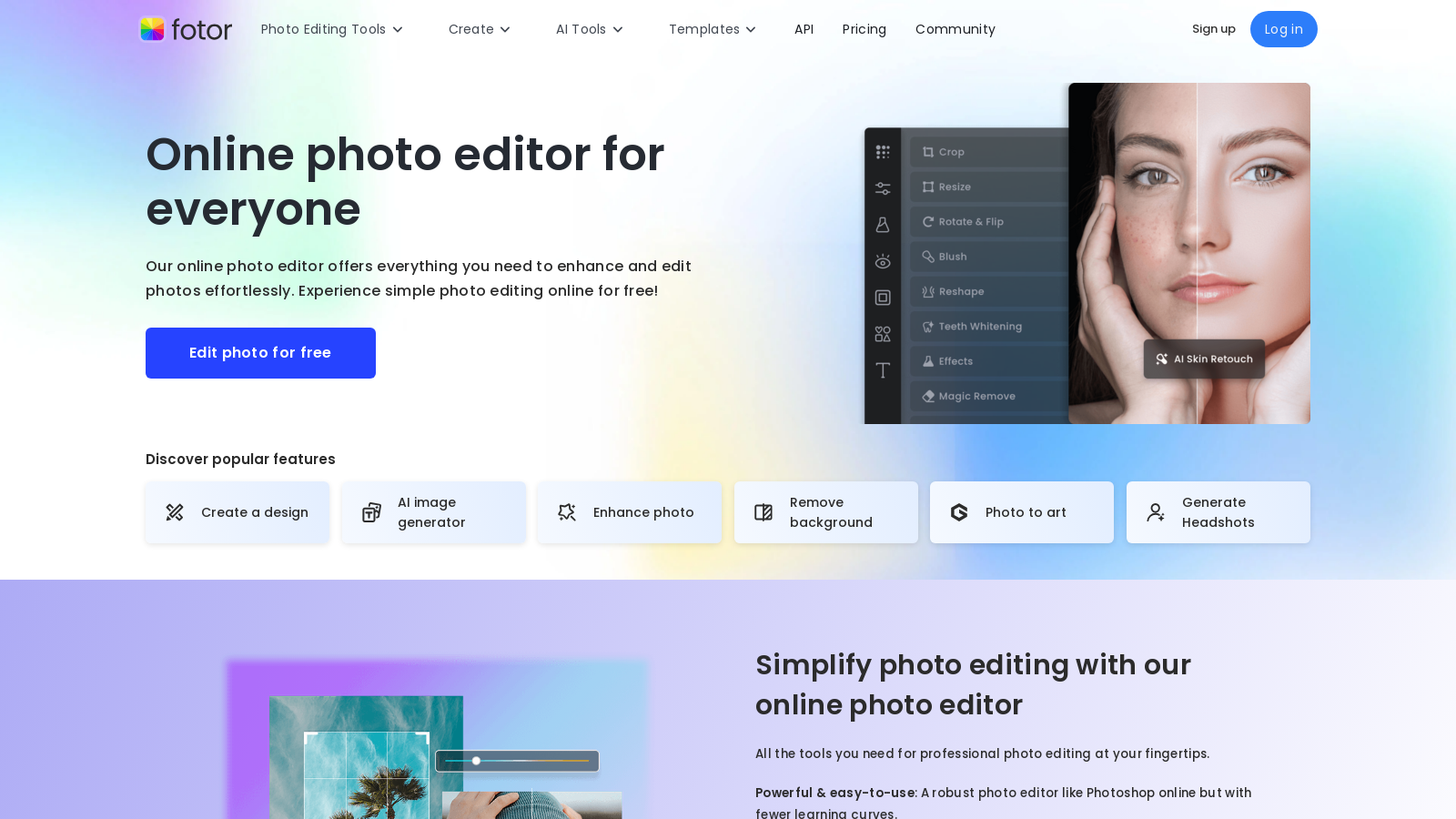
Fotor is an all-in-one photo editing and design platform that revolutionizes the way users enhance and edit images. With its robust set of tools tailored for both beginners and professionals, Fotor provides an intuitive environment for effortless photo editing. Users can crop, enhance, and retouch entire batches of images at once, streamlining the editing process and saving valuable time.
A perfect choice for both casual users and serious photography enthusiasts, Fotor boasts an extensive collection of professional-grade editing tools. The platform offers basic adjustments such as brightness and contrast, alongside advanced features like an AI-powered photo enhancer, background remover, and object removal capabilities. With just a few clicks, you can transform blurry images into strikingly clear photos and seamlessly change backgrounds, making it ideal for elevating your product shots and personal portraits alike.
Generative AI Tools
Fotor is particularly distinguished by its innovative generative AI tools that allow users to create breathtaking images from simple text descriptions. The 'Text to Image' feature empowers users to generate visuals that match their imagination, providing boundless opportunities for creativity. This AI capability not only simplifies the editing process but also encourages artistic expression, with the option to mimic renowned artistic styles.
Additionally, the inclusion of tools like the AI Headshot Generator allows users to quickly create professional-looking headshots, which is especially beneficial for social media and job applications. This generative AI functionality continues to expand Fotor's usability across various creative fields.
User-Focused Features
Fotor provides an array of user-friendly design templates specifically crafted for collages, social media posts, and promotional material. This feature allows anyone—regardless of their graphic design expertise—to produce stunning visuals quickly. Paired with an extensive library of assets, including stock images, fonts, and graphics, along with AI-enhanced editing functionalities, Fotor allows every user to generate professional-quality designs effortlessly.
The mobile app offers the same capabilities as the web version, ensuring users can edit and create high-quality designs on the go. The capacity to switch seamlessly between devices adds to Fotor’s appeal, making it a practical choice for busy professionals and casual users alike.
Accessibility Across Devices
Beyond its user-friendly web application, Fotor also offers a robust mobile app, enabling on-the-go editing. Users can switch seamlessly between desktop and mobile devices without losing access to their projects, enhancing the editing experience and ensuring consistency across different platforms.
Community and Support
Boasting over 800 million users globally, Fotor has established a trusted community. Support is always available through comprehensive tutorials and a dedicated help center, ensuring that both new and experienced users have the resources they need to optimize their workflows. Tutorials cover everything from basic functions to advanced editing techniques, making it easy for users to improve their skills at their own pace.
Getting Started with Fotor
New users can easily kickstart their Fotor experience by creating a free account and exploring its basic features. Fotor’s Basic plan remains a great entry point, providing essential tools without a financial commitment. For those who wish to leverage more advanced tools and capabilities, several premium plans are available, offering greater value with enhanced features tailored to meet the evolving needs of users.
Pricing Options
Recent updates to Fotor's pricing model present several attractive options:
- Fotor Basic: Free forever, offering essential editing features and limited design templates.
- Fotor Pro: Available at €2.83/month, it includes advanced editing tools, premium templates, and AI features.
- Fotor Pro+: Priced at €6.24/month, it encompasses all features from Pro along with expanded cloud storage and AI resources.
With Fotor, users can now select a pricing plan that best fits their needs, ensuring they have the right tools at their disposal, whether for personal projects or professional demands. The platform continuously evolves, integrating new features and enhancing existing ones, making it a leading option in the photo editing and design landscape.
Pros & Cons
Pros
- Offers a comprehensive suite of AI-powered photo editing tools like background removal and enhancement.
- User-friendly interface that simplifies complex photo editing tasks for all skill levels.
- Bulk editing feature allows simultaneous editing of multiple photos, saving time and effort.
Cons
- Some advanced features may require a paid subscription for full access.
Frequently Asked Questions
Fotor is free to start, with paid plans from 0 to 6.24 EUR per month.
According to our latest information, this tool does not seem to have a lifetime deal at the moment, unfortunately.
Fotor provides a variety of AI tools designed to enhance your photo editing experience. This includes an AI Photo Enhancer that improves image quality with a single click, an AI Background Remover for quick background changes, and an AI Object Remover to remove unwanted elements from your images. Additionally, users can explore creative options such as AI-generated artwork and tools to produce professional-quality headshots.
Yes, Fotor's batch photo editor allows you to edit multiple images simultaneously. This feature significantly speeds up your workflow, as you can apply adjustments, effects, or filters to entire batches of photos, making it ideal for users who need to process large sets of images quickly.
Creating collages in Fotor is straightforward. You can start by selecting from a wide range of customizable collage templates. After choosing a layout, drag and drop your desired photos into the selected frames, adjust the size and spacing as needed, and enhance your collage with text, stickers, and effects to personalize it further before saving your final creation.
Fotor is available on multiple platforms, including web browsers, Windows, Mac, iOS, and Android. This cross-platform availability ensures that you can edit photos seamlessly regardless of the device you're using, allowing you to start a project on one device and continue it on another without any hassle.
Absolutely! Fotor is designed with a user-friendly interface that caters to users of all skill levels. With intuitive tools, informative tutorials, and easy-to-navigate features, beginners can feel confident while enhancing their photos without needing prior experience in complex photo editing software.
While Fotor's free version offers many robust features, it comes with some limitations. Users might experience watermarks on their exported photos, have access to a limited number of stock images, effects, and design assets compared to the premium plans, and may need to purchase credits for advanced AI features such as image generation and enhancements.
To create an AI-generated image with Fotor, use the AI Image Generator feature. Enter a description of the image you want to make, and Fotor's AI technology will generate a unique visual based on your prompt. This feature is perfect for bringing your creative ideas to life in just a few clicks.
Fotor offers various support options for users. You can visit the Fotor Help Center for FAQs and guides on common issues. If you require more direct assistance, you can contact their support team via email at support@fotor.com or submit a request through their website. Additionally, there are tutorials available to help you make the most of Fotor's features.