Framer

Easily design and launch custom websites with no coding required.
Framer.com
Is this your tool?
Follow for updates & deals
Get alerts for Framer discounts, feature releases & pricing changes
Similar Tools

Loki.Build
Build and customize landing pages quickly using AI-driven design tools.

Sketchflow
Generate web and app designs with AI-powered code from your ideas and input images.
Visily
Create wireframes and prototypes with AI-assisted design tools for collaborative user interface projects.

Uizard
Simplifies UI design by generating components from text descriptions for quick prototyping.
Synthoframe
Transforms text and images into interactive user interfaces for efficient prototyping.

Framer Media Gallery

Framer (review) video
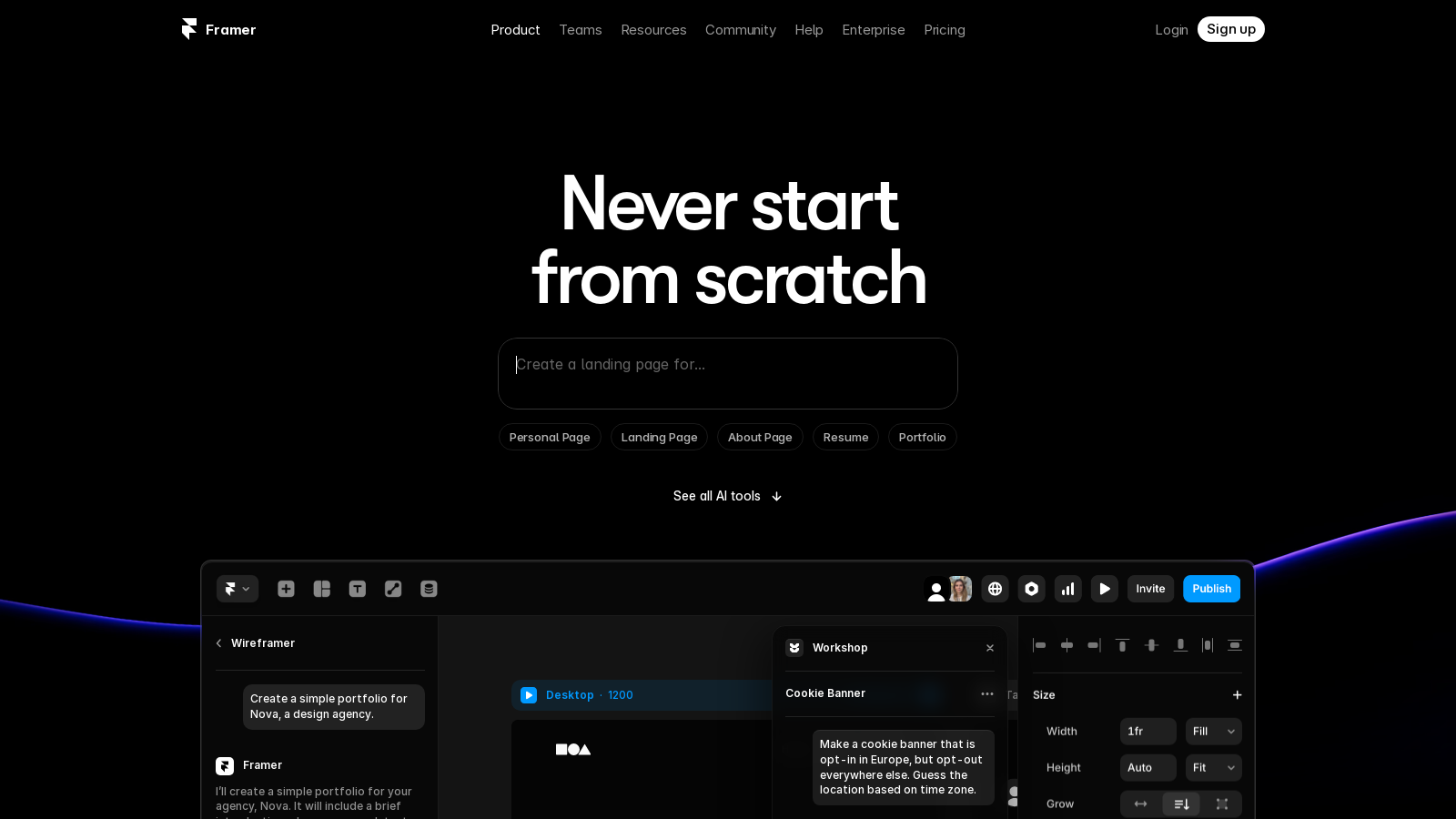
Screenshot of Framer
What is Framer?
Framer is an innovative no-code website builder that empowers users to create stunning and professional websites with ease. With a focus on design and user experience, it enables individuals and teams to craft high-performing websites that truly stand out. This platform integrates a plethora of features tailored to designers and content creators, ensuring that users can build exactly what they envision without compromising on quality or performance.
Start for Free
Framer encourages users to begin their journey by building for free, allowing experimentation with its diverse features and the creation of basic sites without any upfront costs. Whether for personal projects, portfolios, or simple landing pages, the free version provides essential functionalities while limiting certain collaborative and advanced features. For those looking to harness Framer's full potential, upgrading to a paid plan unlocks advanced capabilities, increased storage options, and the ability to utilize custom domains.
Design Freedom and Flexibility
One of the most compelling features of Framer is its flexible design canvas, which offers complete creative control. Unlike many traditional drag-and-drop builders that impose template restrictions, Framer provides a freeform canvas where designs can be constructed from the ground up. This allows for a variety of creations, ranging from straightforward landing pages to intricate portfolios and interactive sites featuring animations and transitions. Consequently, Framer is a top choice for designers aiming to explore the limits of web design.
Advanced Features
Aside from design flexibility, Framer boasts built-in features for SEO optimization and analytics, ensuring not only aesthetic appeal but also successful performance on search engines. The platform includes real-time collaboration tools, enabling teams to edit and publish content simultaneously, which significantly enhances workflow efficiency and productivity.
AI Integration
Framer's powerful AI tools further streamline the design process, facilitating quick generation of layouts and components. The 'AI Wireframer' feature allows users to create structured, responsive pages merely by specifying their requirements, while the ‘Workshop’ assists in developing customizable components without needing to write a single line of code. These innovations simplify the design procedure, thereby improving the overall user experience. Furthermore, Framer now introduces an efficient AI Translate feature, enabling users to translate their entire site into multiple languages with just one click—greatly simplifying the localization process.
Updated Pricing Plans
Framer now offers a variety of pricing tiers suited to different requirements. Users can start with a free plan that is perfect for individual experiments in web design. The personal plan is now offered at €75 per month (when billed annually), which includes elevated limits and essential features suitable for smaller projects. For businesses that require more resources, the 'Scale' plan is available at €200 per month (when billed annually), providing additional storage, collaborative features, and premium support. Additionally, enterprise users have the option for customized pricing, which can include advanced capabilities tailored to their specific needs.
Conclusion
Framer caters to a broad range of users, from freelancers and small businesses to large enterprises. Its scalability and versatility make it an ideal solution for various needs. By integrating ease of use with advanced design tools, Framer positions itself as a robust platform for establishing and maintaining a professional online presence. Join the community of thousands who are successfully creating beautiful, customized websites with Framer; the future of web design is here, and creativity knows no bounds.
Pros & Cons
Pros
- Wireframer AI generates structured, responsive pages based on simple prompts.
- AI Translate feature offers seamless multilingual support without plugins.
- Built-in tools allow real-time collaboration and instant publishing.
Frequently Asked Questions
Framer is free to start, with paid plans from 0 to 200 EUR per month.
According to our latest information, this tool does not seem to have a lifetime deal at the moment, unfortunately.
Framer allows you to create various types of pages, including personal pages, landing pages, about pages, resumes, and portfolios. The AI-powered Wireframer tool can help you quickly generate a responsive page structure, complete with starter content, allowing you to focus on designing and customizing your site.
Framer's AI Translate feature allows you to translate your entire website into multiple languages with just a click. This is done without the need for additional plugins or manual work. Activate the feature, and Framer will handle the translations automatically, ensuring your content is accessible to a broader audience.
The Workshop feature in Framer is a built-in developer tool that allows users to create advanced components without coding knowledge. You can generate custom interactions, animations, and visual effects by writing simple prompts. This feature is designed for rapid prototyping and supports the generation of production-ready components that are easy to edit and reuse.
Yes, Framer supports real-time collaboration, allowing multiple team members to work on a project simultaneously. Users can edit content and make changes live, streamlining the workflow and ensuring that everyone is aligned on the project. This feature is particularly beneficial for design and marketing teams working together.
The free plan in Framer allows up to 1,000 pages, 10 CMS collections, and file uploads of up to 5MB each. While you can explore most features of Framer, certain premium features, such as custom domains, advanced analytics, and AI tools like Wireframer and Workshop, are only available through paid subscriptions.
Framer enables users to build and integrate their own third-party AI plugins seamlessly. You can connect with models like OpenAI, Anthropic, or Gemini to enhance your site's capabilities, such as generating images, rewriting text, and creating alternative text (alt text). This flexibility allows you to further customize your site and utilize advanced AI functionalities.
To maximize your experience with Framer, start by exploring the extensive library of templates available to kickstart your projects. Utilize the Wireframer tool for rapid layout generation and the Workshop for creating custom components without coding. Additionally, take advantage of the real-time collaboration feature with your team to enhance productivity and creativity.
Framer offers a more flexible no-code building experience compared to Wix, which limits users to pre-built templates. With Framer, you have complete creative control over your design, with no restrictions. When compared to Figma, Framer provides live publishing capabilities and built-in CMS functionalities, making it easier to create and manage high-performance, interactive websites.