
Follow for updates & deals
Get alerts for H-tag discounts, feature releases & pricing changes
Similar Tools

Frase
AI-driven content optimization tool that enhances writing and SEO for better online visibility.

Ahrefs SEO Toolbar
Provides on-page SEO analysis, structured data checks, and SERP insights directly from your browser.

SEO Analysis & Website Review by WooRank
Analyzes websites for SEO performance, usability, and accessibility with actionable insights.

BrightEdge
SEO platform that integrates AI for keyword research, content optimization, and performance measurement.

BrandStori
Optimize website messaging for clarity and conversions.

H-tag Media Gallery

H-tag (review) video
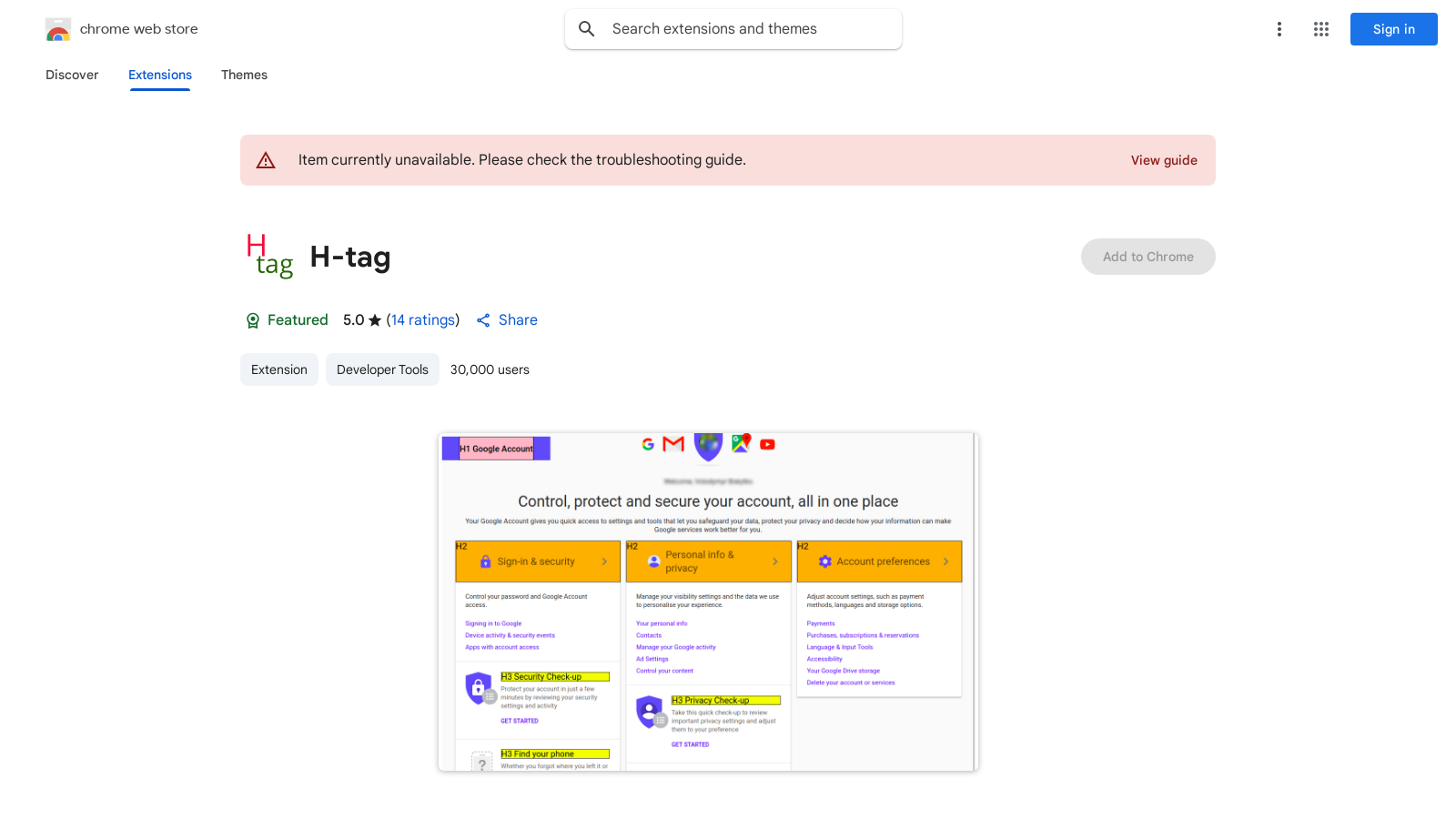
Screenshot of H-tag
What is H-tag?
H-tag is a powerful Chrome extension tailored for SEO specialists and web content creators. With its user-friendly interface, this extension provides a straightforward way to view not just
After downloading and installing H-tag, users can easily access the heading structure of the current webpage. The extension allows you to view all heading tags from H1 to H6, which are crucial in organizing content hierarchy. By simply clicking the 'Show/Hide Tags' button, users can toggle the display of these headings, aiding in content audits and search engine optimization efforts.
In addition to heading tags, H-tag offers functionality to inspect essential meta information, including the page Title, Description, Robots, Canonical link, and Viewport settings. This is made possible through the 'Show/Hide Meta' button, which instantly reveals how search engines perceive a webpage. Understanding this meta information is vital for optimizing SEO strategies to enhance visibility in search engine results.
Another beneficial feature of H-tag is the 'Reset Page' button, which allows users to return the webpage to its original state after toggling various options. This function ensures a clear comparison and makes it easy to see the impact of any changes made. With over 40,000 users and maintaining a stellar average rating of 5.0 from 18 reviews, H-tag has proven to be a reliable tool for professionals involved in SEO and content management.
Furthermore, user privacy is a prime concern for many, and H-tag reassures users by explicitly stating that it does not collect or use personal data. This commitment to privacy strengthens the trust users place in the extension.
Designed for those in digital content creation and SEO roles, H-tag streamlines understanding and improving webpage structure. By utilizing this effective tool, users can implement small adjustments that lead to substantial improvements in how search engines view and rank a website, ultimately boosting online presence.
In conclusion, H-tag represents a simple yet effective utility for managing webpage heading tags and meta information, making it a significant asset in navigating good SEO practices. Its ability to assist in organizing page content not only supports SEO professionals in their objectives but also contributes to an enhanced user experience on websites.
Pros & Cons
Pros
- Displays all H1 to H6 tags on the current webpage for easy review.
- Provides key meta information like Title, Description, and Robots tags.
- User-friendly interface with Show/Hide functionality for tags and meta info.
Frequently Asked Questions
H-tag is available at no cost.
According to our latest information, this tool does not seem to have a lifetime deal at the moment, unfortunately.
H-tag provides key meta information about a webpage, including the title, description, robots directive, canonical URL, and viewport settings. This information is essential for SEO specialists and web content creators to optimize websites effectively and ensure search engine compliance.
Yes, H-tags are particularly useful for SEO professionals as they allow users to easily view and analyze the structure of header tags (H1, H2, etc.) on a webpage. Understanding how these headers are structured can help optimize content for improved search engine ranking and a better user experience.
After installing H-tag, you can activate its features by clicking the 'Show/Hide Tags' button to display the header tags (H1-H6) on the page. To view the metadata, use the 'Show/Hide Meta' button. To revert the page to its original state, click the 'Reset Page' button.
H-tag is a Chrome extension, so it requires the Google Chrome browser to function. Ensure that your Chrome browser is up to date to guarantee compatibility with the extension and access to the latest features.
While H-tag primarily functions as a standalone Chrome extension for displaying header and meta information, it can complement other tools and SEO extensions available in the Chrome Web Store, enhancing your overall workflow. Users are encouraged to explore additional SEO tools for more comprehensive analysis.
There is no specified limit on the number of pages you can analyze with H-tag. You can use it to inspect as many web pages as needed. However, please note that performance may vary depending on the complexity of the webpages being analyzed.
If you encounter issues with H-tag not displaying as expected, first check if the extension is properly installed and enabled in your Chrome browser. You may also want to consult the troubleshooting guide provided on the Chrome Web Store for H-tag to resolve common issues.
Yes, there are several alternatives to H-tag, including SEO-focused extensions such as 'SEO META in 1 CLICK,' 'Detailed SEO Extension,' and 'Heading Tag Markup.' Each of these tools offers various features for checking header tags and meta information, tailored explicitly for SEO optimization.