Imagen3D
Transform 2D images into detailed 3D models quickly with multiple quality options.
Imagen3d.org
Is this your tool?
Follow for updates & deals
Get alerts for Imagen3D discounts, feature releases & pricing changes
Similar Tools

Auralume AI
Generate professional-quality videos from text prompts and images effortlessly with Auralume AI.

Supawork AI
Generate personalized AI headshots and dynamic videos in seconds with customizable options.

genmo
Create realistic videos from text prompts using an open-source video generation model.
Twin AI
Convert still images into engaging videos with voice synchronization and customization options.

LetsEnhance
Enhance and upscale images effortlessly with AI-driven tools for photographers and businesses.

Imagen3D Media Gallery
What is Imagen3D?
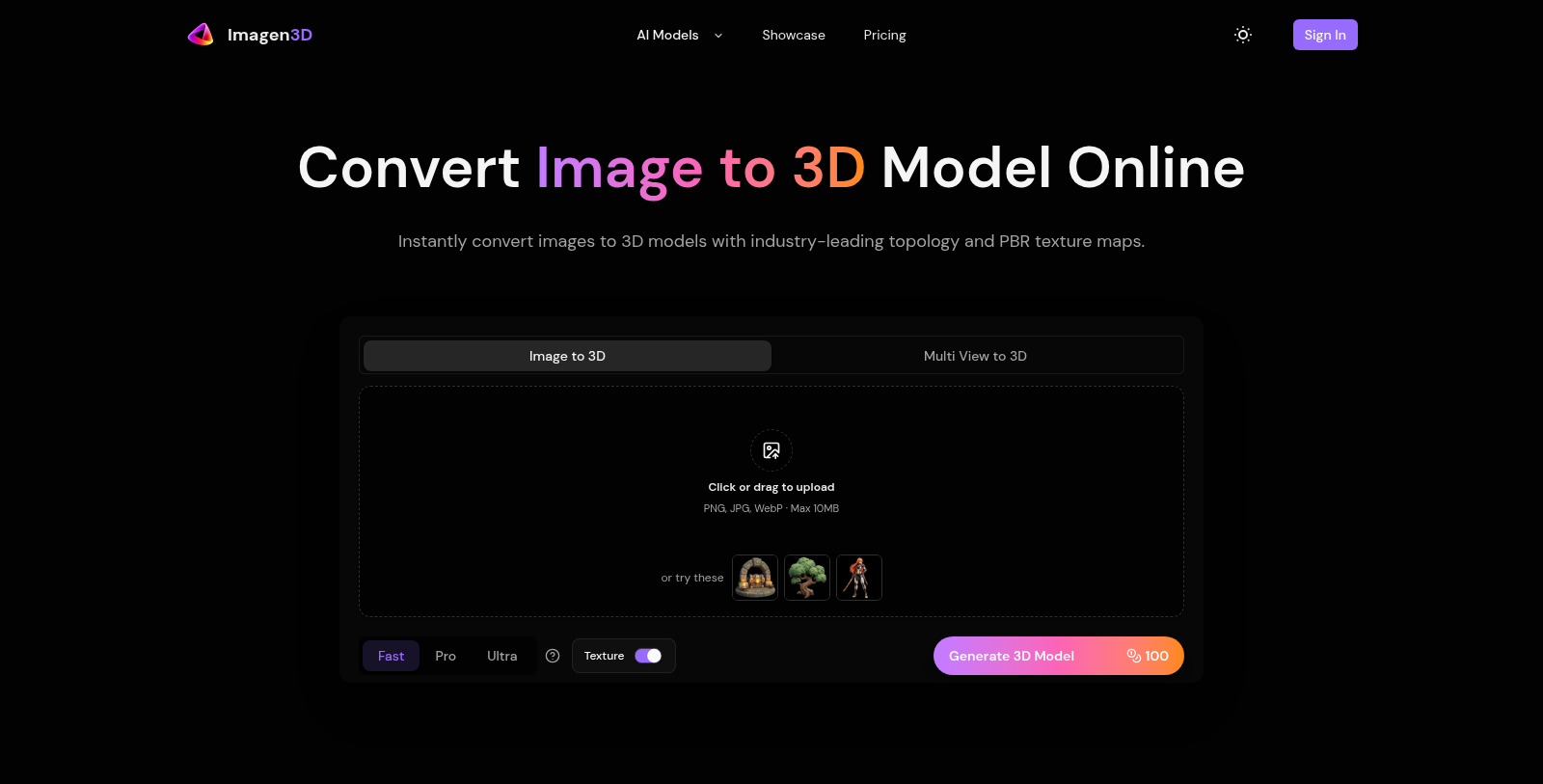
Imagen3D is a revolutionary tool designed for transforming images into high-quality 3D models with the power of AI technology. This online platform enables users to upload 2D photos in formats such as PNG, JPG, or WebP and, within minutes, see their images converted into three-dimensional representations with remarkable detail.
One of the standout features of Imagen3D is its three-tiered quality selection, available as Fast, Pro, and Ultra modes. Each tier caters to different workflow needs, allowing users to prioritize either speed or detailed output. Users need only to upload their image, select the desired quality, and let the AI do the hard work. The generation process is quick, typically completing in as little as 20 seconds to a few minutes, depending on the selected quality.
Not only does Imagen3D generate 3D models, but it does so while preserving intricate surface details and textures from the original images. This is largely due to its use of advanced PBR (Physically-Based Rendering) materials, which ensure realistic lighting interactions. This makes it particularly appealing for various applications such as game development, 3D printing, and AR/VR experiences.
Creating 3D Models in Just Four Steps
The entire process is simplified into an intuitive four-step workflow:
- Upload your image - Make sure it's clear and well-lit for the best results.
- Choose your quality tier - Select from Fast, Pro, or Ultra according to your project needs.
- Generate your 3D model - The AI processes your image rapidly, delivering your 3D asset.
- Export your model - Download in multiple formats, including GLB, OBJ, STL, and more, for easy integration into your creative projects.
Why Choose Imagen3D?
Imagen3D offers a flexible pricing model based on subscription or credits, catering to both casual users and professionals. These pricing options include:
- Basic Plan: $120 monthly or $96 annually, providing 12,000 credits per year.
- Pro Plan: $360 monthly or $288 annually, perfect for regular creators with 36,000 credits.
- Premium Plan: $480 monthly or $384 annually, offering 84,000 credits for studios and high-volume users.
With unlimited downloads within credit limits and concurrent generations, users can streamline their projects without the hassle of waiting. Additionally, all generated 3D models come with full commercial rights, allowing creators to use them in various applications, ns including marketing, film, games, and client projects.
Key Applications of Imagen3D
Whether you're a game developer seeking to quickly build assets for prototyping or a hobbyist who wants to create printable 3D models, Imagen3D simplifies the process. The platform is also ideal for animation, providing a swift pipeline from concept art to on-screen assets without extensive manual modeling. Moreover, the seamless export options make it easy to integrate with popular software like Unity and Blender.
In conclusion, Imagen3D stands out as a powerful tool in the realm of 3D asset generation, leveraging cutting-edge AI technology to provide fast, accurate, and high-quality models that can be utilized across various digital platforms.
Pros & Cons
Pros
- Transforms images into 3D models in minutes with advanced AI technology.
- Outputs include high-quality PBR textures for realistic rendering in multiple formats.
- Supports quick iterations with distinct quality tiers for various project needs.
Cons
- Single-image input may limit the accuracy of 3D model generation.
Frequently Asked Questions
Imagen3D costs 0 to 480 USD per year.
According to our latest information, this tool does not seem to have a lifetime deal at the moment, unfortunately.
To enhance the accuracy of your 3D models created with Imagen3D, consider uploading multiple images of the object from different angles. Pro and Ultra modes support 3-4 images, which can significantly improve geometry and texture fidelity. Ensure that all photos have consistent lighting and are taken against a simple background to avoid confusion during model reconstruction.
PBR (Physically Based Rendering) materials, available in Ultra mode, provide realistic surface properties that accurately respond to lighting in rendering engines such as Unity and Unreal. These materials include albedo, normal, roughness, and metallic maps, which simulate how surfaces interact with light, thereby enhancing the visual quality of your 3D models. Using PBR materials is ideal for projects requiring high realism, such as virtual reality or high-end visual effects.
For optimal results, use clear, well-lit images of a single object with simple backgrounds. Photos should ideally be at least 1024x1024 pixels, though higher resolutions can yield better detail. Avoid complex scenes, transparencies, or heavily shadowed areas, as these can complicate model reconstruction. Good lighting and focus are crucial for effectively transferring the object's details into the 3D model.
While Imagen3D can handle a variety of textures, using images with complex textures or highly reflective surfaces may lead to less accurate results. For best results, choose subjects with matte or semi-gloss finishes and straightforward shapes. For example, products, furniture, and vehicles work well, whereas shiny or transparent objects may not yield optimal models.
To get started with Imagen3D, upload your images—either a single image or multiple views for better accuracy. Next, select the quality tier you prefer: Fast, Pro, or Ultra, based on your project needs. Then initiate the generation process, which takes 20 seconds to 3 minutes, depending on your selection. Finally, download your model in your preferred file format for immediate use in 3D applications.
Yes, you retain full commercial rights to all 3D models generated with Imagen3D. This means you can use these models in client projects, sell them, or include them in games and marketing materials. However, ensure that you have the rights to the original images you upload, as copyright infringement liabilities remain your responsibility.
If you run out of credits during your Imagen3D subscription, you can upgrade to a higher-tier plan, which will immediately increase your credit allowance. Additionally, your credit quota resets at the start of each billing cycle—monthly or annually—so you can manage your usage accordingly. Your generation history and stored assets will still be accessible even when credits are depleted.
Imagen3D supports several industry-standard export formats, including GLB (recommended for universal compatibility), OBJ (for traditional 3D software), STL (for 3D printing), GLTF (for web applications), USDZ (for iOS AR), and MP4 for video previews. This variety allows you to download the same model in different formats without regenerating it, making it versatile for various uses.