LuminaBrush

Interactive tool for precise lighting adjustments using intuitive brush strokes.
Luminabrush.online
Is this your tool?
Follow for updates & deals
Get alerts for LuminaBrush discounts, feature releases & pricing changes
Similar Tools

Graphis
Collaborate on an infinite canvas to create and enhance images, videos, and text seamlessly.

Hocha
Generate high-quality images with AI using preset prompts and advanced editing tools, no login required.
Pixlio AI
Create and edit professional images using advanced AI models and intuitive editing tools.

Fotor
Edit photos and create images easily with intuitive tools and AI features for beginners and professionals.

Pica AI
Revive low-quality images and create professional headshots with AI-powered enhancements.

LuminaBrush Media Gallery
What is LuminaBrush?
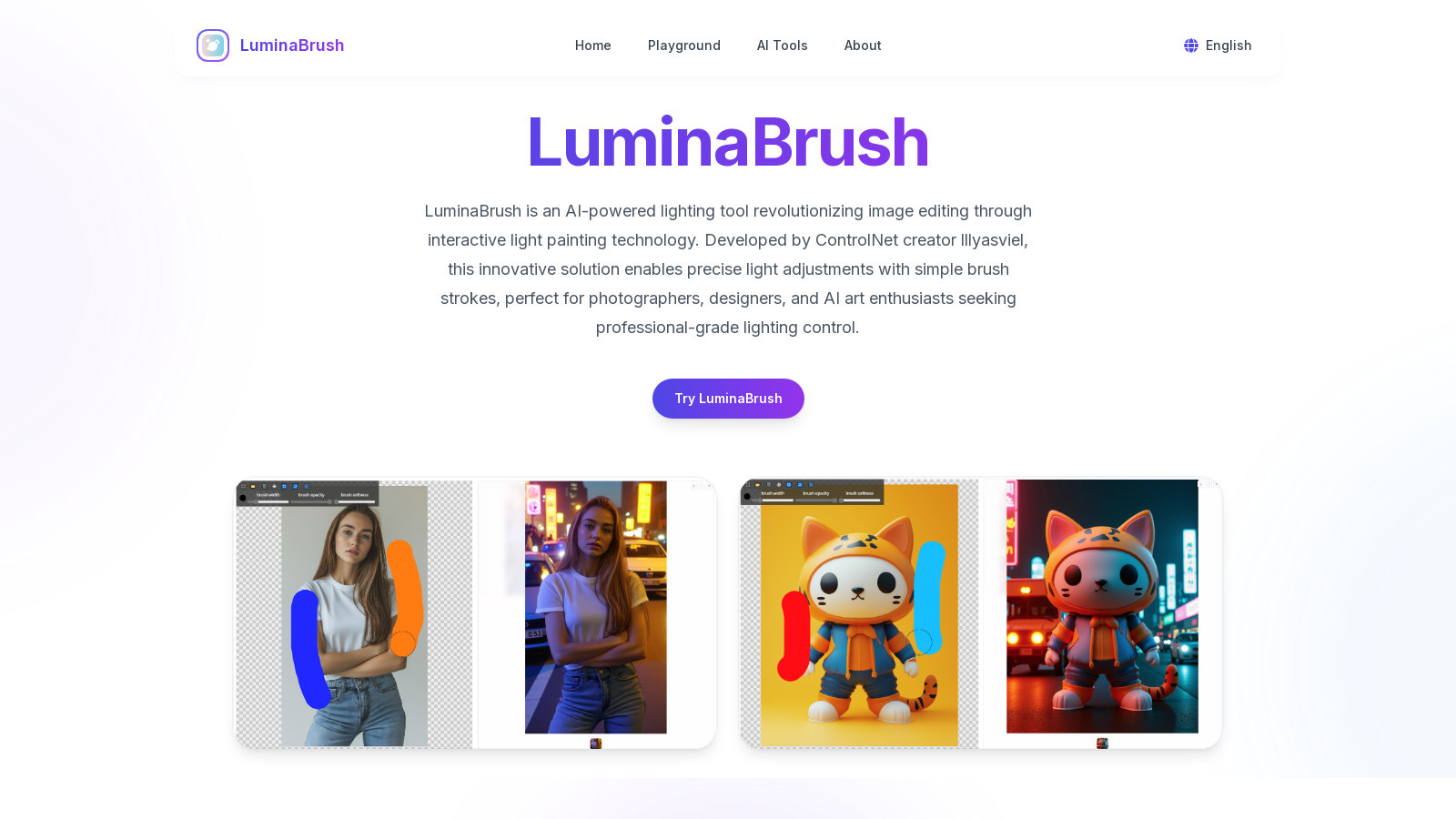
LuminaBrush is an AI-powered lighting tool that is reshaping the world of image editing through its innovative interactive light painting technology. Developed by the creators at ControlNet, this breakthrough tool allows users to make precise adjustments to the lighting of their images with simple brush strokes. It has been designed for photographers, designers, and AI art enthusiasts who are seeking to achieve professional-grade lighting control in their work.
AI-Powered Light Painting Made Simple
Transforming your images with LuminaBrush is incredibly straightforward. The process of enhancing your photos can be achieved in three easy steps:
- Step 1: Upload Your Image - Begin your creative journey by uploading any photo, whether it's traditional photography or an AI-generated image. LuminaBrush's intuitive interface will analyze the existing lighting conditions, readying your canvas for adjustments.
- Step 2: Paint with Light - Utilize the color-coded brush tools to create stunning lighting effects. Apply warm tones for sunset glows or cool shades to simulate moonlight or neon lights. The brush size and intensity can be easily adjusted for optimal control over your light painting.
- Step 3: Export & Share - Once you are satisfied with your enhancements, you can preview the changes in real-time. Export high-resolution results and save your lighting presets for use across multiple projects, or share your work directly to various creative platforms.
Core Features of LuminaBrush
So, why choose LuminaBrush for your lighting control needs? The tool merges advanced AI technology with an intuitive user experience, offering unmatched creative flexibility:
Two-Stage AI Processing
LuminaBrush's proprietary technology utilizes a two-stage processing system. Initially, it neutralizes complex lighting issues before applying your custom light painting. This process ensures that critical image details such as skin texture and material reflectivity are preserved, enabling professional-quality edits.
Smart Brush System
The interactive color brushes within LuminaBrush simulate real-world lighting physics. Users can combine various light sources seamlessly while maintaining natural shadow effects, leading to professional-quality results.
Cross-Platform Compatibility
One of the standout features of LuminaBrush is its compatibility with AI-generated images from various models, including Stable Diffusion and traditional photography methods. Users can export layered lighting data for further editing in tools like Photoshop or ComfyUI.
Real-Time Previews
With LuminaBrush's GPU-accelerated engine, users can experience immediate feedback on lighting changes. This functionality allows for adjustments in intensity, color temperature, and light direction without sacrificing image quality.
User Experiences
The feedback from creative professionals using LuminaBrush highlights its effectiveness:
- Sarah Thompson, Product Photographer - "LuminaBrush's light painting tools have cut my editing time by 60% while ensuring magazine-quality lighting in my pictures."
- Raj Patel, AI Artist - "The AI behind LuminaBrush intuitively understands lighting physics, adding a professional depth to my AI-generated images."
- Emily Zhang, Fashion Blogger - "What used to take hours can now be done in minutes! The color brush system is fantastic, making complex adjustments accessible even for beginners."
FAQs
LuminaBrush is designed for everyone. From beginners exploring the tool for the first time to seasoned professionals enhancing their workflows, this platform caters to all.
Pros & Cons
Pros
- AI-powered brushes allow for professional-grade lighting control with simple strokes.
- Real-time previews enable instant adjustments to lighting effects without quality loss.
- Cross-platform compatibility with Photoshop and AI tools enhances creative workflows.
Cons
- Requires devices with specific hardware capabilities for optimal performance.
Frequently Asked Questions
LuminaBrush is free to start, with paid plans from 0 to 0 USD per month.
According to our latest information, this tool does not seem to have a lifetime deal at the moment, unfortunately.
LuminaBrush offers several unique features, including interactive light painting technology that allows for precise lighting adjustments using color-coded brushes. With a two-stage AI processing system, it first neutralizes complex lighting before applying custom adjustments, thereby preserving critical details such as texture and reflectivity. The tool also supports real-time previews, enabling users to see changes instantly as they adjust intensity, color temperature, and light direction. Additionally, LuminaBrush ensures compatibility with AI-generated images from platforms such as Stable Diffusion and offers export options for layered editing in software like Adobe Photoshop.
Integrating LuminaBrush into your workflow is seamless, especially for photographers and digital artists. You can upload images from various sources, including AI-generated art and traditional photography, directly into LuminaBrush. After enhancing your images using its intuitive light painting tools, you can export layered lighting data as PNG masks for further editing in Photoshop or other software. This compatibility allows you to enhance AI visuals while maintaining resolution and detail integrity, making it a versatile addition to your creative toolkit.
Yes, LuminaBrush is well-suited for commercial applications, including product photography, real estate visualization, and advertising. It includes professional plans that offer commercial licenses, ensuring your work remains compliant while delivering high-quality images. The software's advanced AI algorithms preserve essential details, such as skin texture and material reflectivity, which are crucial in professional settings. Users can confidently rely on LuminaBrush for generating magazine-quality lighting effects in their commercial projects.
To use LuminaBrush, you need access to a modern web browser such as Chrome, Firefox, or Safari that supports WebGL 2.0. For optimal performance, especially when processing 4K+ images, it's recommended to have a device with at least 8GB of RAM and a dedicated GPU. This configuration ensures that the light painting features work smoothly and effectively, providing a seamless editing experience.
To enhance your experience with LuminaBrush, familiarize yourself with the color-coded brush system, as it can significantly impact your results. Use warm tones for sunset effects and cool hues for moonlight to create a realistic lighting effect. Take advantage of the real-time preview feature to make immediate adjustments, ensuring your edits align with your creative vision. Additionally, save presets of your favorite lighting styles to achieve consistent results across different projects, thereby streamlining your editing process.
Yes, LuminaBrush supports high dynamic range (HDR) lighting effects. This allows users to combine multiple light sources, with adjustable intensity ranging from 0% to 200%, which can result in realistic shadows and highlights. The software's advanced algorithms ensure that users can create vivid images without the risk of overexposure, making it a vital tool for photographers and digital artists seeking high-quality visual outputs.
After enhancing your images with LuminaBrush, sharing your creations is straightforward. You can export your edited images in high resolution for use on various platforms, including social media, websites, or in professional portfolios. Additionally, LuminaBrush allows you to save presets, making it easy to replicate specific lighting styles across multiple projects. You can also directly share your images or styles on creative platforms, increasing your visibility and showcasing your work to a broader audience.
LuminaBrush provides user support primarily through its official website, where users can find detailed tutorials, step-by-step guides, and insights into the user experience. For specific issues or advanced troubleshooting, users are encouraged to refer to the FAQ section or contact us through the provided options on the site. The company prides itself on community-driven development, regularly updating its features based on user feedback, thus enhancing the overall support experience.