













Napkin

Transforms textual content into engaging visuals for effective business communication
Napkin.ai
Is this your tool?
Follow for updates & deals
Get alerts for Napkin discounts, feature releases & pricing changes
Similar Tools

Decktopus
Generate engaging presentations quickly with AI assistance for content and design

BlueWillow
Generate unique artwork from text prompts using an easy-to-use interface.
Drawnaq
Create custom graphics and designs effortlessly with AI-driven tools and intuitive editing features.

Automatic1111 - Stable Diffusion web UI
Interactive web interface for generating images with Stable Diffusion using the Gradio framework.

Tome
Create and share multimedia presentations with AI-enhanced content and interactive features.

Napkin Media Gallery

Napkin (review) video
Screenshot of Napkin
What is Napkin?
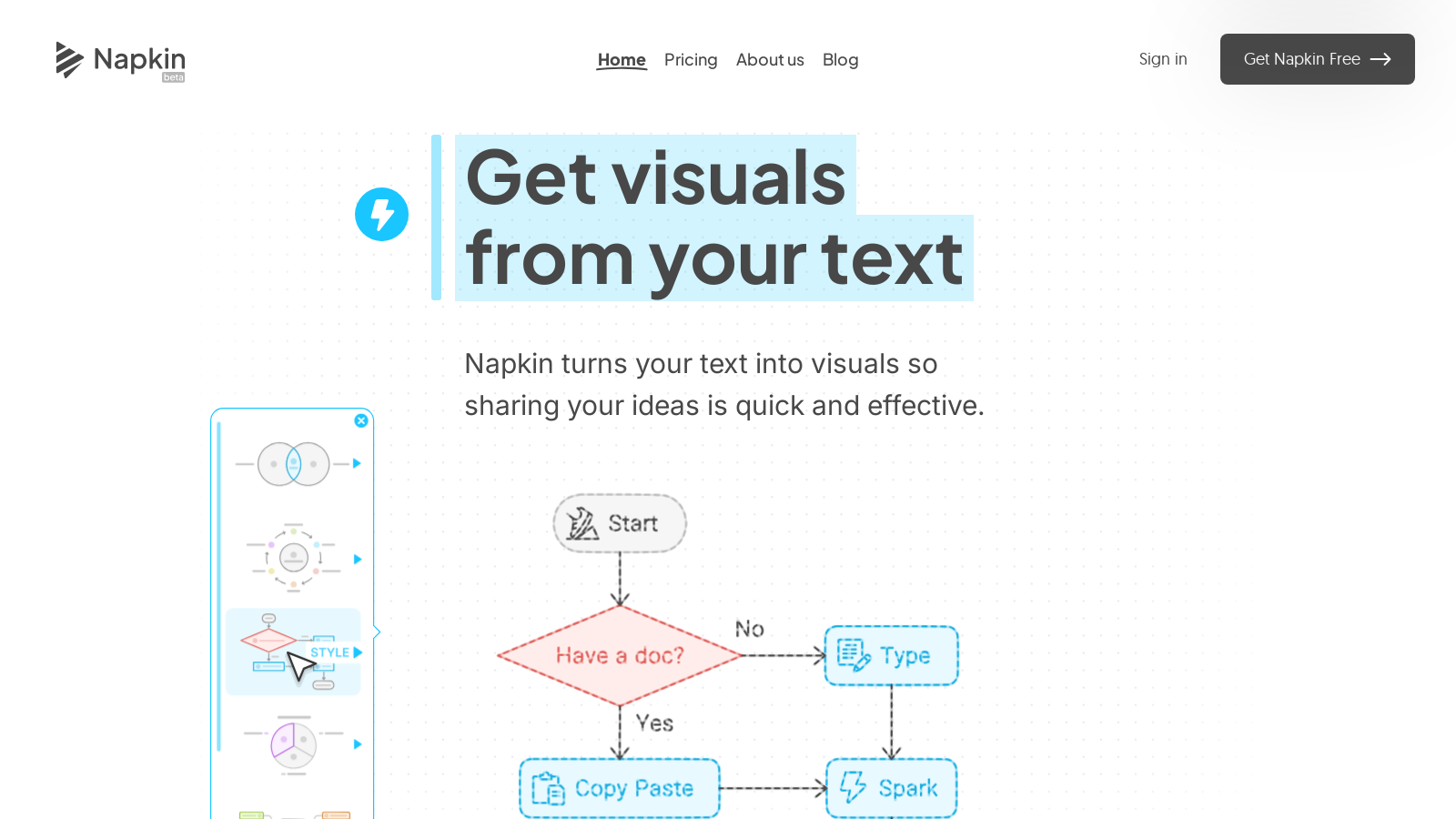
Napkin is an innovative platform that transforms your textual content into engaging visuals, enhancing your business communication. Designed to help users convey their ideas clearly, Napkin allows you to import or paste your text and select appropriate visuals to match your context.
How It Works
The process is simple: start by importing your text. You do not need to create prompts; Napkin works directly from your input, making the transition from text to visuals seamless. After generating options, you can select the visual that best conveys your message and further customize it to meet your specific needs. Customization features include adding icons from an extensive database, adjusting styles, colors, and fonts, making your visuals truly unique.
Key Enhancements in Napkin
Recently, Napkin has introduced several exciting upgrades that make creating visuals even easier. With features like **Custom Generation**, users can now specify the type of visual needed, choose layouts, and fine-tune details for faster and more personalized outputs. Another addition, **Elastic Designs**, allows visuals to automatically scale with your text content, making it easier to fit various ideas into one cohesive graphic. Furthermore, with the introduction of **multiple Mindmap styles**, users can now create their favorite layout, giving greater flexibility and options to present their thoughts.
Features that Empower You
With Napkin, your visuals can be exported in multiple formats, including .ppt, .png, .pdf, and .svg, ensuring compatibility with various platforms and presentation tools. The tool is handy for creating infographics, diagrams, mind maps, flowcharts, and data charts. As a versatile solution, it caters expressly to professionals aiming to communicate complex ideas effectively. Added functionalities like **dynamic connectors** and custom styles help enhance existing visuals and ensure they align with individual branding.
User Testimonials
Many users have found Napkin to be a game-changer in their workflow. From project managers to educators, users praise its intuitive design and efficiency. Nicolás, a project manager, remarks how it has significantly improved his presentation creation process. Others, like Emma Farquharson, share how Napkin has helped them produce engaging visuals that meet professional standards for publications. Users consistently highlight the valuable time saved and the enhanced clarity of their communication.
Accessibility and Collaboration
Currently, Napkin is available on desktop, and while you can view your creations on mobile, full functionality is optimized for desktop use. The application supports team collaborations with features that allow multiple users to work together in real time, enhancing teamwork and productivity. You can invite team members to join your workspace easily and manage collaborative projects smoothly, making it an ideal tool for group tasks.
Pricing Options
Napkin operates on a freemium model, providing a free plan that includes essential features along with **500 AI credits per week** for visuals. For advanced users, the **Plus plan** is available at **NULL per person per month**, which offers an expanded **10,000 AI credits per month** and additional customization options. The **Pro plan**, priced at **NULL per person per month**, caters to deeper visual needs, allowing for **30,000 AI credits per month**, more exclusive designs, and other organizational features. The flexibility in pricing means that users can select a plan suitable for their needs and scale as required.
Join the Beta
As Napkin continues to evolve, users are encouraged to join their free beta program to stay updated with new features and improvements. By signing up, you can start improving your communication today!
Pros & Cons
Pros
- Transforms text directly into visuals without needing prompts.
- Offers extensive editing and customization options for visuals.
- Supports collaboration with real-time editing and feedback features.
Cons
- Visual creation and editing are currently only available on desktop.
Frequently Asked Questions
Napkin is free to start, with paid plans from 0 to 22 USD per month.
According to our latest information, this tool does not seem to have a lifetime deal at the moment, unfortunately.
Napkin allows you to create a variety of visuals, including infographics, diagrams, mind maps, flowcharts, and data charts. These visuals can be used for presentations, blog posts, social media, and compelling documents, enhancing your communication by making complex ideas more accessible and engaging.
To generate visuals, paste or import your text into Napkin. The tool operates automatically without requiring prompts; once your text is in the system, click the 'Spark' icon to initiate the visual generation process. Napkin uses AI to suggest visuals that best represent your content, allowing you to select and customize your preferred option.
Yes, visuals generated in Napkin are fully editable. You can modify the content, change icons, colors, and fonts, and add dynamic connectors to enhance the visual impact. This flexibility helps ensure that the visuals align perfectly with your message and style.
Napkin supports multiple export formats, allowing you to export your visuals as PPT, PNG, PDF, or SVG files. This means you can seamlessly integrate your visuals into presentations, documents, websites, or share them as standalone graphics for social media or blogs.
Currently, Napkin does not support creating and editing visuals on mobile devices. While you can view your existing projects on mobile, the best experience for creating and editing is on a desktop. Future updates may include mobile editing capabilities.
Napkin offers robust collaboration features that enable team members to work together seamlessly. You can create a Teamspace to invite and manage collaborators, edit visuals in real-time, and provide feedback directly on text and visuals via comments and highlights, enhancing teamwork and communication.
While specific integrations are not detailed on the website, Napkin's export capabilities allow you to easily integrate your visuals with platforms like PowerPoint, Google Slides, and other document or content management tools. For questions about integrations, you may want to contact Napkin's support for more information.
If you need assistance, you can reach out to Napkin's support team by clicking the chat widget on their website or emailing them at contact@napkin.ai. They are available to help you troubleshoot issues or provide guidance on using the tool effectively.




