













Pebblely

Generate product photos quickly by removing backgrounds and customizing images with AI.
Pebblely.com
Is this your tool?
Follow for updates & deals
Get alerts for Pebblely discounts, feature releases & pricing changes
Similar Tools

LetsEnhance
Enhance and upscale images effortlessly with AI-driven tools for photographers and businesses.

PicWish
AI-powered tool for batch background removal and image enhancement
Supawork AI
Generate personalized AI headshots and dynamic videos in seconds with customizable options.

HitPaw
Enhance videos, photos, and audio with easy-to-use multimedia editing tools.
PixNova AI
Generate and edit images with AI, including headshots, face swaps, and baby predictions.

Pebblely Media Gallery

Pebblely (review) video
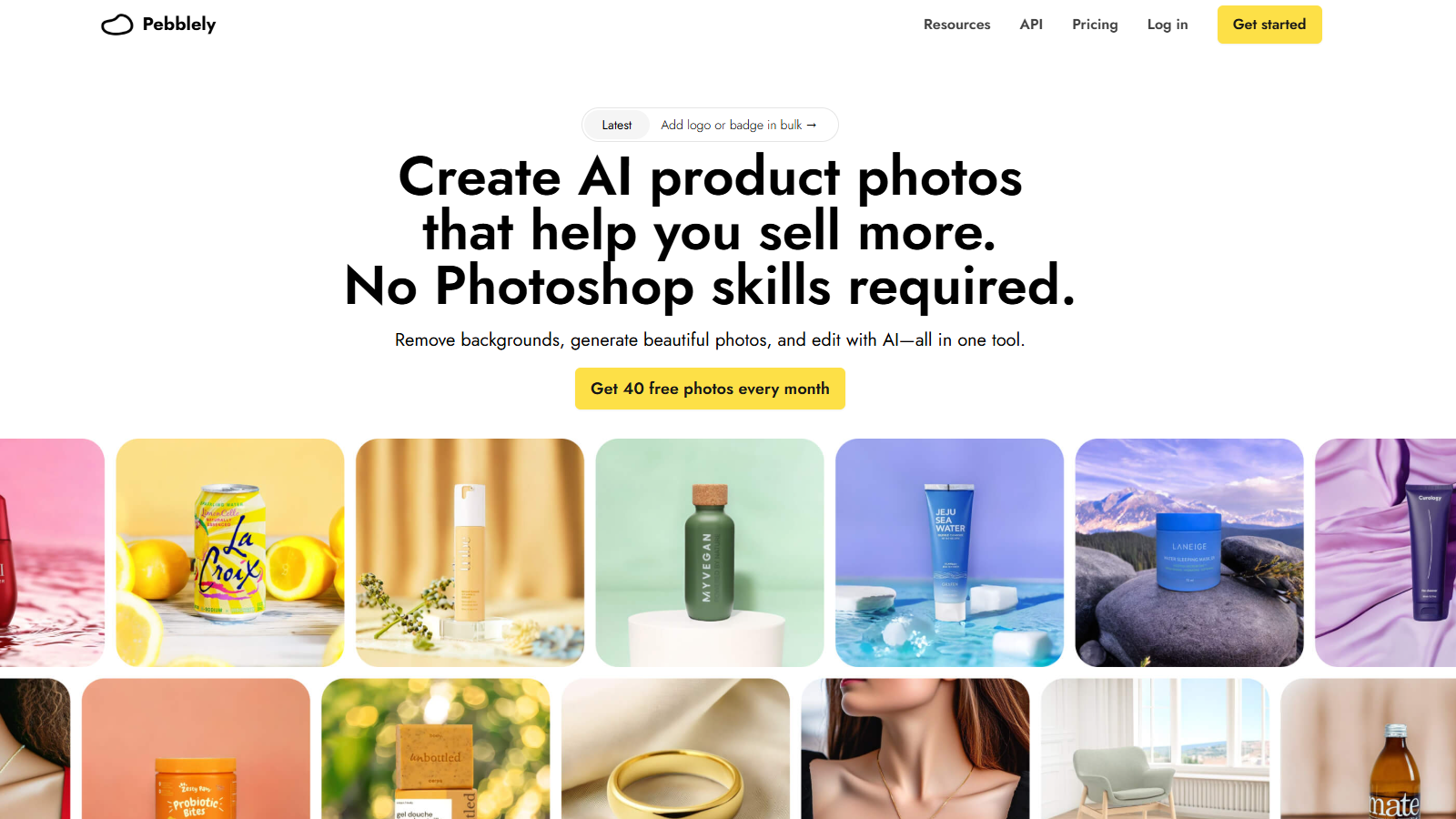
Screenshot of Pebblely
What is Pebblely?
Pebblely is an innovative AI-powered tool designed to transform mundane product photography into visually appealing images in mere seconds. It’s perfect for entrepreneurs, marketers, and creators looking to produce high-quality imagery without the need for extensive design skills or access to expensive equipment.
With Pebblely, you receive 40 images for free each month, allowing you to experiment with over 40 background themes. The AI intelligently removes backgrounds and enhances images, enabling users to showcase their products in a delightful manner. This feature is particularly advantageous for businesses seeking to enhance their online presence rapidly without investing countless hours in graphic design.
Features of Pebblely
The core strengths of Pebblely revolve around its flexibility and user-friendliness. This tool permits users to easily generate product photos by simply uploading their product images. Once uploaded, users can customize their images by selecting desired backgrounds, adjusting sizes, and adding logos or badges to reinforce their brand identity.
1. **Background Removal**: The AI automatically removes backgrounds, preparing your product images for the next step of enhancement.
2. **Custom Backgrounds**: Users can generate unique backgrounds by providing descriptions or using reference images. This feature allows for more control and can help align with brand aesthetics.
3. **Multi-Product Capability**: Users can create images featuring multiple products or props within a single frame, making it an excellent tool for bundle promotions or social media showcases.
4. **Editing Functions**: In addition to generating images, Pebblely allows users to edit existing images by removing unwanted elements, adjusting layer positions, and resizing products within their images.
5. **Adding Logos or Badges**: Recently, Pebblely introduced a feature enabling users to add logos or badges in bulk to their generated images, enhancing branding opportunities.
6. **API Access**: For businesses requiring high-volume processing, Pebblely offers an API that allows programmatic generation of images, capable of handling up to 200,000 images per day, providing unlimited scalability for growing needs.
Subscription Plans
Pebblely offers several subscription options, providing additional features for professional creators and businesses. The basic plan costs NULL per month, providing access to 1,000 images per month, custom sizes, and dynamic background capabilities.
The Pro plan, which is priced at NULL per month, removes limits on image creation and offers priority support—making it ideal for businesses that need high volumes of product imagery regularly.
Why Choose Pebblely?
The reason Pebblely stands out in the competitive landscape of product photography tools is due to its ease of use combined with powerful AI capabilities. Users report significant improvements in their marketing efforts, with enhanced image quality leading to increased engagement rates on social media and successful conversions on sales platforms.
With over 25 million images generated globally, the success stories from satisfied customers underscore the effectiveness of using Pebblely to streamline product photography. Whether you are a small business owner, an agency, or an established brand, Pebblely helps you generate compelling visual content efficiently, allowing you to focus on what truly matters: growing your business.
Pros & Cons
Pros
- Automates background removal, saving time for product photography.
- Generates custom and themed backgrounds based on user descriptions.
- Allows bulk image generation and logo addition to streamline marketing.
Cons
- The tool may require paid subscription for advanced features, limiting some users.
Frequently Asked Questions
Pebblely is free to start, with paid plans from 0 to 32 USD per month.
According to our latest information, this tool does not seem to have a lifetime deal at the moment, unfortunately.
Pebblely offers a range of features, including AI-driven background removal, the ability to create custom backgrounds, and options to edit images by removing objects or repositioning products. Users can select from over 40 themes for their backgrounds or provide custom descriptions for even greater customization. The tool also allows users to add logos or badges to enhance branding and improve product appeal.
Yes! Pebblely allows you to generate images incorporating multiple products and props simultaneously. You can upload several items, arrange them on the canvas, and create images that showcase your products together, enhancing their presentation for marketing initiatives or social media.
To generate images that align with your brand colors, utilize Pebblely's 'Select a reference' feature. By uploading an image that reflects your brand colors, you can guide the AI to create images that accurately represent your branding. This feature is handy for businesses that want to maintain a consistent visual identity across their products.
Begin by uploading high-quality product images that appear three-dimensional and realistic. Use clear, descriptive language when entering custom prompts for backgrounds. Additionally, leverage the reference image feature to guide the AI. Lastly, experiment with different arrangements and backgrounds to see what works best for your product presentation.
With the free plan, users can generate 40 images each month, while the paid plans offer more extensive options. The Basic plan allows for 1,000 images per month, and the Pro plan offers unlimited image generation, making it easier to scale content creation as your business grows.
To bulk generate images, navigate to the generation settings within Pebblely and select up to 25 products to create variations with similar or different backgrounds at once. This feature significantly expedites the process of producing multiple marketing assets for various platforms.
After generating images, you can enter the Edit mode to make adjustments. You can move, resize, or remove objects directly from the photos. Click on the generated image and utilize the editing tools to refine your visuals to better suit your needs before downloading them.
Yes, Pebblely offers an API that enables seamless integration with your existing systems, allowing you to process and generate product photos at scale. This is particularly beneficial for businesses that require high-volume photo generation for multiple channels, ensuring consistent, high-quality visuals.



