Pictory

Generate engaging videos from text quickly using AI-powered automation tools.
Pictory.ai
Is this your tool?
Follow for updates & deals
Get alerts for Pictory discounts, feature releases & pricing changes
Similar Tools

Topview
Create personalized marketing videos quickly and easily with AI-generated scripts and voiceovers.

Vozo
Create lip-sync videos in multiple languages with AI-powered editing and translation tools.

JoggAI
Generate professional videos using customizable AI avatars and text prompts in multiple languages.

KreadoAI
Generate professional videos from text, images, and presentations using AI avatars and voices.

AKOOL
Generative AI platform for creating personalized visuals and interactive marketing content.

Pictory Media Gallery

Pictory (review) video
Screenshot of Pictory
What is Pictory?
Pictory is a revolutionary AI video generator designed to simplify the video creation process for anyone looking to create compelling video content quickly and efficiently. Whether you are an educator, marketer, or content creator, Pictory helps you turn text into engaging videos in just minutes. The platform's user-friendly interface ensures you don't need prior video-editing experience, making it accessible to everyone.
With Pictory, you can convert a wide array of content into videos: from blog posts and scripts to presentations and audio files. The AI technology automatically analyzes your input, selects relevant visuals from a vast media library, and generates a polished video complete with captions and voiceovers. This is particularly beneficial for those seeking to maximize video content reach, as Pictory allows users to repurpose existing materials into video formats without the usual hassle.
Key Features of Pictory
Pictory offers numerous features that enhance your video-making experience:
- AI-Powered Automation: Automate video creation using Pictory's sophisticated AI algorithms which streamline the production process.
- Text to Video Conversion: Turn your written scripts or articles into visually appealing videos effortlessly.
- Rich Media Library: Access millions of stock images, video clips, and music tracks to elevate your storytelling.
- Custom Branding: Upload your logos and customize color schemes to maintain brand consistency across all produced videos.
- Multi-Format Support: Create videos in various aspect ratios suitable for different social media platforms.
Why Choose Pictory?
Video content is increasingly vital for engaging audiences across various channels, and Pictory simplifies this by providing a one-stop shop for all your video creation needs. It stands out not just for its ease of use but also for powerful AI tools that significantly reduce the time required to create high-quality videos. Users can produce content faster, allowing them to focus on more strategic activities while maintaining output quality. Additionally, Pictory supports collaboration, making it an excellent choice for teams looking to create content together.
Target Audience
Pictory is ideal for content creators, marketers, business professionals, and educators who need to produce video content quickly. Whether you are creating training materials, marketing videos, or social media content, Pictory provides the tools necessary to bring your ideas to life.
Getting Started with Pictory
If you're ready to enhance your content creation capabilities, start your free trial today and discover how easy it is to generate professional videos with Pictory. With a range of plans, including subscription options, you can find a solution that fits your needs and budget.
Pros & Cons
Pros
- Effortlessly converts text, scripts, and URLs into engaging videos in minutes.
- Offers a vast library of stock assets, including 18 million videos and 29 languages for voiceovers.
- Integrates with automation tools like Zapier for seamless video workflow enhancement.
Frequently Asked Questions
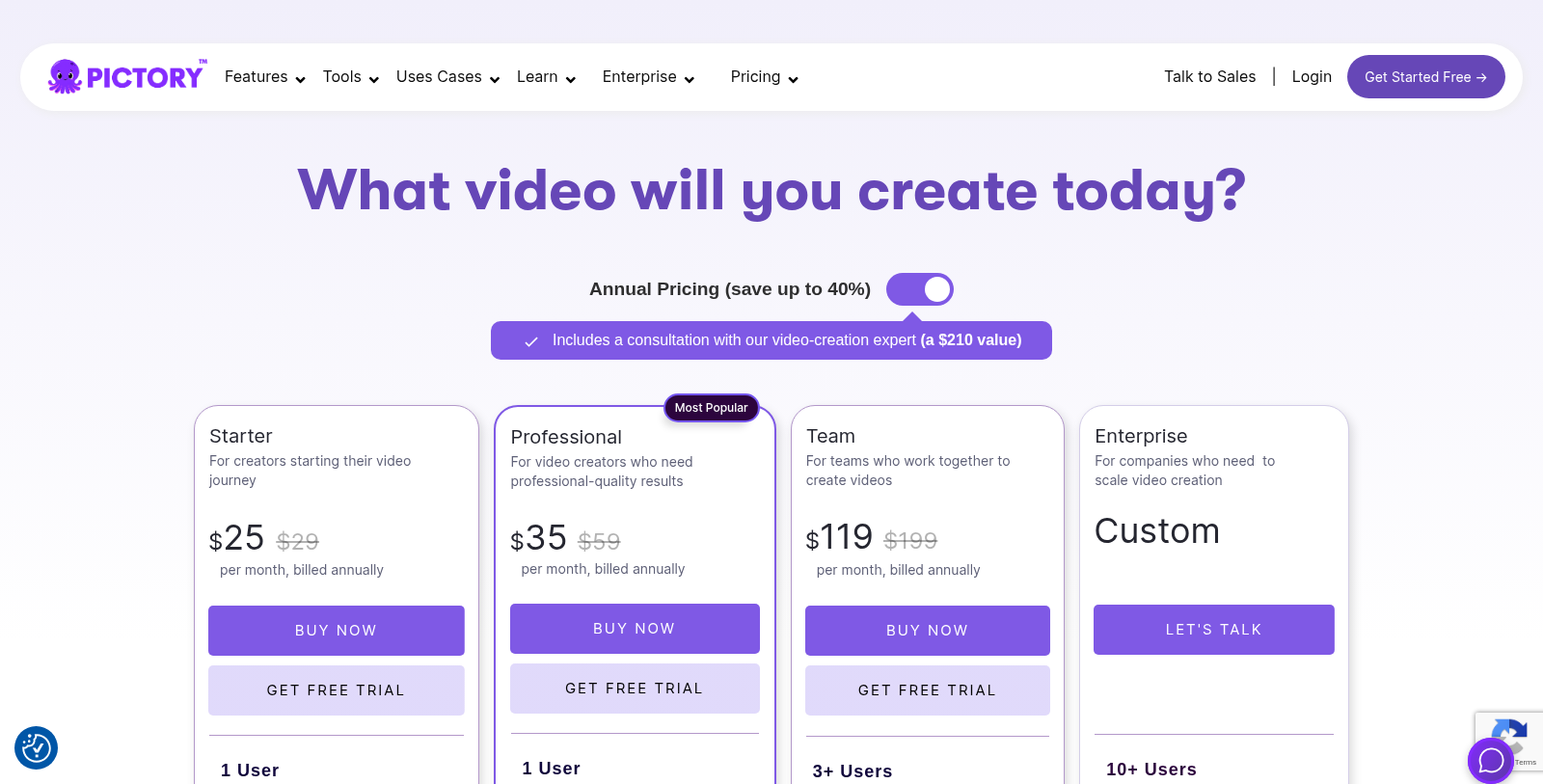
Pictory is free to start, with paid plans from 0 to 199 USD per month.
According to our latest information, this tool does not seem to have a lifetime deal at the moment, unfortunately.
Pictory allows you to create a variety of video formats, including promotional videos, educational tutorials, product videos, and videos transformed from blog posts and scripts. You can also generate videos directly from URLs, images, and PowerPoint presentations, making it versatile for different uses such as marketing, training, and content creation.
The AI Voice Generator feature in Pictory converts text into lifelike audio narration. You can choose from a range of voice styles, accents, and tones to fit your video perfectly. The tool automatically syncs the generated voiceovers with your video scenes and captions, delivering a polished, professional audio experience without manual recording.
Pictory integrates with platforms like Zapier and Make, enabling you to streamline your video workflows by automating tasks. This means you can connect Pictory to other apps you already use, allowing a more efficient video creation process and automating tasks like generating videos from text or templates.
Yes, Pictory has different video length limits based on the subscription plan you choose. For example, the Starter Plan allows you to create videos up to 5 minutes long; the Professional Plan provides 30 minutes; and the Team Plan supports videos up to 180 minutes in length, with custom options available for Enterprise plans.
Absolutely! Pictory lets you upload your own branding elements, such as logos, fonts, and color palettes. You can also create brand kits to ensure all your videos maintain a consistent look and feel, which enhances your brand identity across all platforms.
Pictory provides a variety of user support resources, including a help center with guides and tutorials, email support for inquiries, and professional onboarding assistance for Teams and Enterprise plans. Additionally, users can access a community of creators for tips and best practices.
While Pictory focuses primarily on video creation, tracking video performance often requires exporting videos to external platforms like YouTube or social media channels. It's essential to leverage the analytics tools these platforms provide to measure views, engagement, and audience reaction to videos created with Pictory.
If you need more video generation credits, you can upgrade your subscription plan to unlock additional features and credits. Alternatively, you can explore add-ons in your account settings, where you can purchase extra credits or features without upgrading your entire plan.