PixNova AI

Generate and edit images with AI, including headshots, face swaps, and baby predictions.
Pixnova.ai
Is this your tool?
Follow for updates & deals
Get alerts for PixNova AI discounts, feature releases & pricing changes
Similar Tools

AI Ease
AI-powered tools for efficient photo editing, including background removal and image enhancement.

Hocha
Generate high-quality images with AI using preset prompts and advanced editing tools, no login required.
Pixlio AI
Create and edit professional images using advanced AI models and intuitive editing tools.

LuminaBrush
Interactive tool for precise lighting adjustments using intuitive brush strokes.

Graphis
Collaborate on an infinite canvas to create and enhance images, videos, and text seamlessly.

PixNova AI Media Gallery

PixNova AI (review) video
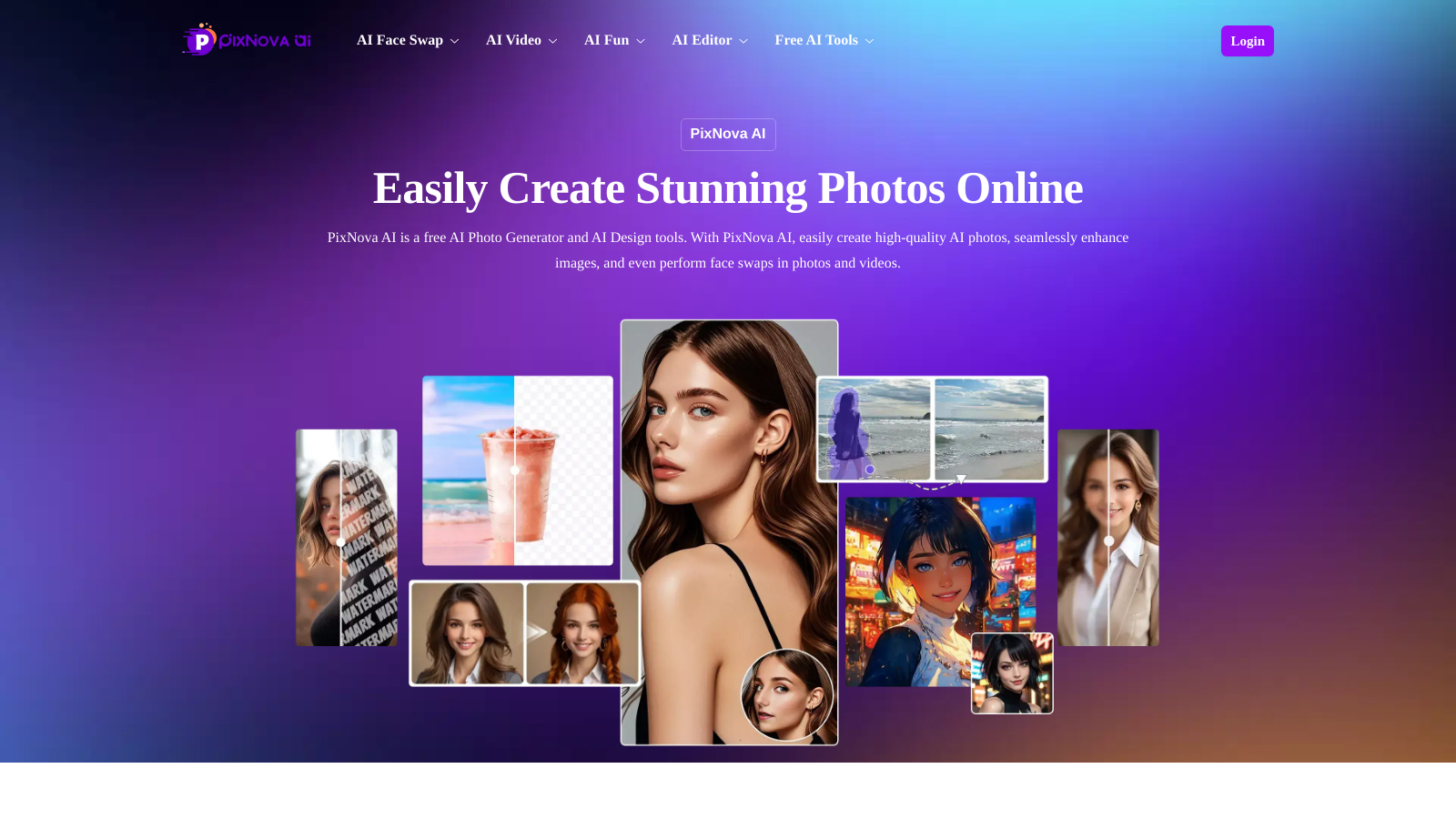
Screenshot of PixNova AI
What is PixNova AI?
PixNova AI is an innovative all-in-one AI photo generator and design tool, tailored for users seeking to create stunning photos seamlessly. This free AI photo generator allows you to engage with multiple functionalities, including image editing, face swapping, and video generation. The user-friendly interface of PixNova stands out as a major advantage, making it perfect for anyone looking to create captivating visuals without needing extensive editing skills or technical expertise.
At the core of PixNova’s functionalities lies its smart image optimization feature. The platform employs cutting-edge algorithms to enhance photos, guaranteeing that the final product looks polished and professional. Whether you're dealing with inadequate lighting, lackluster colors, or details that require sharpening, PixNova AI addresses these needs efficiently and effectively.
Create Studio-Quality AI Headshots
One of the most notable features of PixNova is its AI headshot generator. This tool utilizes advanced facial recognition and natural lighting simulation to effortlessly convert any photo into a high-quality, studio-grade portrait. Ideal for job seekers, LinkedIn profile enhancement, or corporate branding, this feature eliminates the need for arranging a professional photoshoot or possessing prior editing experience.
Generate Ultra-Realistic Baby Predictions
Have you ever wondered what your future baby might look like? PixNova’s AI Baby Generator combines facial features from two uploaded photos to conjure up realistic and adorable baby images. Utilizing a genetic-style prediction algorithm, users can generate heartwarming, lifelike results with just a single click. It's a delightful tool that’s perfect for sharing joy within families and amongst friends.
Explore the AI Clothes Changer
Another engaging feature of PixNova is its AI Clothes Changer. This utility allows users to visualize themselves in various outfits or styles without needing to try them on physically. It's a whimsical way to explore and experiment with looks, boosting confidence before making a purchase decision.
Face Swapping Made Easy
Face swapping is one of the most entertaining aspects of PixNova. The platform enables users to effortlessly swap faces in photos, whether they are with friends, family, or even celebrities. This feature is especially popular for group photos, where participants may prefer to swap expressions or create entertaining memes. The entire process is straightforward, devoid of any complex steps or software installations, ensuring that it remains accessible to everyone.
More Fun with AI Tools
PixNova AI also offers a variety of playful AI tools that help in bringing creative ideas to life. From video generation and image extending to enhancing photos, object removal, and resizing images, the suite is comprehensive and designed to cater to a broad range of creative needs.
In summary, PixNova AI empowers users to execute a myriad of tasks—from enhancing personal photos to generating imaginative visuals—all with minimal effort. The platform stands out not only for its powerful capabilities but also for its accessibility, appealing to novices and seasoned creators alike. Explore your creative potential with PixNova AI and let your imagination lead the way!
Pros & Cons
Pros
- Supports unlimited face swaps in a single photo without needing sign-up.
- Utilizes AI for realistic face swaps, ensuring high-quality results.
- Fully browser-based, allowing easy use without downloads or watermarks.
Cons
- Currently requires clear, well-lit images for optimal face detection.
Frequently Asked Questions
PixNova AI is available at no cost.
According to our latest information, this tool does not seem to have a lifetime deal at the moment, unfortunately.
PixNova AI offers a range of distinctive features, including an AI Photo Generator that enables high-quality photo creation, an AI Headshot Generator that transforms everyday photos into professional-looking headshots, and an AI Baby Generator that predicts how a future baby might look by merging facial features from two images. Additionally, features like AI face swaps, magical photo transformations, and image optimization tools set it apart in the image editing software landscape.
To achieve the best results with PixNova's face swap tool, ensure that the source images are high-resolution, well-lit, and that faces are front-facing. Avoid using anime or illustrated images, as the AI may struggle to process them. Also, use clear, distinct facial features for easier detection. When swapping faces in group photos, consider cropping individual faces for more accurate results. Always check your images for consistency in angles and lighting for a more natural look.
Yes, PixNova AI allows users to swap multiple faces in group photos. The tool automatically detects all visible faces in the uploaded image. Users can then upload new faces to replace them. However, group face swapping works best when clear, well-lit photos are used. Although the tool detects and swaps faces automatically, ensure that you upload individual facial images for better results, as direct swaps within a group may not produce optimal outcomes.
When using PixNova AI, your uploaded photos are not stored or shared by the platform. This means that privacy is maintained during your usage. However, as with any online service, it's advisable to avoid uploading sensitive personal images. You can use PixNova confidently, knowing that your data will not be misused.
Absolutely! PixNova AI features a specific AI Headshot Generator designed to create professional-quality headshots from everyday photos. This feature utilizes facial analysis and lighting simulation, enabling users to create polished portraits suitable for corporate and professional settings. No photography experience or advanced editing skills are required—upload your photo and let the AI do the work.
PixNova AI can be creatively utilized for various fun activities, such as generating memes through face swaps, predicting future baby looks with the AI Baby Generator, or creating themed images for events like weddings or graduation parties. Its playful AI tools encourage users to explore different visual transformations, making it perfect for both personal enjoyment and light-hearted social media content.
No, PixNova AI is entirely web-based, meaning you don't need to install any software to access its features. Users can directly visit the PixNova website to utilize tools such as the AI Photo Generator and the face swap feature from any device via their web browser, making it highly convenient and easy to access.
PixNova AI stands out from many other face swap applications due to its user-friendly interface, no sign-up requirement, and unlimited face detection per photo. Unlike other tools that may have restrictions on the number of faces or may require complicated setups, PixNova allows users to quickly and effortlessly swap faces without any watermarks or delays, making it a more efficient choice for group edits and casual fun.