Shakker
AI tool for generating images with customizable features and models for various creative projects
Shakker.ai
Is this your tool?
Follow for updates & deals
Get alerts for Shakker discounts, feature releases & pricing changes
Similar Tools

Imagen 3
Transforms text prompts into high-resolution images, making digital content creation accessible for all.

STOCKIMG.AI
Generate custom images from text prompts using AI for logos, posters, and more.
DALL·E 2
Generates detailed images from textual descriptions with features for editing and style variations.

Image Labs
AI software for editing images with customizable styles and extensive editing features.
Kolors AI
Generates custom images and videos for design projects through an intuitive chat interface.

Shakker Media Gallery

Shakker (review) video
Screenshot of Shakker
What is Shakker?
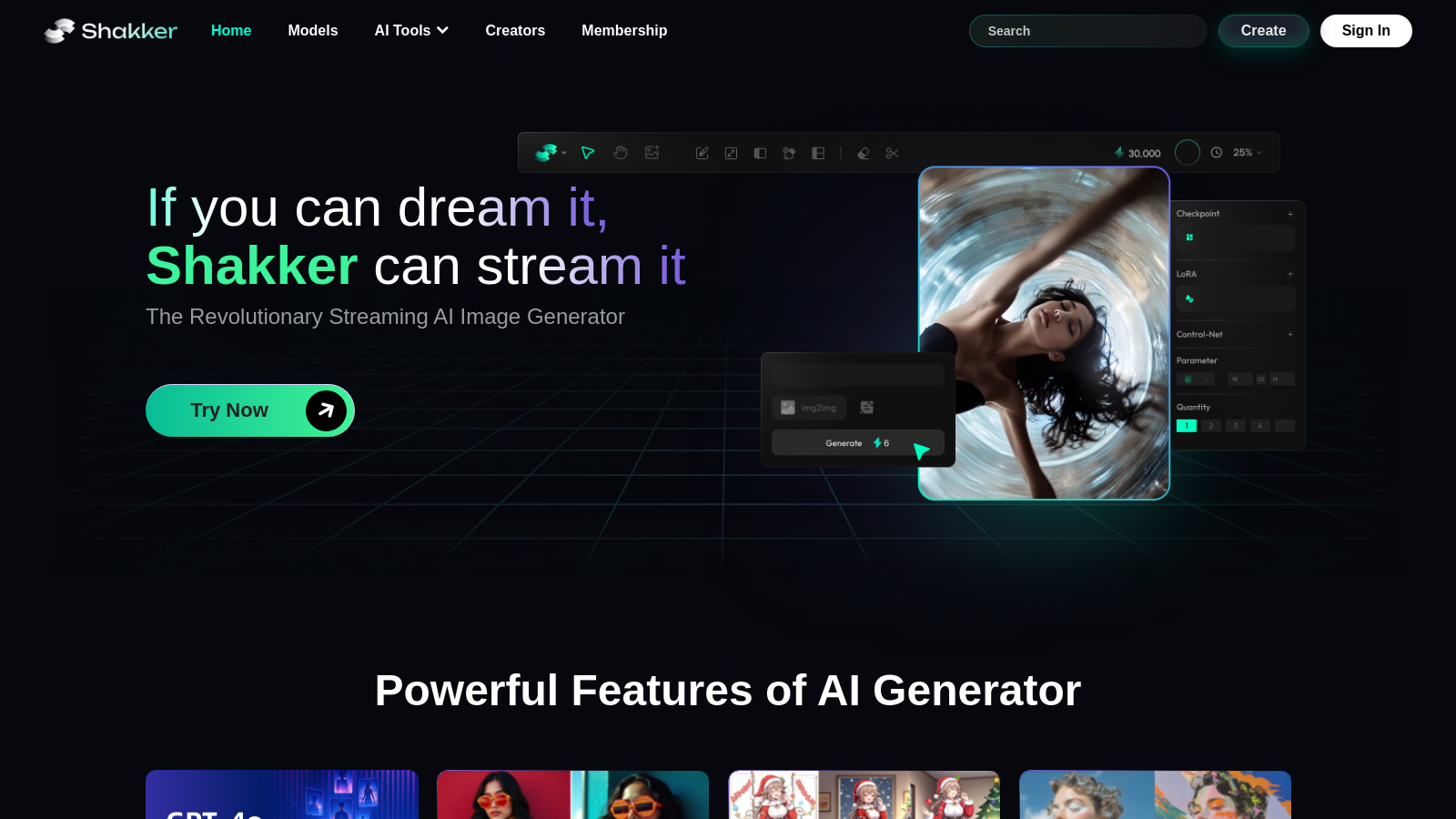
If you can dream it, Shakker can stream it—introducing the revolutionary streaming AI image generator designed to empower creators of any skill level. Shakker offers a comprehensive platform featuring WebUI, ComfyUI, a training tool, and the advanced Shakker AI Generator. This tool is built to help you bring your creative visions to life with an incredible range of capabilities and features.
Powerful Features of AI Generator
The Shakker AI Generator is equipped with a variety of features that cater to diverse creative needs:
- Color Palette: Easily select and customize a color palette that suits your project’s needs.
- Entity Control: Manipulate and control individual elements in your images with precision.
- Style Transfer: Apply various artistic styles to your images effortlessly.
- Spatial Control: Adjust spatial dimensions and depths in your art.
- Inpainting and Outpainting: Fill in missing parts of images or expand your art beyond the original boundaries.
- Face Swap: Generate realistic face swaps for a range of creative applications.
Diverse Models for Every Need
Shakker hosts exclusive models tailored for specific design areas:
- Logo & Icon: Create sharp and professional logos and icons.
- Game Design: Design characters and environments for various game genres.
- Architecture: Visualize architectural projects with stunning realism.
- Photography: Enhance and manipulate photographic images for creative outputs.
- Concept Art: Generate ideas for characters and settings in visual storytelling.
Enhanced Community and Feedback
Shakker thrives on a robust community spirit, where creators support and inspire each other. Users frequently express excitement about the platform’s diversity in models and capabilities. Recent feedback underscores how Shakker has transformed into a thriving space for collaboration, creativity, and innovation, allowing users to explore limitless possibilities.
Unmatched Benefits for Creators
Shakker isn’t just a tool; it’s a robust platform offering unmatched benefits:
- Easy access with minimal setup—great for quick creations.
- A supportive community striving to enhance collective creative potentials.
- Regular updates and model expansions to cater to evolving creative needs.
- Access to advanced models, including new styles and filters, enriching the creative toolkit offered by Shakker.
Getting Started with Shakker
Start utilizing Shakker AI today! Just upload your images or start your projects directly from the browser. The platform provides a seamless interface that allows you to focus entirely on your creative tasks without the burden of complex installations or setups. Shakker also features an online face swap tool and style transfer functionality, making artistic transformations even more engaging and accessible.
Join the future of design with Shakker:
Pros & Cons
Pros
- Offers powerful tools like GPT-4o-Image1 for diverse image creation.
- Provides various AI features including inpainting, outpainting, and style transfer.
- Accessible online without downloads, making it user-friendly for all skill levels.
Frequently Asked Questions
Shakker is free to start, with paid plans from 0 to 0 Unknown per Translation not found for 'time_period_unknown'.
According to our latest information, this tool does not seem to have a lifetime deal at the moment, unfortunately.
Shakker offers a diverse range of image generation models, including generative art styles such as logo and icon design, game design, architecture, and various illustration styles. Specific models include LoRA, FLUX, and static diffusion integrated tools, catering to a range of creative needs, from professional graphics to fun art.
Yes! Shakker offers an entirely online platform that allows you to create high-quality images without requiring any software installations. This will enable users to access powerful tools like ComfyUI and Automatic1111 WebUI directly from their browser, making it user-friendly and accessible from any device.
Shakker's AI face swap tool is versatile and ideal for various applications. Users can create humorous memes, enhance professional edits, visualize new styles or looks, and use them for mockups in creative projects. It supports seamless integration for entertainment, social media content, and marketing efforts.
Shakker's AI Style Transfer tool utilizes deep learning algorithms to blend the content of your images with various artistic styles. You upload your image, select a creative style, and the tool generates a transformed version of your image, reflecting the chosen style while maintaining the essence of the original content.
While Shakker supports a wide range of artistic styles and models, users may encounter limitations in terms of extremely high-resolution outputs or very complex requests that all models may not fully support. It's advisable to experiment with different prompts and styles to achieve desired results.
To effectively use Shakker, you should have a stable internet connection and a modern web browser. There are no specific hardware requirements, as all processing is performed on Shakker's servers, allowing you to generate images and access features from any device without requiring local resources.
Shakker's ComfyUI allows users to create customized workflows using various nodes. You can adjust features such as inpainting, LoRA, or Flux to suit your specific artistic needs. These customizable options enhance the efficiency and flexibility of the image generation process, allowing you to tailor it to your creative vision.
Shakker provides user support via email for any technical issues or inquiries. Users are encouraged to contact the support team at contact@shakker.ai for assistance with the platform or to resolve any queries related to image generation and tool functionality.