Ultimate Web Scraper

Effortlessly extract data like text, images, and links from websites with a single click.
Google.com
Is this your tool?
Follow for updates & deals
Get alerts for Ultimate Web Scraper discounts, feature releases & pricing changes
Similar Tools

Smartlead
Efficiently automate cold email outreach with features like unlimited mailboxes and AI-driven warmups.

Stormy
Streamlines influencer discovery and campaign management using AI to match brands with relevant creators.

Hoppy Copy
Streamline email marketing with AI-driven content generation and brand-aligned automated campaigns.

Watermelon
Create custom AI agents for automated customer support across multiple channels.

Validate Idea
Test and validate startup ideas by creating customizable landing pages for user feedback.

Ultimate Web Scraper Media Gallery

Ultimate Web Scraper (review) video
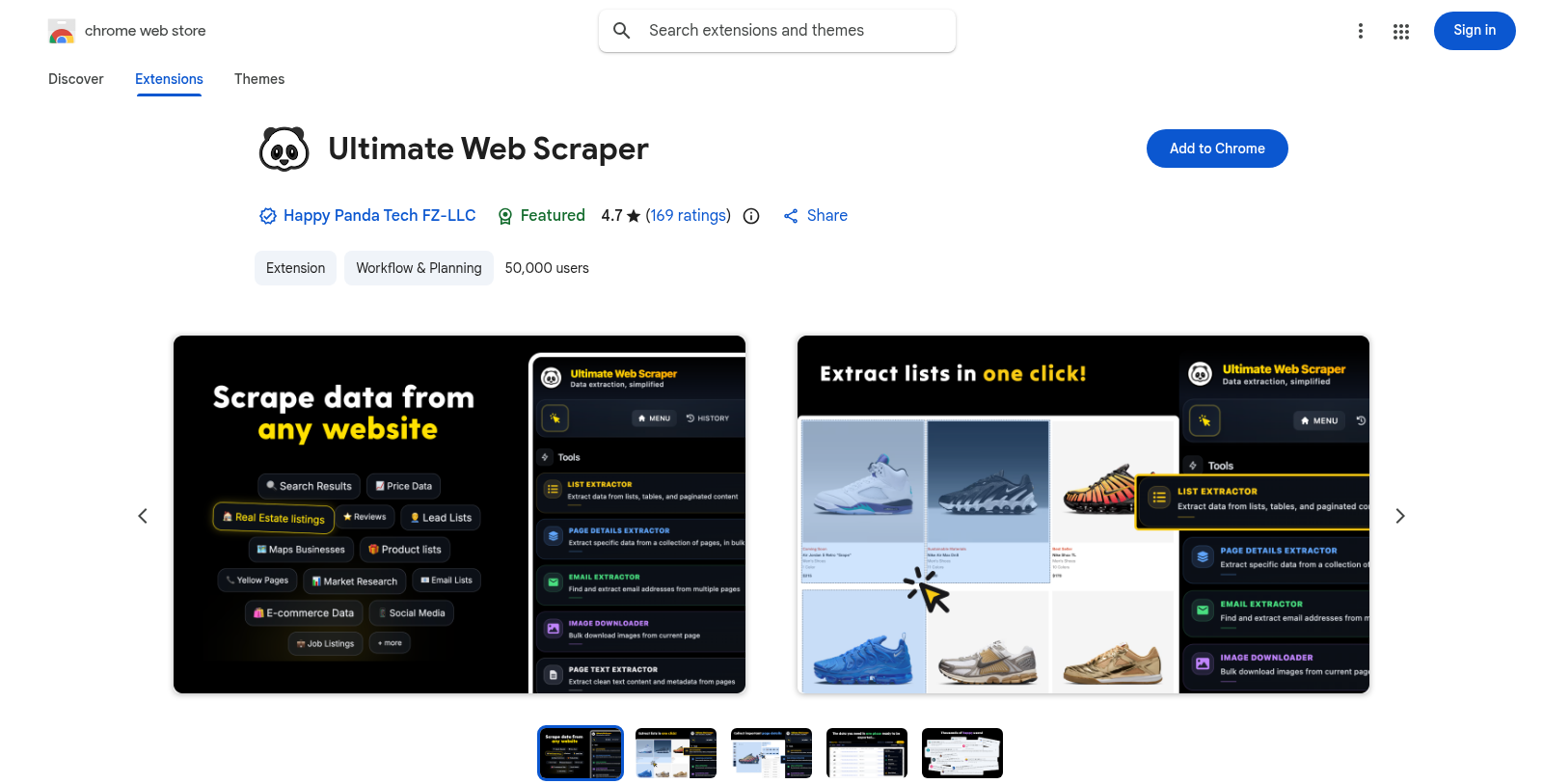
Screenshot of Ultimate Web Scraper
What is Ultimate Web Scraper?
Ultimate Web Scraper is a powerful Chrome extension designed for exceptional web scraping and data extraction capabilities. With this tool, users can effortlessly gather information such as text, images, emails, and links from virtually any website with just a single click. The intuitive design of Ultimate Web Scraper means no coding skills are required, making it an accessible solution for both professionals and casual users alike. This tool not only delivers accurate results but also simplifies the extraction of both structured and unstructured data.
Key Features of Ultimate Web Scraper:
- One-Click Extraction: Effortlessly extract lists, tables, and other listings with a single click. The advanced smart selection tool streamlines this process, handling even complex structures, including pagination and infinite scrolling.
- Bulk Page Scraping: Extract essential data, including emails, phone numbers, and business details from multiple URLs seamlessly. This feature is perfect for B2B marketers seeking to gather leads quickly.
- Email and Phone Scraping: Targeted extraction for lead generation, enabling users to gather lists of contacts for marketing initiatives.
- Image Downloader: Download images from any website swiftly and effortlessly, allowing for easy asset management.
- Data Export Options: Export your extracted data in various formats such as CSV, Excel, and Google Sheets, making it easy to share and utilize.
The Ultimate Web Scraper serves professionals across various industries, including B2B marketers, sales teams, SaaS companies, and researchers. It enables efficient data collection for analytics, research, and purposes such as e-commerce data extraction, competitive analysis, and social media insights.
How it Works:
- Install the Extension: Install Ultimate Web Scraper from the Chrome Web Store.
- Navigate to Target Websites: Browse to the webpage from which you wish to extract data.
- Select and Extract: Use the smart selection tool to highlight and capture desired data points.
- Export Data: Download the extracted information in your preferred format.
The tool is particularly valued for its speed and accuracy, as well as its ability to handle complex scraping tasks, ensuring results are obtained quickly without compromising on the quality of the data. Moreover, all operations are conducted securely within the user's browser, which guarantees data privacy.
Conclusion:
In summary, the Ultimate Web Scraper is not just a versatile and intelligent tool; it is an essential component for enhancing your web scraping and data extraction endeavors. With its AI-powered features and no-code solution, it effectively scales to meet the needs of users from diverse sectors. Whether you’re a data scientist building datasets for machine learning or a marketer creating targeted outreach email lists, Ultimate Web Scraper can cater to your requirements flawlessly. Join the thousands of professionals who have turned to this robust tool to supercharge their web scraping capabilities.
Pros & Cons
Pros
- Offers one-click extraction for emails, images, and structured data from any site.
- AI-powered extraction ensures superior accuracy and fast data processing.
- Exports extracted data to multiple formats like CSV, Excel, and Google Sheets.
Cons
- Limited to specific browsers, primarily designed for Chrome users.
Frequently Asked Questions
Ultimate Web Scraper costs 60 to 120 USD per Translation not found for 'time_period_unknown'.
This tool offers a lifetime deal.
Ultimate Web Scraper allows you to extract a wide variety of data types from websites. You can scrape email addresses, phone numbers, business details, job titles, product information, and social media profiles. The tool is versatile enough for both structured (e.g., tables and lists) and unstructured (e.g., plain text and images) data, enabling you to gather comprehensive data for lead generation, market research, and competitive analysis.
Yes, Ultimate Web Scraper can extract data from websites that require login credentials. The extension runs in your browser, allowing you to log in as you usually would. Once logged in, you can easily scrape the data you need without losing security or privacy, handling everything from the client side for swift results.
Ultimate Web Scraper offers flexible export options that let you download your extracted data in several formats, including CSV, Excel, and Google Sheets. This makes it easy to share your data or import it into other applications for analysis. Additionally, there is support for integrations like n8n and webhooks to automate your workflows, making data management even more efficient.
To extract data from multiple pages or URLs using Ultimate Web Scraper, upload a CSV file containing the URLs you want to scan. The tool allows you to select specific elements (such as text, images, or links) from each page, and it extracts data in bulk from all the provided URLs. This feature is handy for tasks such as scraping leads or product details across multiple webpages.
Ultimate Web Scraper can be utilized in various scenarios, including B2B marketing, where users can find quality leads with complete contact information. It's also valuable for sales teams to build comprehensive prospect lists, for e-commerce businesses to scrape product information, and for researchers who need to gather large datasets for analysis. Other use cases include competitor pricing monitoring, social media research, and content gathering from blogs and forums.
While Ultimate Web Scraper is powerful, users should be aware of a few limitations. For example, although it can handle most websites, some sites may implement anti-scraping measures that hinder extraction. Additionally, the tool is designed as a Chrome extension, so compatibility issues may arise in other browsers unless you use Edge or Brave. Always review website terms of service to ensure compliance when scraping data.
To get started with Ultimate Web Scraper, first install the extension from the Chrome Web Store. Next, navigate to the website you want to extract data from. Use the tool's one-click extraction feature to scrape lists, pages, or images. Finally, you can export the extracted data to CSV, Excel, or Google Sheets for easy access and sharing. The intuitive interface makes it simple, even for users without coding experience.
If you have questions or encounter issues while using Ultimate Web Scraper, you can reach out for support via email at support@ultimatewebscraper.com. Additionally, there is a Reddit community dedicated to the tool, where users can share tips and ask questions. This multi-channel support ensures that you can get assistance when needed.