Videomaker.me

Generate videos from text or images using advanced AI for quick and easy video creation.
Videomaker.me
Is this your tool?
Follow for updates & deals
Get alerts for Videomaker.me discounts, feature releases & pricing changes
Similar Tools

PixVerse
Generate professional-quality videos from text prompts and images in seconds.
Twin AI
Convert still images into engaging videos with voice synchronization and customization options.
TalkingPhotos
Convert photos into talking videos with realistic movements and expressions.

Flixier
Cloud-based video editor with AI tools for automatic subtitling and noise removal.
WayinVideo
Extract highlight moments from long videos and create engaging clips for social media.

Videomaker.me Media Gallery
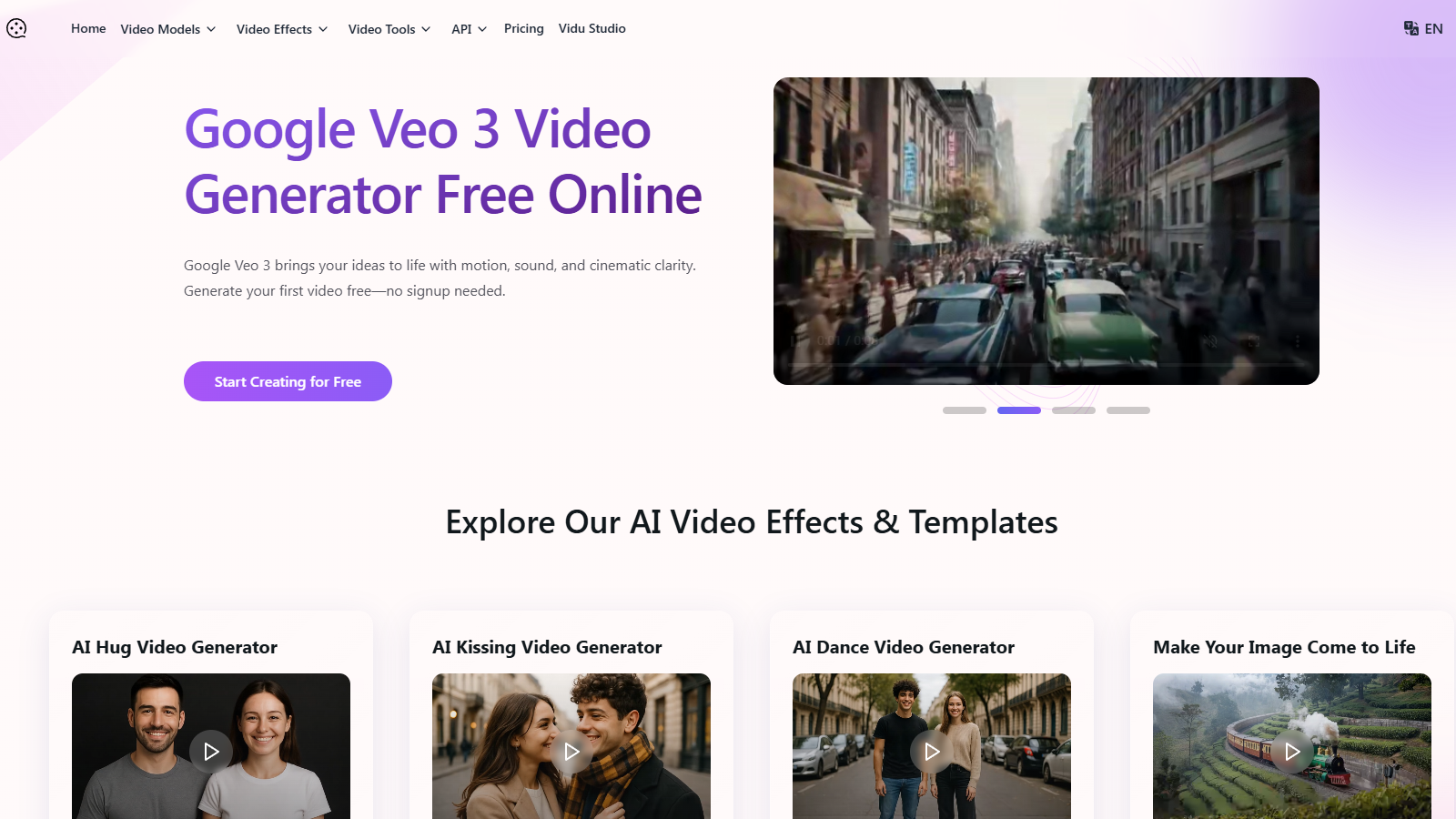
What is Videomaker.me?
Videomaker.me is a revolutionary online platform that utilizes cutting-edge AI technology, specifically the Google DeepMind's Veo 3, to make video creation accessible and effortless for creators and businesses alike. This platform enables users to generate stunning videos quickly, whether from detailed text descriptions or static images, allowing them to bring their ideas to life without requiring extensive knowledge in video editing.
Key Features of Videomaker.me
- Text to Video Generation: With the advanced features of Veo 3, users can input text prompts that are translated into high-quality videos in mere seconds. This functionality is ideal for content creators, marketers, and educators looking to produce engaging visual storytelling effortlessly.
Complementing this is the Image to Video conversion feature that allows users to upload images and animate them using motion and transitions. This function enhances the storytelling ability by animating scenes ranging from simple photographs to complex visual narratives.
Synchronized Audio & Realistic Sound Effects: The platform sets itself apart by including synchronized audio in its video generation. Veo 3 produces videos with dialogue, ambient sounds, and sound effects, enhancing the immersive quality and professionalism of each project, ensuring that every visual element resonates with the intended narrative.
Creating Videos Made Simple
Using Videomaker.me is intuitive and structured:
- Begin by logging into the platform and selecting whether to generate a video from text or images.
- Input your descriptive text prompt or upload an image, enabling the AI to comprehend and visualize your ideas.
- Customize video parameters such as duration and style, then proceed with generation. The output video typically becomes available in moments, ready for sharing or feedback.
This user-friendly approach positions Videomaker.me as an excellent resource for both novices and seasoned creators, allowing users to surpass technical challenges and focus on creative expression.
Pricing Models
Videomaker.me adopts a Freemium pricing model, granting users access to basic features for free while offering premium plans packed with advanced capabilities. The paid options provide value-added benefits such as:
Understanding the Plans
- The Basic Plan costs approximately NULL.9 per month. It offers 100 credits, enabling users to create up to 50 videos, alongside essential features like text and image-to-video conversion, and 720p video resolution.
- The Pro Plan, priced at around NULL.9 per month, provides 1000 credits, suitable for generating up to 500 videos, and includes advanced options such as 1080p videos and priority support.
- The Ultra Plan is designed for heavy users at NULL.9 monthly, featuring 3000 credits which allow for the generation of up to 1500 videos, with additional perks like unlimited storage and commercial usage rights.
Overall, Videomaker.me offers a versatile tool for anyone aiming to create captivating video content swiftly and efficiently, making it an appealing solution for modern marketing demands.
Pros & Cons
Pros
- Offers free access to the advanced Google Veo 3 AI video generator with no signup needed.
- Generates high-quality, 8-second videos with synchronized audio, enhancing storytelling.
- Features over 60 artistic effects and the ability to animate images, adding creative flexibility.
Cons
- Free plan may experience slower video generation during peak times due to high demand.
Frequently Asked Questions
Videomaker.me is available at no cost.
According to our latest information, this tool does not seem to have a lifetime deal at the moment, unfortunately.
Veo 3 enables users to create high-quality videos from text or image prompts, complete with synchronized audio, including ambient sounds and voiceovers. It creates 8-second cinematic clips that capture motion and subtle effects, making it ideal for turning scripts or still images into dynamic visual content. Additionally, users can choose from various AI effects and filters to further customize their videos.
Videomaker. Me's Veo 3 integrates seamlessly with Flow, Google's AI filmmaking suite, allowing users to specify locations, camera shots, and visual styles for complex video workflows. This integration enables users to expand their creative storytelling capabilities while utilizing other advanced AI tools, such as Imagen 4 and Gemini AI, for enhanced video production.
While the free version of Videomaker.me allows you to create videos without registration, it may come with lower priority for video generation and fewer features compared to paid plans. Users may also experience slower generation speeds during peak times and have limitations on the video resolution, typically up to 720p, whereas premium plans offer up to 1080p.
Videomaker.me is suitable for various applications, including creating engaging social media content, educational videos for online learning, marketing and promotional materials, and quick prototypes for creative projects. Whether you're a content creator, marketer, or educator, the platform simplifies video production, making it accessible and efficient.
Currently, Videomaker.me allows for the generation of videos but does not feature extensive built-in editing capabilities after generation. However, users can download the generated content and use external video editing software, such as Adobe Premiere Pro or DaVinci Resolve, to make adjustments, add effects, or combine multiple clips.
Most videos using the Veo 3 AI generator are typically produced within 5 to 10 seconds, even with the inclusion of complex elements like synchronized audio. The platform is designed to strike a balance between speed and quality, making it ideal for real-time testing and rapid content creation.
Videomaker.me accepts both text and image inputs for creating videos. Users can enter detailed text descriptions to generate video scenes or upload images that will be transformed into dynamic, moving visuals. This versatility allows for a wide range of creative expressions in the generated videos.
Yes, to produce watermark-free videos, users need to subscribe to a paid plan. The free version includes watermarked outputs, while the Basic and Pro plans enable private generation and deliver videos without watermarks, making them suitable for professional use.