Visily
Create wireframes and prototypes with AI-assisted design tools for collaborative user interface projects.
Visily.ai
Is this your tool?
Follow for updates & deals
Get alerts for Visily discounts, feature releases & pricing changes
Similar Tools
Synthoframe
Transforms text and images into interactive user interfaces for efficient prototyping.

Magic Light
Generate engaging videos from text, maintaining character consistency and diverse visual styles.

CLIP Interrogator
Generates optimized text prompts for text-to-image models based on input images.

Scribble Diffusion
Turn your sketch into a refined image using AI.

Imagen 3
Transforms text prompts into high-resolution images, making digital content creation accessible for all.

Visily Media Gallery

Visily (review) video
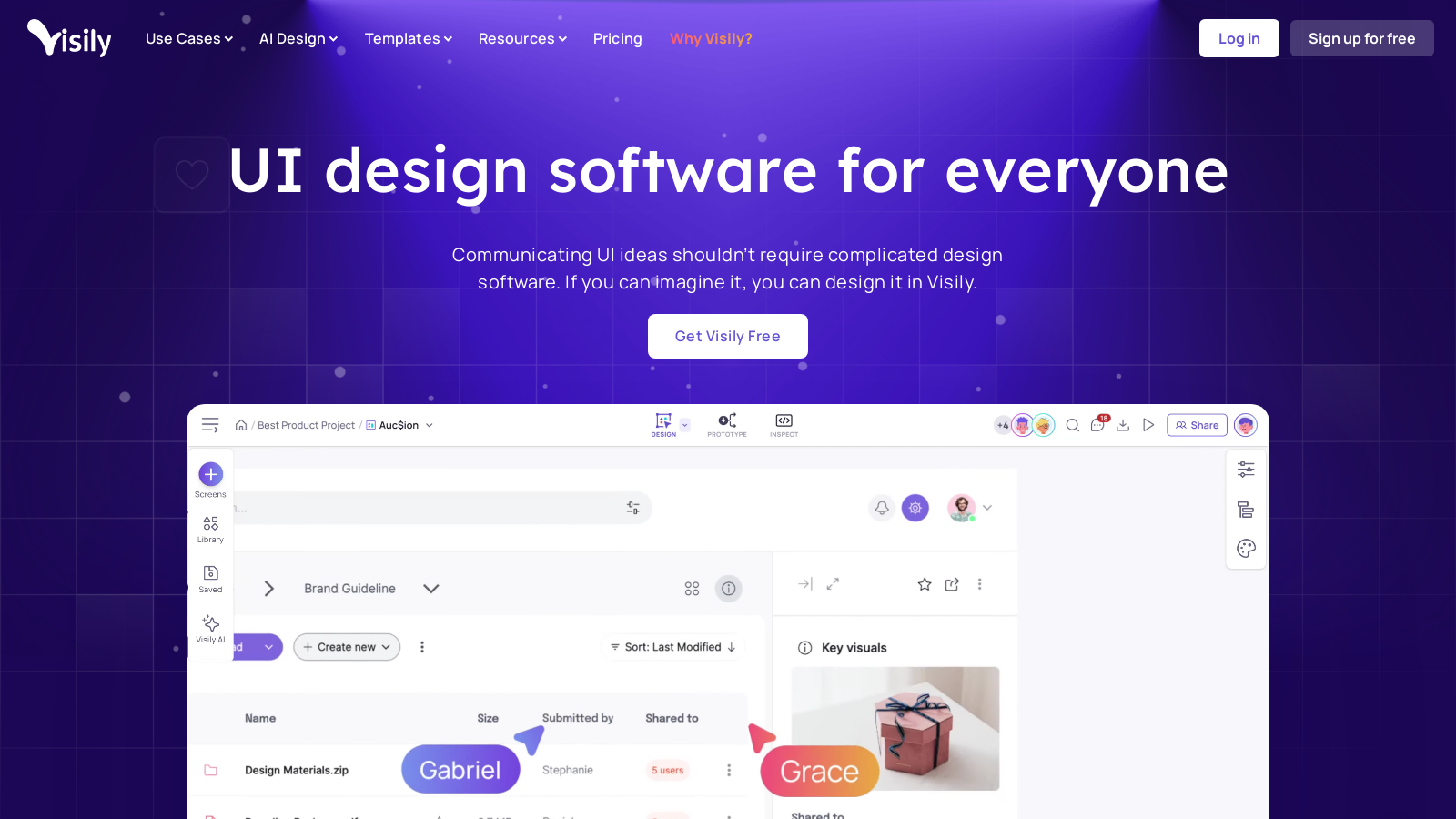
Screenshot of Visily
What is Visily?
Visily is a groundbreaking UI design software that streamlines the process of creating wireframes, prototypes, and collaborative designs. With its user-friendly interface and advanced artificial intelligence (AI) capabilities, Visily empowers individuals of all design skill levels to effectively bring their ideas to fruition. Whether you're brainstorming innovative application interfaces or refining existing designs, Visily offers a comprehensive solution equipped with powerful tools to cater to a wide array of design requirements.
Why Choose VisilyNULL
As the digital landscape evolves, the communication of UI ideas must remain accessible and uncomplicated. Visily addresses this need by providing tools that eliminate the traditional complexities of design software. You can start from any source of inspiration—be it screenshots, quick sketches, or text prompts—and transform them into stunning high-fidelity designs without ever facing the intimidating ‘blank canvas’ problem. Visily’s AI assists not only in wireframing and prototyping but also enhances the creative process, making design more intuitive and less technically challenging.
Getting Started with Visily
New users can easily dive in with a free Starter plan that facilitates exploration of the platform’s core functionalities. This plan includes features such as two editable boards per workspace, a selection of limited elements per board, 200 AI credits, and 150 template credits. This generous offering allows newcomers to familiarize themselves with essential tools without any financial risk.
Pro and Business Plans
For users seeking enhanced functionality, Visily presents two robust paid options. The Pro plan is available for NULL per editor per month when billed annually, including unlimited boards and elements, private folders, and an expanded AI credit allotment of 3,000 credits per editor monthly. Tailored for professionals and small teams, this plan enables effective collaboration and project management. On the other hand, the Business plan, priced at ? per editor per month, is designed for larger enterprises and includes features like SAML SSO, custom teams, and a whopping 10,000 AI credits per editor each month, in addition to unlimited template credits.
AI-Powered Design Features
AI capabilities are integral to Visily's suite of tools. Notably, features like Screenshot to Design allow users to upload existing UI screenshots, converting them into editable designs almost instantly. This functionality eliminates the learning curve typical of traditional design tools, enabling users to focus on creative ideation with minimal hindrance. Other AI features include Text to Design and Text to Diagram, which permit the transformation of simple text prompts into visually appealing designs and flowcharts.
Collaboration Made Seamless
With Visily, collaboration is effortless. The platform endorses real-time project collaboration, allowing teams to co-create on design boards. This functionality facilitates commenting, adjustments, and idea sharing directly within the application, fostering an environment ripe for innovation. Additionally, certain guest editors can be invited to specific folders or boards, enabling teamwork without the prerequisite of account creation.
Extensive Template Library
Visily boasts an impressive library of over 1,500 prebuilt templates across numerous categories, significantly reducing the time needed to kick off projects. Users can design for both mobile and web platforms with ease, utilizing these templates to create a visually striking product quickly. Furthermore, smart components and UI presets simplify the design process while maintaining high aesthetic standards.
Continuous Enhancements and Community Support
Visily is committed to regular updates and feature enhancements, ensuring that users always benefit from the latest tools and capabilities. For instance, new templates are continually added, providing fresh resources for users to utilize in their projects. Community feedback plays a pivotal role in Visily’s evolution, and users are encouraged to suggest features that would enhance their design experience.
Conclusion
In summary, Visily stands out as a user-friendly platform that merges cutting-edge AI technology with a rich design experience suitable for novices and professionals alike. Its freemium pricing allows users to engage without financial pressures, while the advanced plans cater to the varied needs of growing teams and enterprises. As the design field grows more complex, tools like Visily ensure that creativity remains accessible and productive for everyone involved in the design process. So whether you are initiating ideas, finalizing user interfaces, or collaborating on innovative projects, Visily stands equipped with the solutions to help you excel.
Pros & Cons
Pros
- AI-powered tools streamline the design process, reducing workflow complexity.
- Offers over 1,500 customizable templates for rapid UI development.
- Screenshot and sketch inputs are converted into editable wireframes seamlessly.
Cons
- Some advanced features require a paid subscription for full access.
Frequently Asked Questions
Visily is free to start, with paid plans from 0 to 29 USD per month.
According to our latest information, this tool does not seem to have a lifetime deal at the moment, unfortunately.
Visily harnesses AI to enhance the design process through features like 'Screenshot to Design', where you can transform any screenshot into an editable design. Additionally, 'Text to Design' allows you to turn plain text prompts into high-fidelity wireframes, and the 'Magic Theme' feature generates aesthetic themes with a single click. These AI-driven tools streamline the workflow, making design more accessible, even for those with little experience.
Visily offers robust collaborative tools designed for real-time teamwork. Users can invite collaborators to specific boards or workspaces without requiring them to create an account, thereby facilitating seamless communication and feedback. The platform supports an unlimited number of viewers and commenters, and users can engage through a commenting system that allows for visual markups and resolutions. These features enable teams to work efficiently together, regardless of their location.
Visily boasts a library of over 1,500 customizable templates for various applications, including mobile, web, and websites. This extensive collection helps users jump-start their designs for multiple contexts, including SaaS products, e-commerce sites, and mobile apps. The templates are not only professional but also adaptable, allowing designers to modify them as per their specific requirements.
The Starter plan in Visily provides a good opportunity to explore the platform, but it comes with limitations. Users are restricted to only two editable boards per workspace and a maximum of 2,500 elements per board. Additionally, this plan allows only 200 AI credits per workspace and limited template credits. For those needing more flexibility, such as unlimited boards and advanced features, upgrading to the Pro plan is advisable.
Currently, Visily does not support importing designs directly; however, you can leverage the 'Screenshot to Design' feature to convert existing components from other design tools, such as Figma, into editable designs in Visily. This functionality enables you to easily transform screenshots of your designs and then modify them as needed within Visily.
Visily users can access a variety of support options. The Help Center offers detailed guides and FAQs to help users navigate the platform and utilize its features effectively. Additionally, users can reach out directly via email at support@visily.ai for personalized assistance. For users on the Business plan, priority support is also available.
To get the most out of Visily's AI tools, start by using the 'Text to Design' feature to generate concepts from text prompts, aiding your brainstorming session. Utilize the 'Screenshot to Design' feature to adapt existing designs or inspirations quickly. Experiment with the 'Magic Theme' to customize your application's aesthetic, and don't forget to explore the vast library of templates to jumpstart your project.
The Pro plan is ideal for solo professionals or small teams, offering unlimited boards, private folders, and 3,000 AI credits per editor monthly. The Business plan, on the other hand, caters to larger organizations, providing all Pro features along with advanced compliance measures such as SAML SSO, unlimited template credits, custom teams, and priority support. It's tailored for teams that require enhanced security and more extensive collaboration tools.