X-Design

Generate logos and branding materials quickly with AI tools designed for small businesses.
X-design.com
Is this your tool?
Follow for updates & deals
Get alerts for X-Design discounts, feature releases & pricing changes
Similar Tools
Movely
Create videos by transforming images into dynamic content with AI and a wide range of customizable templates.
Lovart
Automates the design process to create visuals, videos, audio content, and 3D designs from user prompts.
vivago
Generate AI-driven images and videos from text prompts with customizable editing tools.
Mage
Generate high-quality images and videos from text descriptions with AI-driven technology.

Lucent
Create studio-quality images and videos by voice command using diverse AI models and customizable templates.

X-Design Media Gallery

X-Design (review) video
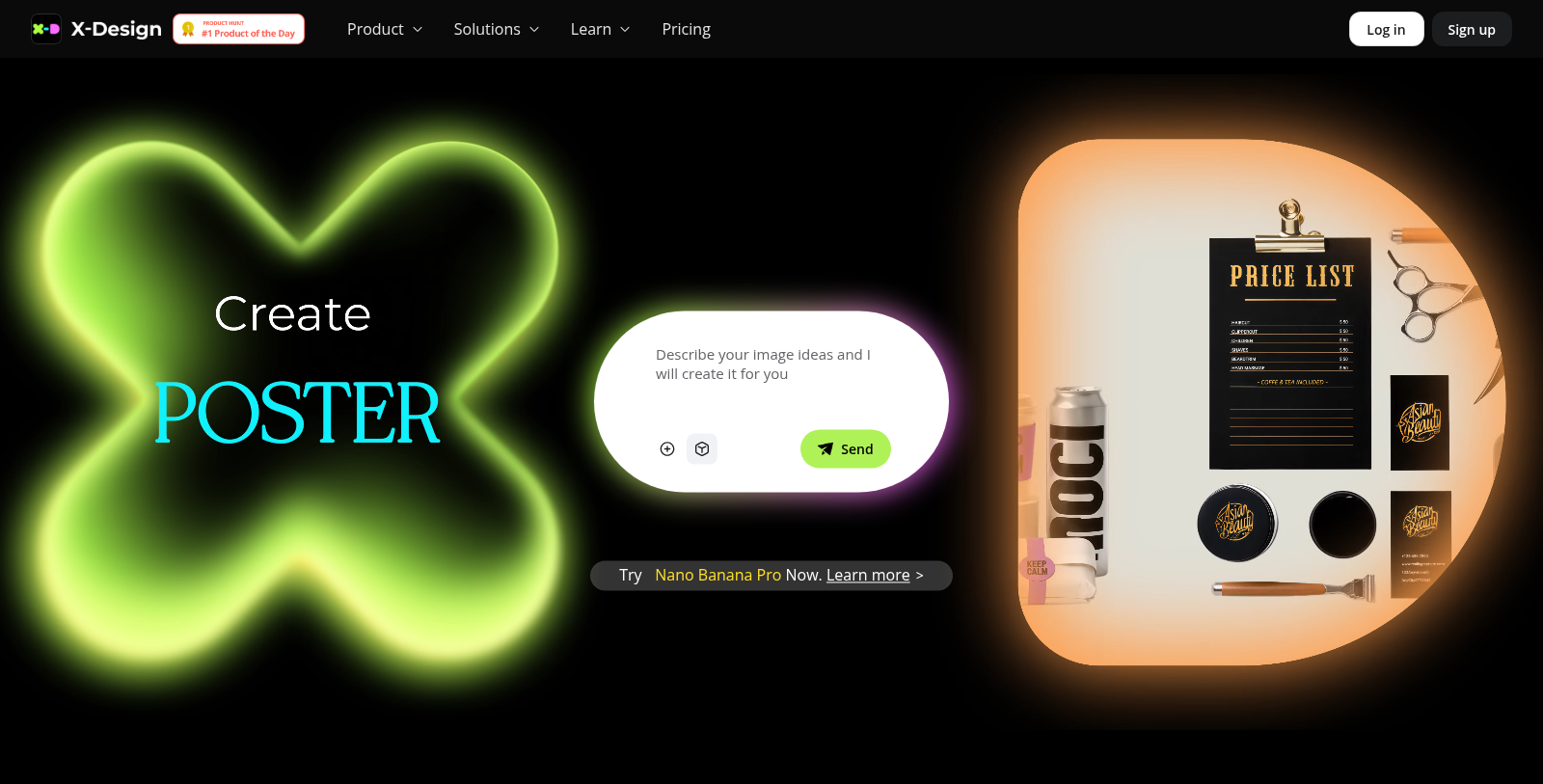
Screenshot of X-Design
What is X-Design?
X-Design is a cutting-edge AI design tool that empowers users to create stunning graphics, logos, posters, and videos effortlessly, harnessing the latest AI technology. Designed primarily for small businesses, it enables rapid brand identity enhancement without the need for extensive design experience.
Effortless Brand Identity Creation: With X-Design, generating polished logos that reflect your brand's essence is simple and expedited, offering delivery in mere seconds rather than weeks. The platform seamlessly provides comprehensive solutions, including one-click visual mockups across various formats such as menus, posters, and packaging, ensuring a cohesive brand presence across all channels.
Automated and Intuitive Design Tools: The structured automation systems in X-Design grant users access to various powerful features, including AI background removal, marketing poster creation, and product photography. These processes are streamlined through simple descriptions, yielding modern aesthetics that consistently align with your brand.
Why Opt for X-Design?
X-Design has garnered favor among small business owners who prioritize time efficiency. Users frequently report transforming what used to be hours of design work into mere minutes, citing significant time savings that allow them to focus on other critical aspects of their operations. The platform captures the nuances of brand identity and provides tailored solutions aligning with target demographics.
Feature Highlights:
- Locked-In Brand Kit: Once a brand kit is established, your essential brand assets—including logos, color palettes, and fonts—are instantly accessible and automatically applied across all future projects, ensuring brand consistency.
- Realistic Product Photography: X-Design can elevate basic smartphone photos into professional-grade product imagery by optimizing them for various platforms like social media and e-commerce. Users can place their products into real-life, natural settings with no extra setup, making it fit for any occasion.
- Layered Flexibility: The platform offers fully editable layered files that can be adjusted in seconds, allowing for quick pivots or specific design tweaks as needed.
AI Tools for Comprehensive Creative Solutions
X-Design integrates a suite of advanced tools tailored to various design requirements, from content creation to video production. The AI agent fits seamlessly into daily workflows, serving as a valuable asset for all creative professionals.
Expanded Functionalities:
The platform also offers additional functionalities, including AI-generated fashion models for e-commerce purposes, an advanced poster generator, and video enhancements tailored to create high-quality outputs efficiently. Whether crafting e-commerce visuals or engaging social media content, X-Design provides tailored resources to guide users from concept to completion effortlessly.
Conclusion: X-Design is a revolutionary tool for anyone keen on streamlining their design process and bolstering their brand image. With advanced AI capabilities combined with a user-friendly interface, it enables high-quality designs without requiring extensive technical knowledge or prior experience.
Pros & Cons
Pros
- Creates polished logos and branding materials in seconds, streamlining design workflows.
- Offers a wide range of AI tools for photo and video editing, enhancing creativity for users.
- Ensures brand consistency by storing and applying brand assets across projects automatically.
Cons
- Free plan has significant feature limitations, restricting daily and monthly usage quotas.
Frequently Asked Questions
X-Design is free to start, with paid plans from 0 to 20.83 USD per month.
According to our latest information, this tool does not seem to have a lifetime deal at the moment, unfortunately.
The AI Design Agent in X-Design helps users quickly and effortlessly generate a variety of professional-quality visuals. It supports the creation of images, logos, posters, menus, and more. The agent assists throughout the design process by allowing users to experiment with layouts, ensuring that the final output is creative, polished, and tailored to specific project needs.
X-Design allows you to use your subscription and credits across its various platforms, including the online toolkit, iOS, and Android applications. This flexibility ensures that you can access your design tools and content anytime, anywhere. However, note that free and paid features may vary slightly by platform, so please check compatibility.
The Free plan provides limited access to features, with daily and monthly usage caps on image and video generation, as well as other tools. The Plus plansignificantly increases these limits, providing more credits and usage across various tools. The Pro plan offers the highest limits, plus additional features such as unlimited image removal, advanced AI tools, and larger monthly quotas. Users should evaluate their design needs and choose the plan accordingly.
To use the Text-to-Video feature, enter your text script or idea into the AI agent, then select your preferred style. The AI will then generate a storyboard with suggested scenes. You can then customize the timing and visuals before exporting the formatted video. This tool is designed to help marketers and educators produce professional video content quickly and efficiently, making it ideal for e-commerce and social media applications.
Yes, X-Design is designed to help small businesses achieve brand consistency without extensive design skills or resources. The platform enables users to quickly create branded assets such as logos, packaging, and promotional materials. It automatically aligns designs with existing brand kits, ensuring that visuals remain cohesive across different channels and campaigns.
New users can access a range of support options, including live chat on the homepage, an extensive help center, and tutorial resources that outline how to use the various tools available in X-Design. Additionally, users can contact customer support via email for personalized assistance, ensuring they have the support they need to navigate the platform effectively.
The AI Fashion Model Generator enables users to create realistic product images without traditional modeling setups. Users can upload basic images and customize aspects such as skin tone, body size, and background to generate professional-grade visuals. This tool is ideal for e-commerce platforms, enabling businesses to significantly reduce production costs associated with model photography.
Nano Banana 2 (Pro) allows users to create a wide range of visuals, including high-resolution product images, marketing materials, infographics, and multi-frame comics. It enhances image clarity and supports multilingual text generation, making it ideal for diverse marketing campaigns. The tool's advanced semantic editing capabilities ensure edits are contextually relevant,givingg usersgreaterh precision in their design work.