













Adobe Speech Enhancer
Enhances voice recordings to achieve clear, studio-quality sound for podcasts and voiceovers.
Podcast.adobe.com
Is this your tool?
Follow for updates & deals
Get alerts for Adobe Speech Enhancer discounts, feature releases & pricing changes
Similar Tools

Otter
Automates transcription and summarizes key points during meetings and conversations.

tl;dv
Automatic meeting transcription and summaries for various conferencing platforms.

NoteWave
Transcribes and summarizes meetings in real time, capturing key decisions and action items.

Descript
Edit audio and video content using text-based editing for intuitive production.

David AI
Provides curated audio datasets for training speech and conversational AI models.

Adobe Speech Enhancer Media Gallery

Adobe Speech Enhancer (review) video
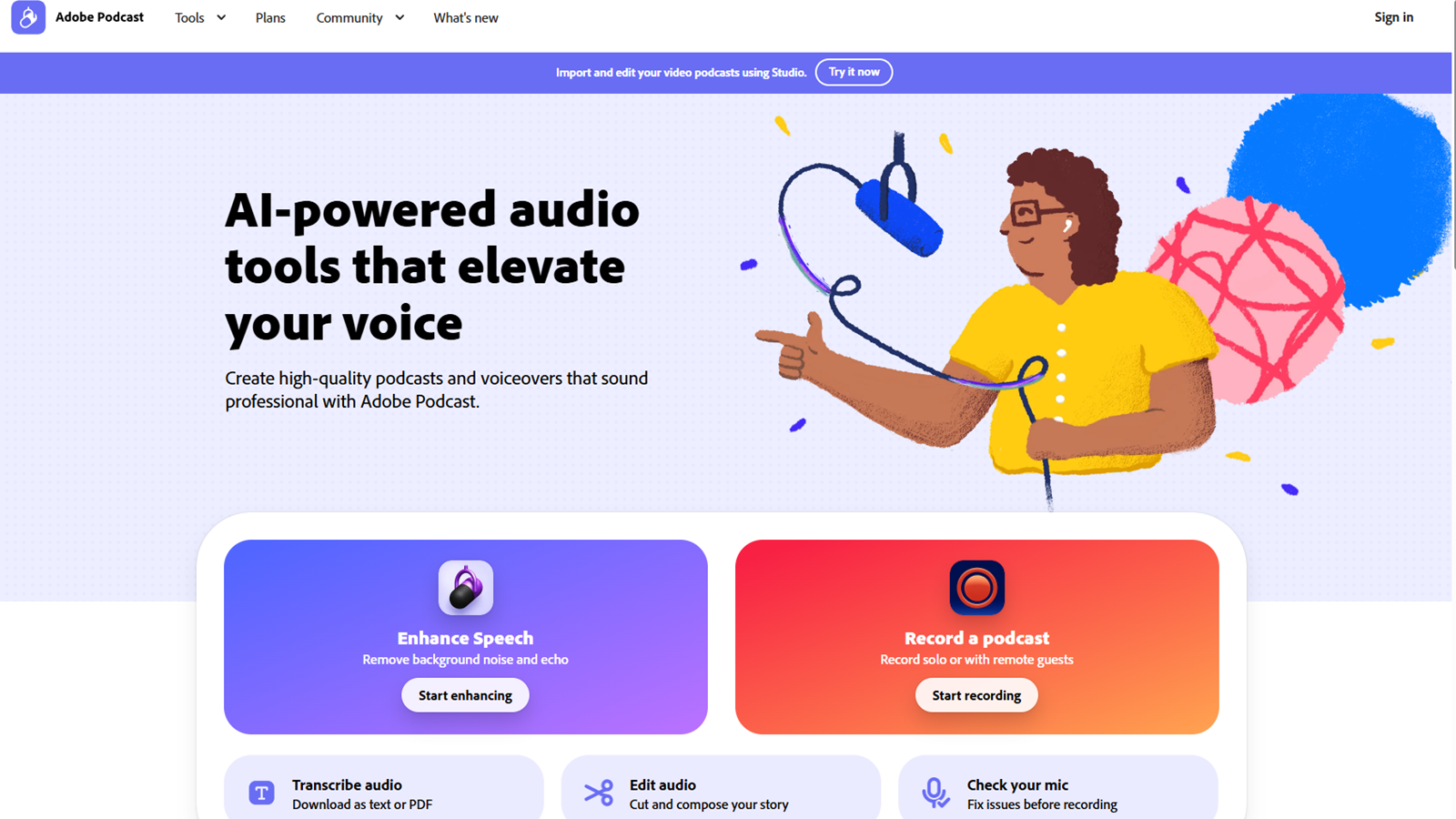
Screenshot of Adobe Speech Enhancer
What is Adobe Speech Enhancer?
Adobe Speech Enhancer presents a groundbreaking solution to a prevalent issue in voice recording: achieving studio-quality sound. Post-recording audio enhancement has become essential with many recordings made in less-than-ideal environments. The Adobe tool offers free speech enhancement, making voice recordings mirror the sound quality you'd expect from a high-end studio.
Its AI-powered audio tools are at the core of Adobe Speech Enhancer's capabilities. These tools are meticulously designed to elevate the quality of your voice. This makes it particularly beneficial for content creators, allowing them to produce high-quality podcasts and voiceovers with a professional touch. Introducing Adobe Podcast, a dedicated feature within the suite, users can transform their voice recordings, making them crisp and free from distracting ambient noises.
One of the standout features of the tool is its simplicity. Users can enhance their spoken audio with just a single click. This intuitive design principle ensures that creators can focus on what truly matters - their story, content, and delivery - rather than being bogged down by audio technicalities. Adobe Podcast's AI is primed to ensure that voice recordings are clear and possess the tonal richness of studio-quality recordings.
For those in the podcasting industry, Adobe Speech Enhancer is the perfect solution. Given the rise in podcast popularity and the competitive nature of the medium, having clear, high-quality audio can set one's podcast apart from the multitude of others. Adobe ensures that your audience receives the best audio experience possible regardless of where you record.
Pros & Cons
Pros
- Utilizes AI for high-quality audio recording and editing online.
- Offers features for seamless recording, transcription, and sharing.
- Designed for clarity and crisp audio output for users.
Frequently Asked Questions
Adobe Speech Enhancer is free to start, with paid plans from 0 to 0 USD per month.
According to our latest information, this tool does not seem to have a lifetime deal at the moment, unfortunately.
Adobe Speech Enhancer offers a comprehensive suite of audio recording and editing tools that operate directly within your web browser. You can easily record, transcribe, edit, and share audio files, ensuring that professional software's AI technology enhances sound clarity, allowing creators to produce crisp and clear audio that significantly improves the listener's experience.
To get started with Adobe Speech Enhancer, visit the official Adobe Podcast website. You can sign up for an account and begin accessing the provided tools. The platform is primarily web-based, which means you can record and edit your audio without additional software installations. Once you’re logged in, follow the on-screen instructions to begin your recording sessions.
Adobe Speech Enhancer includes a range of features such as high-quality audio recording, automated transcription services, intuitive editing tools that allow you to cut and arrange audio clips, and the capability to apply audio effects. It also offers easy sharing options, enabling quick distribution of your enhanced audio content across various platforms.
Yes, Adobe Speech Enhancer integrates seamlessly with other Adobe tools, which enhances your creative possibilities. You can easily export your enhanced audio files to software like Adobe Audition for further editing or create visual content with Adobe Premiere Pro to complement your audio projects, creating a cohesive workflow.
Adobe Speech Enhancer requires a stable internet connection since it operates on a web-based platform. Additionally, users should have an Adobe account to access the service. While the platform is user-friendly, advanced editing features may require familiarity with audio editing principles. For extensive projects, users should ensure that their audio recording devices and microphones meet quality standards to achieve optimal results.
Adobe Speech Enhancer utilizes advanced AI algorithms that optimize audio clarity by reducing background noise, balancing audio levels, and enhancing speech intelligibility. These enhancements ensure that spoken content is explicit and easily understood, transforming raw recordings into polished audio ready for professional distribution.
With Adobe Speech Enhancer, you can create a variety of audio content, including podcasts, interviews, voiceovers, and audiobooks. Its robust features cater to different creators looking to produce high-quality spoken audio, making it suitable for both personal and professional projects.
If you encounter any issues while using Adobe Speech Enhancer, you can visit the official Adobe Podcast support page for assistance. Here, you will find a range of resources, including tutorials, FAQs, and contact options for customer support to help resolve any technical issues you may have.



