Bolt

AI-powered web development platform for creating full-stack applications and websites in your browser.
Bolt.new
Is this your tool?
Follow for updates & deals
Get alerts for Bolt discounts, feature releases & pricing changes
Similar Tools

Lovable
Build web applications and websites by describing your ideas in a chat interface with AI assistance.
vibecodeprompts
Generate tailored prompts for AI coding tools, optimizing compatibility and saving development time.

AskBlake
Build web applications quickly with minimal coding using a unique expert task distribution method.

Anam
Create adaptable, lifelike AI personas for engaging conversations in various digital experiences.
Blink
Research code and collaborate within Slack for seamless team interactions and efficient project management.

Bolt Media Gallery

Bolt (review) video
Screenshot of Bolt
What is Bolt?
Bolt is an innovative platform that continues to transform web development through its advanced AI integration. Tailored for developers of all skill levels—from seasoned experts to beginners—this browser-based AI development tool is particularly adept at full-stack web application development. Following the enhancements introduced with Bolt V2, the platform has remarkably increased its capacity to manage projects that are 1,000 times larger than earlier iterations. The significant upgrades in context management promote smooth navigation and a user-friendly experience, facilitating the handling of intricate applications.
What Can You Build with Bolt
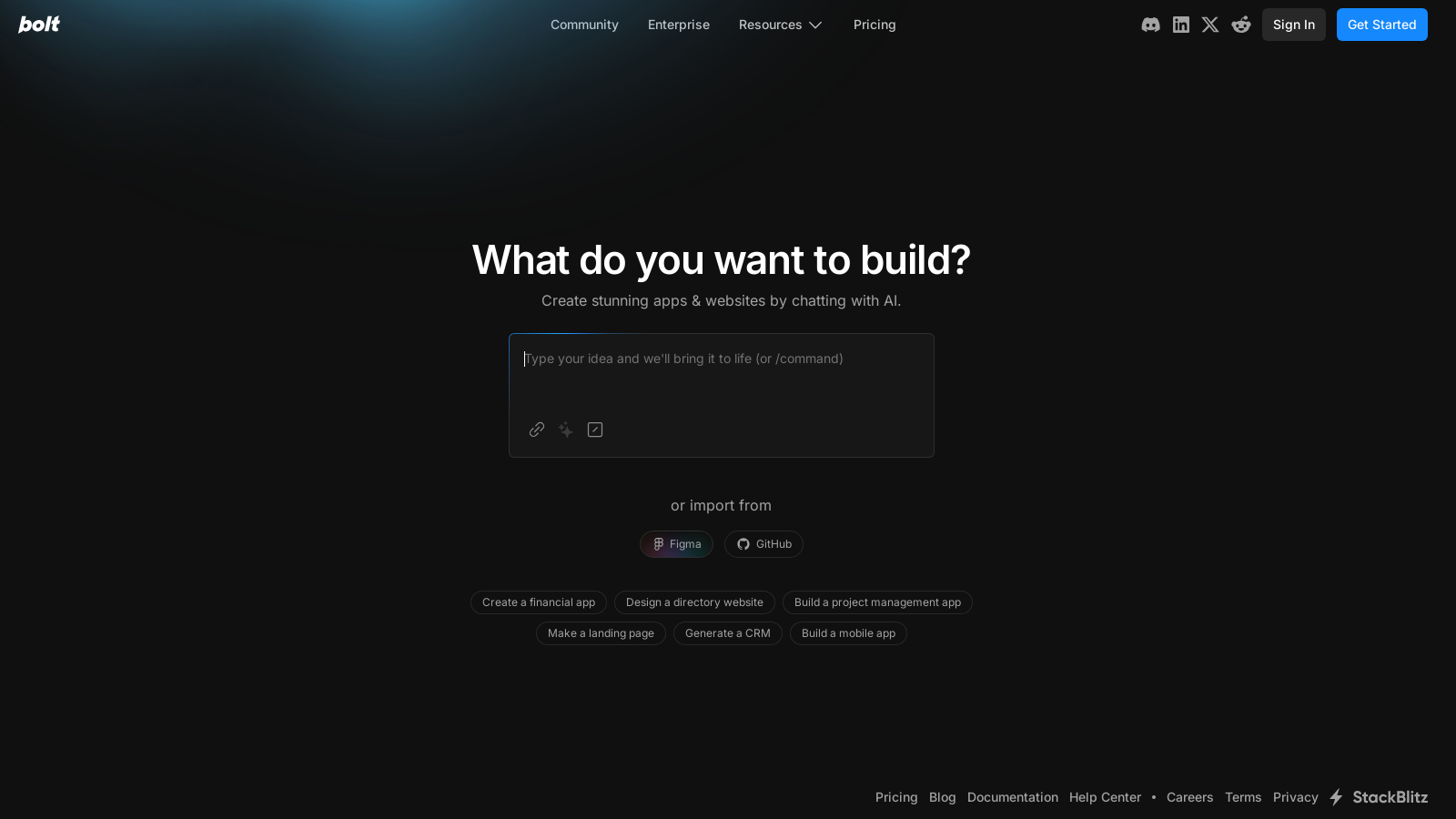
With Bolt, developers can seamlessly create visually captivating applications and websites simply by interacting with the AI through chat. The platform provides the versatility to tackle a wide array of projects effectively, such as:
- Financial applications
- Directory websites
- Project management tools
- Landing pages
- Customer Relationship Management (CRM) systems
- Mobile applications
The intuitive chat interface guides users in clearly articulating their project needs, fostering a productive development process. Continuous enhancements streamline the transition from concept to execution, making it accessible for novices and seasoned developers alike.
Latest Enhancements and Features
The launch of Bolt V2 has introduced innovative features that elevate the performance of AI capabilities. The integration of Claude Sonnet 4 from Anthropic significantly boosts the platform's coding abilities, achieving an error reduction of up to 98%. With features such as automatic testing, refactoring, and iteration, developers are free to focus on creation instead of troubleshooting repetitive issues. The enhanced system can produce aesthetically pleasing applications in a fraction of the time, making the process both efficient and enjoyable.
A standout feature of Bolt is its robust two-way GitHub integration, which simplifies version control, ensures reliable backups, and promotes effective collaboration—all within a user-friendly environment. Developers can easily link their GitHub repositories to their Bolt projects, with real-time synchronization that maximizes teamwork. The GitHub integration has also been upgraded to include better deployment options, further simplifying the development workflow.
Recent updates have fortified connections with key services such as Figma for design importation, Supabase for database management, Stripe for payment processing, and Netlify for seamless hosting and deployment. New features include improved project management tools and enhanced capabilities for scaling applications using an integrated design system, thus allowing developers to quickly create branded applications without needing extensive design work from scratch.
Pricing Overview
Bolt adopts a freemium model, enabling users to initiate their experience with the platform free of charge while offering options to upgrade as their demands increase. The current pricing structure comprises:
- Free Plan: Completely free to use, supporting both public and private projects with a monthly cap of 1 million tokens and a daily limit of 150,000 tokens.
- Pro Plan: Priced at ? per month, this popular option accommodates both public and private projects, commencing with an allowance of 10 million tokens per month, increased file upload capacities, and no daily restrictions on token usage. Unused tokens roll over into the next month.
- Teams Plan: At a cost of ? per member per month, this plan includes all Pro features alongside centralized billing, team-level access management, and enhanced collaboration among team members.
- Enterprise Plan: A fully customizable plan tailored for organizations requiring dedicated support, Single Sign-On (SSO), private NPM registries, and additional bespoke services. Prospective users are encouraged to reach out directly to Bolt for further information.
Understanding Tokens
Tokens are fundamental within the Bolt ecosystem, serving as the units for the AI's computational functions, including chat communications and code generation. Effective token management is paramount for optimizing user experience while regulating costs. Starting July 1, 2025, users on paid subscriptions will gain the ability to roll over any unused tokens into the following month.
AI Integration
Bolt’s sophisticated implementation of advanced AI models, specifically Claude Sonnet 4, guarantees exceptional performance in programming tasks. The platform acts as a powerful autocomplete system, generating code in accordance with established patterns, thus significantly lowering error rates and empowering users in their application development endeavors.
Team Collaboration
Bolt’s Teams Plan provides shared workspaces for effective collaboration across projects. Every member is allocated a specific monthly token quota adaptable to their team’s subscription tier, encouraging teamwork while ensuring individual accountability in resource management, as tokens are not dispersed among team members.
Enhanced Capabilities
Bolt excels at managing larger and more complex applications, courtesy of its state-of-the-art context management feature. Recent enhancements further boost the ability to swiftly create applications with built-in design systems, vastly improving user experience. With integrated solutions for payment management and hosting, users can promptly deploy their applications without the hassle of juggling multiple platforms. Additionally, Bolt’s continual enhancements aid users in building more effectively and efficiently, enabling swift iterations and superior project outcomes.
Conclusion
In conclusion, Bolt emerges as a remarkable tool for those venturing into the field of web development. Its wide-ranging features, supported by AI assistance, seamless integrations with various platforms, and thoughtful token management strategies position it as an excellent choice for developers of all skill levels. As the platform evolves, with ongoing advancements in error management, extended project capabilities, and refined AI functionalities, Bolt consolidates its status as a leading choice for developers eager to leverage the potential of AI in their web development projects.
Pros & Cons
Pros
- Offers a chat-based environment for real-time code implementation.
- Supports integrations with popular tools like Figma, GitHub, and Stripe.
- Good for both learners and experienced developers to build complex web applications.
Cons
- Requires clear and precise prompting from users for effective results.
- Token usage can increase costs significantly for larger projects.
Frequently Asked Questions
Bolt is free to start, with paid plans from 0 to 30 USD per month.
According to our latest information, this tool does not seem to have a lifetime deal at the moment, unfortunately.
With Bolt, you can create a wide variety of applications ranging from simple websites to fully-featured JavaScript-based web applications. Some examples include financial apps, project management tools, directory websites, landing pages, and CRMs. You can also build mobile applications using Expo. The tool is particularly suitable for both technical users and beginners looking to learn web development.
Bolt offers seamless integration with Figma, allowing you to import your designs directly into the development environment. This means you can design your application in Figma and then use Bolt to generate the corresponding code, making the development process much more efficient and visually aligned with your initial designs.
Yes, Bolt provides a Teams subscription that allows multiple users to collaborate on projects. Each team member receives their token allotment based on the subscription tier, allowing for shared access to projects while maintaining individual control over token usage. This setup enables teams to collaborate on app development within a centralized workspace.
To achieve the best results with Bolt, it's essential to provide clear and specific prompts. Start by defining what you want to build, detailing the features, aesthetics, and user experience you envision. You can also improve your prompts using the 'Enhance prompt' feature in Bolt, which suggests more detailed prompts based on your initial request. Continuously refine your prompts based on the results you obtain.
Yes, free plans on Bolt come with specific limitations. Users have a daily limit of 150,000 tokens and a monthly limit of 1 million tokens. This means that if you exceed these limits, you will be restricted in how much you can interact with the AI module during that period. Upgrading to a paid plan significantly increases these limits.
Managing your projects in Bolt is straightforward. You can import existing projects, organize files, and interact with the Bolt AI through the user interface. The tool allows you to create backups, revert changes, and collaborate with team members, making it easy to keep your project structured and well-maintained.
To deploy your application, you can utilize Bolt's integration with Netlify for easy hosting. Build your app, and when you're ready to go live, use the one-click deployment option directly within Bolt. Alternatively, you can connect to GitHub for CI/CD deployments or use Expo for mobile apps. Ensure you follow the respective integration guides for detailed instructions.
If you encounter issues while using Bolt, consult the Help Center for common troubleshooting tips first. If the problem persists, you can reach out for support. Bolt also offers in-app help options, and you can leverage the community for advice and solutions from other users who may have faced similar challenges.