













Cleanup.pictures

Remove unwanted objects and blemishes from photos using AI-powered image retouching.
Cleanup.pictures
Is this your tool?
Follow for updates & deals
Get alerts for Cleanup.pictures discounts, feature releases & pricing changes
Similar Tools

HitPaw
Enhance videos, photos, and audio with easy-to-use multimedia editing tools.

remove.bg
Automatically remove image backgrounds in seconds.

cutout.pro
Automates background removal and enhances images and videos using AI-driven technology.
N8ked
Transform images by undressing them with advanced AI technology.

Trugen AI
Create human-like AI video agents that emulate real emotions and engage users in natural conversations.

Cleanup.pictures Media Gallery

Cleanup.pictures (review) video
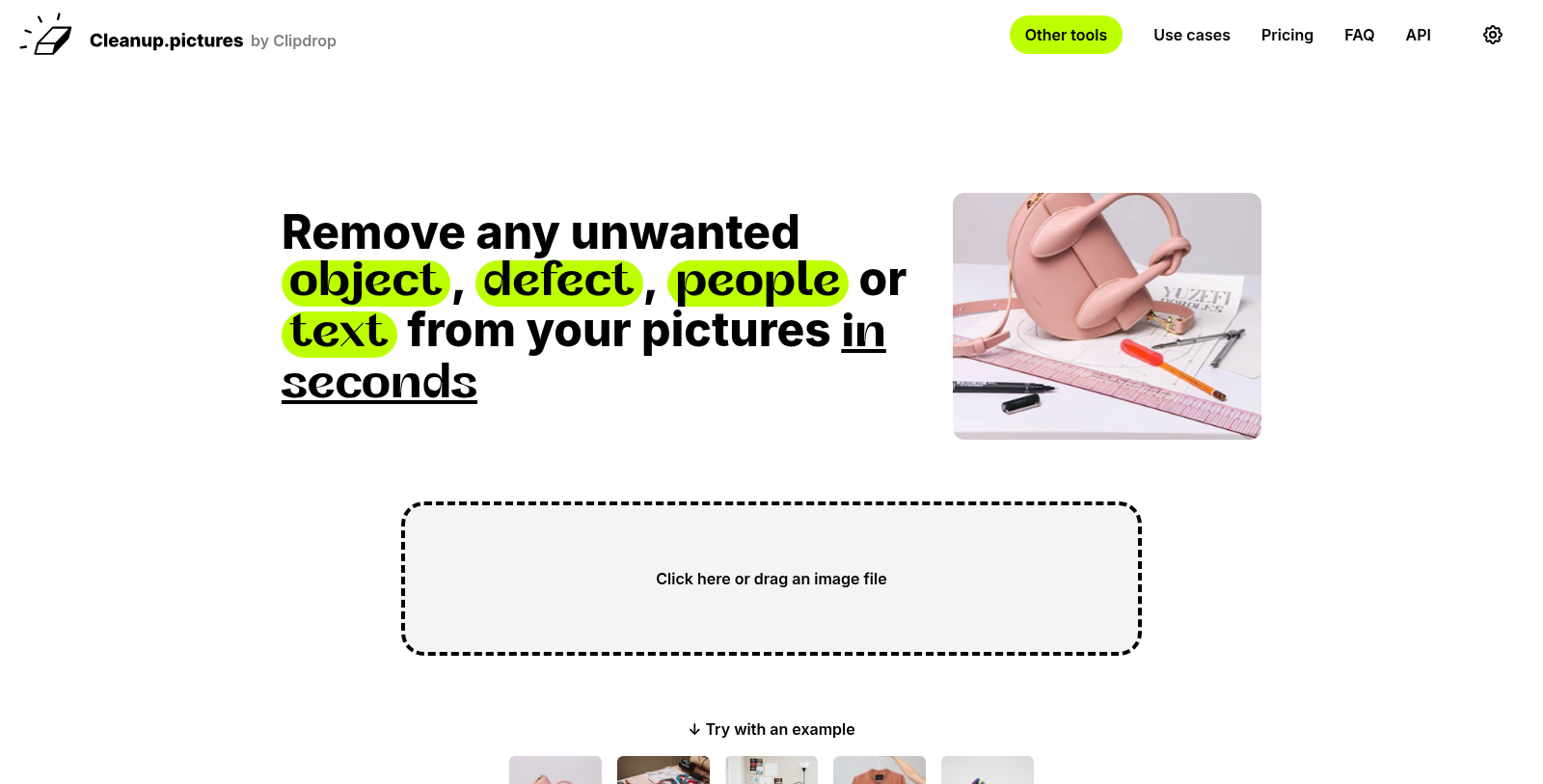
Screenshot of Cleanup.pictures
What is Cleanup.pictures?
Cleanup.pictures is an innovative web application designed to simplify image retouching and enhancement. With just a few clicks, users can remove unwanted objects, blemishes, or text from their photos, achieving professional results without complex software like Adobe Photoshop. This tool harnesses the power of artificial intelligence to deliver exceptional quality and speed, making it a favorite among photographers and creatives.
One of the standout features of Cleanup.pictures is its user-friendly interface. Users can drag and drop their images into the application, and within moments, see the difference as imperfections disappear. The AI technology accurately fills in the background to maintain image integrity, making it suitable for a wide range of use cases, from real estate to e-commerce.
Why Use Cleanup.pictures?
Cleanup.pictures stands out from other retouching applications for several reasons. Unlike traditional clone tools, which often require background references and can leave smears or lines, Cleanup.pictures uses advanced AI to analyze the image contextually and determine the best way to restore areas impacted by removal.
Improved Image Quality
The application offers two main tiers: a free version that allows unlimited image cleaning with resolutions limited to 720p, and a Pro version that starts at $5 per month or $36 annually, which provides unlimited resolution and high-quality refinements. This tier is ideal for those needing high-resolution outputs, such as professional photographers and agencies.
Efficient Object Removal
Cleanup.pictures is particularly effective at removing unwanted objects or people from photos. This is achieved by selecting the area to be removed and letting the AI do its work. Users have reported significant time savings using this tool compared to manual editing in other software.
Creative Uses
The tool is perfect for various creative applications, including cleaning images for marketing, real estate listings, or simply enhancing personal photographs, by providing an easy way to declutter images. Pictures allow users to focus on the important aspects of their photos without distractions.
API Access for Developers
For developers interested in incorporating Cleanup.pictures technology into their own applications, the platform offers a usage-based API. This allows seamless integration of its high-quality inpainting capabilities, empowering users to implement advanced image editing features in their products.
Subscription Management and Free Trials
Cleanup.pictures offers a free trial for users to explore the high-res capabilities of the Pro version before committing. Subscription management is straightforward, allowing users to pause or cancel at their convenience.
With its blend of efficiency, advanced technology, and user-friendly design, Cleanup.pictures is revolutionizing how we enhance and clean images. Whether for professional or personal use, this tool provides a powerful solution for anyone looking to improve their photographs quickly and effectively.
Pros & Cons
Pros
- AI technology enables quick and effective removal of unwanted objects from images.
- Users can achieve professional-quality results in just a few clicks without complex software.
- Supports a wide range of use cases, including real estate and e-commerce applications.
Cons
- Free version limits export resolution to 720p, which may not meet all needs.
Frequently Asked Questions
Cleanup.pictures is free to start, with paid plans from 0 to 5 USD per month.
According to our latest information, this tool does not seem to have a lifetime deal at the moment, unfortunately.
Cleanup.pictures specializes in quickly removing unwanted elements from images, such as people, objects, text, and watermarks. Through its advanced AI technology, you can achieve professional-quality edits in just a few clicks, making it an ideal tool for photographers, real estate agents, and creative agencies seeking to enhance their image presentations.
Yes, Cleanup. Pictures is compatible with both mobile and desktop devices. You can access the application on your phone or computer, letting you edit images on the go or work from your preferred setup. The user experience remains consistent across platforms, so you can retouch your pictures efficiently wherever you are.
You can upload images of any size to Cleanup. pictures. However, if you are using the free version, exported images will be limited to 720 pixels. For those who require higher-resolution images, upgrading to the Pro version enables unlimited resolution exports.
Inpainting in Cleanup. Pictures is an AI-driven technology that intelligently removes unwanted objects from your photos. Unlike traditional clone tools, which require a reference background, Cleanup's AI can seamlessly reconstruct the background based on what it predicts should be there, resulting in cleaner, more natural-looking edits.
To get the most accurate edits, it's recommended to use a larger brush when marking areas for removal. This helps ensure that shadows and edges are well-covered, allowing the AI to reconstruct missing parts more effectively. For text or watermark removal, make sure to draw over a larger area than the text itself to enhance accuracy.
Absolutely! Cleanup.pictures offers a free trial that lets you thoroughly evaluate the Pro version's features and capabilities without any commitment. During this trial, you can test high-resolution output and determine if the tool meets your editing needs before making your purchase decision.
You can easily integrate Cleanup. pictures API into your project, whether you are working in environments like Node.js, SwiftUI, or Kotlin. The platform provides comprehensive API documentation, a live demo, and multiple sample codes to help you get started quickly with inpainting and other functionalities.
Suppose you encounter technical difficulties while using Cleanup. pictures, it's best to reach out to their support team. They are available to assist with any issues and can provide guidance on troubleshooting or addressing any platform incompatibilities you may experience. Make sure to utilize the free trial period to understand the platform's features and coordinate with support for optimal results.





