Fellow

AI assistant that automates note-taking and action item tracking during team meetings.
Fellow.ai
Is this your tool?
Follow for updates & deals
Get alerts for Fellow discounts, feature releases & pricing changes
Similar Tools

tl;dv
Automatic meeting transcription and summaries for various conferencing platforms.

Atono
A comprehensive platform for product teams to collaboratively plan, build, and manage software development.

Meeting.ai
Captures and organizes meeting notes with automated transcription for seamless collaboration

Otter
Automates transcription and summarizes key points during meetings and conversations.

NoteWave
Transcribes and summarizes meetings in real time, capturing key decisions and action items.

Fellow Media Gallery

Fellow (review) video
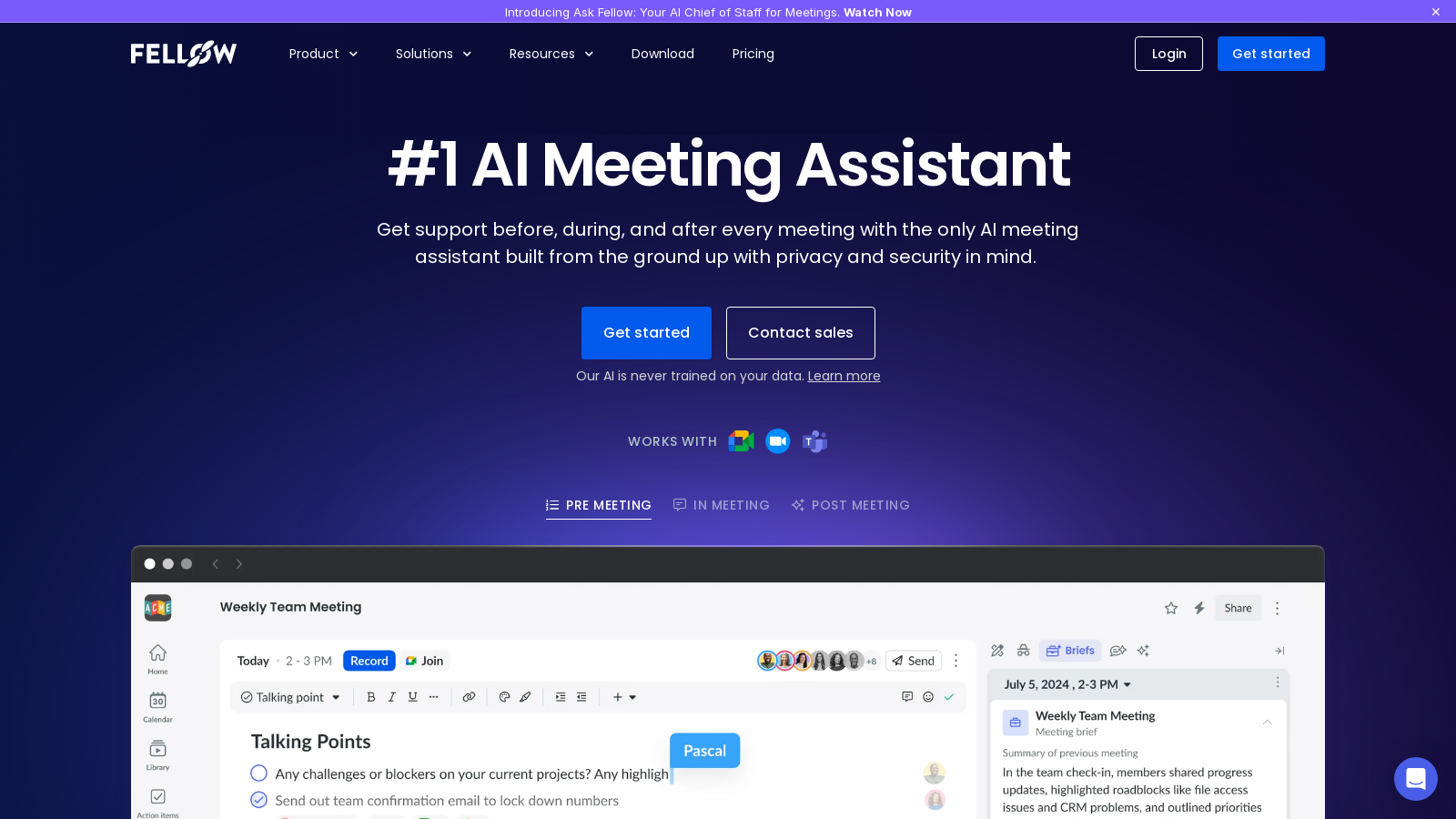
Screenshot of Fellow
What is Fellow?
Fellow is not just an AI meeting assistant; it is a comprehensive platform designed from the ground up with the dual focus of enhancing workplace productivity and safeguarding user privacy. With a commitment to security, Fellow efficiently manages the entire meeting workflow—from pre-meeting agendas to accurate note-taking and detailed post-meeting summaries. This versatile tool empowers teams to prepare thoroughly, document essential aspects seamlessly, and ensure timely follow-ups, fostering a culture of meaningful meetings and collaboration.
What Makes Fellow Stand Out
As a leader in AI meeting assistance, Fellow uniquely prioritizes user confidentiality while providing extensive capabilities. It is the only AI meeting assistant built with privacy-first principles at its core, ensuring that all meeting recordings, notes, and summaries are accessible only to authorized individuals. Fellow’s AI is never trained on user data, thus guaranteeing confidentiality and security.
Fellow integrates seamlessly with leading video conferencing platforms, including Zoom, Microsoft Teams, Google Meet, and Slack. It offers real-time transcription capabilities, delivering actionable insights that significantly enhance meeting efficiency. Recently, Fellow has expanded its transcription support to accommodate an impressive over 90 languages, proving its adaptability for diverse, global teams.
Key Features of Fellow
- AI Meeting Insights: The innovative 'Ask Fellow' feature acts as a personal AI assistant, providing deeper insights drawn from prior meetings and facilitating follow-up email drafting, significantly boosting team accountability.
- Automated AI Note-Taking: With real-time capture of crucial discussion points and action items, Fellow allows participants to engage fully in conversations while it manages the note-taking process.
- Collaborative Meeting Agendas: Users can collaboratively develop and modify meeting agendas, increasing engagement and encouraging contributions even before discussions begin.
- Extensive Integrations: Fellow connects with over 50 applications, including Salesforce, HubSpot, Asana, and Jira, to facilitate streamlined workflows that are tailored to various technical environments.
- Centralized Library: All meeting notes, AI-generated summaries, transcripts, and recordings are securely stored in one easy-to-access location, simplifying critical information management.
- AI-Generated Action Items: Conversations can be transformed into actionable tasks with specific deadlines, greatly enhancing team accountability and follow-through.
- Meeting Analytics: Valuable insights into participant engagement and overall meeting effectiveness support continuous improvements in meeting strategies.
- Privacy Focus: Fellow adheres to stringent security protocols, compliant with SOC 2, HIPAA, and GDPR, offering customizable permissions for recordings to enhance governance.
- Flexible Recording Options: Users can choose between bot-based and botless recording methods, providing versatility for different meeting scenarios.
- Admin-Controlled Access: Administrators can precisely define permission levels concerning who can record and access sensitive content, thus significantly improving data governance.
- Pre-Meeting Preparation: AI-generated briefs are provided in advance of meetings, streamlining preparation time and maximizing overall efficiency.
Recent Innovations
Fellow's commitment to improving meeting productivity is highlighted by its ongoing innovations. The Ask Fellow feature has recently undergone significant enhancements, now providing much deeper insights and simplifying catch-up on missed meetings and follow-up management. Additionally, Fellow has introduced custom recap templates that allow users to personalize summaries to align with their organizational tone and culture, ensuring that crucial discussion points are communicated effectively.
Pricing Overview
Fellow operates under a freemium model, catering to the varying needs of its user base. The free tier provides unlimited access to essential features, enabling users to create up to five AI-generated meeting notes and recordings per month. For teams requiring more extensive functionalities, the Team Plan allows for up to ten AI-generated notes and recordings per user each month at a competitive rate. Organizations can opt for the Business Plan, which includes unlimited notes and recordings, as well as premium features like advanced CRM integrations and detailed analytics. Larger enterprises may prefer the Enterprise Plan, which offers advanced user management options, heightened security measures, and customized pricing tailored to specific organizational needs.
Why Choose Fellow?
In the fast-paced world of work today, effective communication and adept meeting management are essential for organizational success. Fellow redefines traditional meetings into collaborative experiences by systematically organizing notes and actionable insights, ensuring transparency and accountability among team members. Its unwavering commitment to privacy also protects sensitive business information.
Conclusion
For teams seeking to maximize meeting productivity and enhance collaboration, Fellow stands out as an exceptional solution that excels in both virtual and hybrid settings. Its comprehensive feature set, combined with an intuitive user interface, guarantees a productive and impactful experience for all meeting participants.
Pros & Cons
Pros
- Privacy-first approach with strict controls over meeting data access and permissions.
- AI-powered meeting notes capture conversations accurately and automatically generate action items.
- Integrates seamlessly with over 50 tools used in corporate workflows for enhanced productivity.
Cons
- Lack of detailed information on pricing and tiers may lead to confusion for potential users.
Frequently Asked Questions
Fellow is free to start, with paid plans from 0 to 25 USD per month.
According to our latest information, this tool does not seem to have a lifetime deal at the moment, unfortunately.
Fellow is built with a strong emphasis on privacy and security, ensuring that all meeting data remains confidential and is never used to train AI models. It offers advanced controls to manage who can access recordings, notes, and transcripts, which is crucial for organizations concerned about data security and data breaches. Additionally, Fellow integrates seamlessly with over 50 tools, enabling teams to streamline their meeting workflows while maintaining compliance with privacy regulations.
Fellow makes it easy to prepare for meetings with collaborative agendas and AI-generated pre-meeting briefs. Users can build agendas in advance, allowing all participants to contribute talking points and attach necessary documents. This ensures everyone is aligned and ready to engage, making meetings more productive. The tool also provides templates for various meeting types, which can help standardize the agenda-setting process.
Yes, Fellow boasts over 50 integrations with popular platforms, including Google Meet, Zoom, Microsoft Teams, Salesforce, and HubSpot. This wide range of integrations ensures that Fellow can fit seamlessly into your existing workflow, enhancing productivity by keeping all meeting data up-to-date across different applications your team already uses.
Fellow takes privacy seriously. Your meeting data, including recordings and transcriptions, is securely stored and accessible only to authorized team members, as determined by the permissions you set. The platform adheres to strict compliance standards, including SOC 2 and HIPAA, ensuring that your data is protected with encryption and other security measures. For additional safety, you can redact sensitive information from recordings and transcripts before sharing.
After every meeting, Fellow automatically generates action items from the discussions and assigns them to relevant team members. This helps ensure accountability and follow-through on tasks. Users can also manually create action items and set deadlines within the platform. Furthermore, previous action items are carried forward to the next meeting's agenda, making it easy to keep track of outstanding tasks and decisions.
Absolutely! Fellow is designed with remote and hybrid teams in mind. It automatically joins virtual meetings to capture audio and video, transcribing discussions in real-time. With features like AI-generated summaries and follow-up tasks, Fellow helps teams stay connected and organized, regardless of their members' locations.
Fellow offers robust analytics that provide insights into your organization's meeting patterns. This includes data on meeting frequency, duration, and participant engagement. By analyzing these metrics, leaders can identify inefficiencies, ensure effective meeting practices, and encourage behaviors that enhance overall productivity within teams.
Fellow provides comprehensive support through its Help Center, which includes articles, FAQs, and troubleshooting tips. Additionally, you can reach out to Fellow's support team through chat or email for immediate assistance with technical issues or feature inquiries. There are also dedicated onboarding programs and account managers available for enterprise clients to ensure a smooth experience.