Interpreter

AI-powered desktop tool for reading, editing, and analyzing various document formats seamlessly.
Openinterpreter.com
Is this your tool?
Follow for updates & deals
Get alerts for Interpreter discounts, feature releases & pricing changes
Similar Tools

Claude
A collaborative AI assistant for tasks like brainstorming, research, and enhancing team productivity.

StackAI
Streamlines complex workflows using AI agents for data extraction, knowledge retrieval, and document generation.

ClickUp
An all-in-one platform for task management, collaboration, and workflow automation.

Jan
Open-source AI tool that operates locally on your device, ensuring privacy without cloud reliance.

Craft
Create, organize, and share documents with a flexible block-based system across all devices.

Interpreter Media Gallery
What is Interpreter?
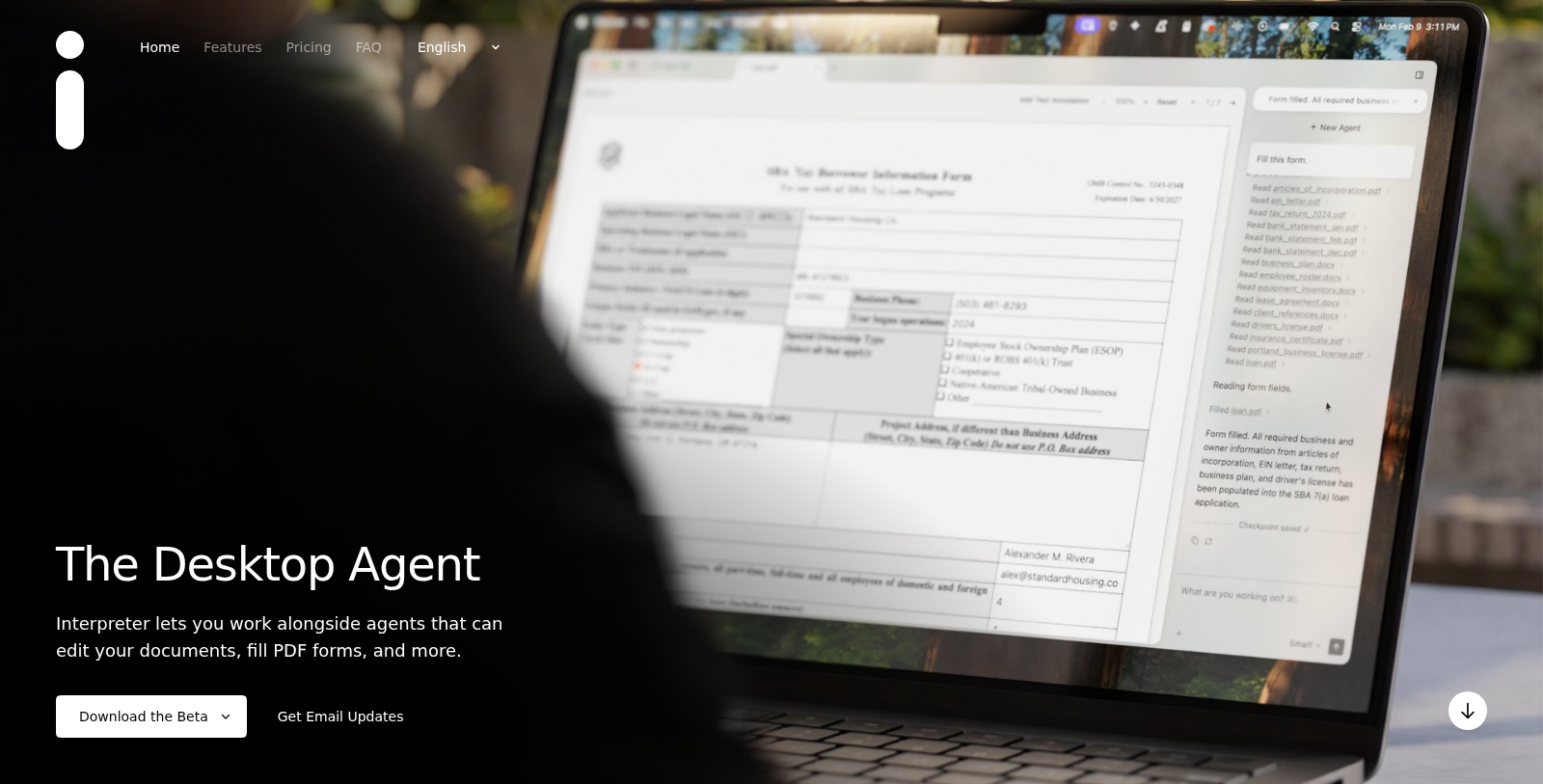
Interpreter is an innovative desktop agent designed to transform the way you interact with documents. This tool allows you to seamlessly read, edit, and create documents on your computer using advanced AI technology. Whether you are working with PDF forms, Excel spreadsheets, Word documents, or Markdown files, Interpreter provides a comprehensive suite of features that make document processing faster and more efficient.
One of the standout functionalities of Interpreter is its ability to fill PDF forms instantly. The tool works with both interactive and non-interactive forms, saving you time and avoiding manual entry. For users who often deal with data analysis, Interpreter offers a fully featured, AI-native Excel replacement. You can create pivot tables, generate charts, and apply formulas effortlessly, empowering you to analyze and visualize your data with ease.
Powerful Document Editing
As for word processing needs, Interpreter includes a rich editing solution for Word documents. This editor supports tracked changes, maintains formatting, and allows you to embed images. It is designed with AI capabilities that can provide suggestions and corrections, streamlining your writing and ensuring high-quality output. Additionally, for users who prefer Markdown, Interpreter features a local, rich-text Markdown editor to take advantage of structured text formatting while maintaining a clean interface.
Integrating with AI Models
Using Interpreter is simple and flexible. You can log in with your OpenAI account and bring your own API keys for providers such as OpenAI, Anthropic, Groq, and OpenRouter. The paid subscription offers managed models, removing the need for API key configuration, allowing users to focus on their tasks rather than setup. The agent handles complex requests and interactions, responding to user questions about document contents and deriving insights.
Data Privacy and Security
Privacy is a significant concern for users, especially when dealing with sensitive documents. The interpreter ensures that local model usage remains entirely on your device, so your confidential data is not sent to external servers. Users utilizing their API keys maintain direct communication, safeguarding their information. For those opting for hosted models, the service temporarily logs requests for up to 30 days to adhere to privacy standards.
User Experience and Support
The user interface of Interpreter is designed to be intuitive, catering to both seasoned users and newcomers. The agent can handle a variety of requests, such as analyzing multiple PDF files for patterns, pulling data into Excel, or transforming receipts into structured expense reports. Interpreter's capabilities extend to building dashboards and financial models, making it a versatile tool for professionals across numerous fields.
Interpreter's commitment to user support is reflected in its pricing plans. The tool offers a free tier that includes essential functionalities, while the paid plan enhances the experience with priority support and advanced features. This structure ensures that users can find a suitable option that meets their requirements without an initial financial commitment.
Conclusion
In summary, Interpreter is a powerful desktop agent that leverages AI to enhance document interactions.
From filling forms to performing complex data analysis, it stands out as an essential tool for efficiency and productivity. Whether you choose the free version or opt for a paid plan, Interpreter offers the flexibility and features necessary to streamline your document management tasks.Pros & Cons
Pros
- Supports editing and creating documents across various formats including Word and Excel.
- Utilizes local models to keep user data private and secure on their device.
- Offers integration with multiple AI models, allowing flexible usage with personal API keys.
Cons
- Requires internet access for hosted model usage due to server routing.
Frequently Asked Questions
Interpreter is free to start, with paid plans from 0 to 20 USD per month.
According to our latest information, this tool does not seem to have a lifetime deal at the moment, unfortunately.
Interpreter is a powerful desktop agent designed for document management. It allows users to read, edit, and create documents in formats such as Word, Excel, and PDF. Key features include querying PDF folders to identify patterns, exporting data to Excel with functional formulas, filling out PDF forms from various sources, and converting receipts into structured expense reports. Additionally, it can transform transcripts into actionable notes or slide decks and facilitate the building of dashboards and financial models.
To get started with Interpreter, visit the official website and choose the plan that suits you. If you opt for the free version, log in using your ChatGPT account or provide your own API keys from platforms like OpenAI or Anthropic. After installation, you can begin using the agent for document tasks by either describing what you need or manually opening documents to edit. For detailed guidance, refer to the user documentation provided on the website.
Interpreter is compatible with various AI models. You can sign in using your ChatGPT account and access its capabilities for free. Alternatively, if you have your own API keys, you can integrate models from OpenAI, Anthropic, Groq, OpenRouter, or use local models via Ollama. The paid version includes managed models that simplify the setup process by eliminating the need for personal API keys.
Interpreter's privacy policy emphasizes data security. When using local models, all data processing occurs on your device, ensuring privacy. If you opt to use your own API keys, data transmission occurs directly to the AI provider's servers without passing through Interpreter's servers. However, if you utilize hosted models, requests are routed through Interpreter's servers and are logged for up to 30 days. For further details, consult the Privacy Policy available on the website.
An interpreter excels in various document-related tasks. Users can ask it to search through PDF folders for specific information, extract data from documents to create complex Excel sheets, or fill out PDF forms with data from different files. It can also assist in converting raw data, such as receipts, into neatly formatted expense reports and in efficiently managing information from transcripts. These functionalities make it an invaluable tool for both personal productivity and professional documentation tasks.
Interpreter offers varying levels of support depending on the subscription plan. Free users can access community support, while those on the paid plan receive priority support for more prompt assistance. For businesses needing dedicated support and compliance options, the custom plan offers direct contact support through the Interpreter's team. Users can reach out for help through the contact options provided on the website.
While Interpreter is a versatile tool, it has certain limitations. Free users must bring their own API keys to access advanced functionality and are subject to community support only. Additionally, using hosted models means that data requests are logged for a limited time, and the extent of features may vary between free and paid plans. Users should evaluate their specific needs and consider subscription options to access all features without constraints.
Yes, there are several alternatives to Interpreter that can assist with document management and data manipulation tasks. Tools like Adobe Acrobat for PDFs, Microsoft Excel for spreadsheet management, and various AI-based document automation platforms can serve similar functions. It's important to evaluate your specific requirements when considering alternatives, as each tool may offer unique features tailored to different use cases.