







Onvo AI

AI-powered
Connects databases and spreadsheets, cleans the data and builds live interactive dashboards
Onvo.aiOpens in new tabIs this your tool? Claim this page
Claim Your Tool Page
Free to claim • Premium features available
- Verified Badge – Show users your tool is legitimate with a verified checkmark that builds instant credibility.
- Edit Your Profile – Update descriptions, screenshots, pricing, and keep your listing accurate and up-to-date.
- Boost Visibility – Get featured placements, priority listing in categories, and promotional badges to stand out.
- Respond to Reviews – Engage with your users by responding to feedback and building trust with potential customers.
Follow for updates & deals
Get alerts for Onvo AI discounts, feature releases & pricing changes
Similar Tools

stockinsights.ai
AI equity research assistant for company filings, earnings call summaries and SEC disclosures

Respan
Open-source AI gateway with built-in observability, prompt management and evaluations

VOC.AI
Review analysis platform that turns marketplace buyer reviews into product and market insights
User Evaluation
AI interviewer runs customer interviews with screened participants and links each claim to a clip

Typo
Engineering intelligence platform that measures delivery, developer experience and AI impact

Omnifact
GDPR-compliant enterprise AI platform with a privacy filter, hosted in Germany or on-premises

Kick
Agentic accounting ledger that categorizes transactions and does the books with you

Ajelix
Agentic AI chat for work that turns spreadsheets and business data into reports and results
New Tools

Text Generator
OpenAI-compatible API giving access to many AI text, vision and speech models through one endpoint

RambleFix
Turns spoken voice notes into polished emails, notes and summaries on web, iPhone and Mac

QuickCreator
AI content team of agents that researches, writes and optimizes SEO articles in your brand voice

Linfo.ai
Summarizes articles, YouTube videos and documents into takeaways, outlines and mind maps

Brain Pod AI
AI platform for writing, images and chat, now evolving into Charigent with AI characters and workflows

AutoBlogging.Pro
Generates SEO-optimized blog articles with GPT models and publishes them to WordPress automatically

Vsub
Turns a script or voiceover into narrated, illustrated faceless videos using your own style template

VideoToPage
Turns YouTube videos, uploads and recordings into blog posts, articles and social posts

Onvo AI Media Gallery
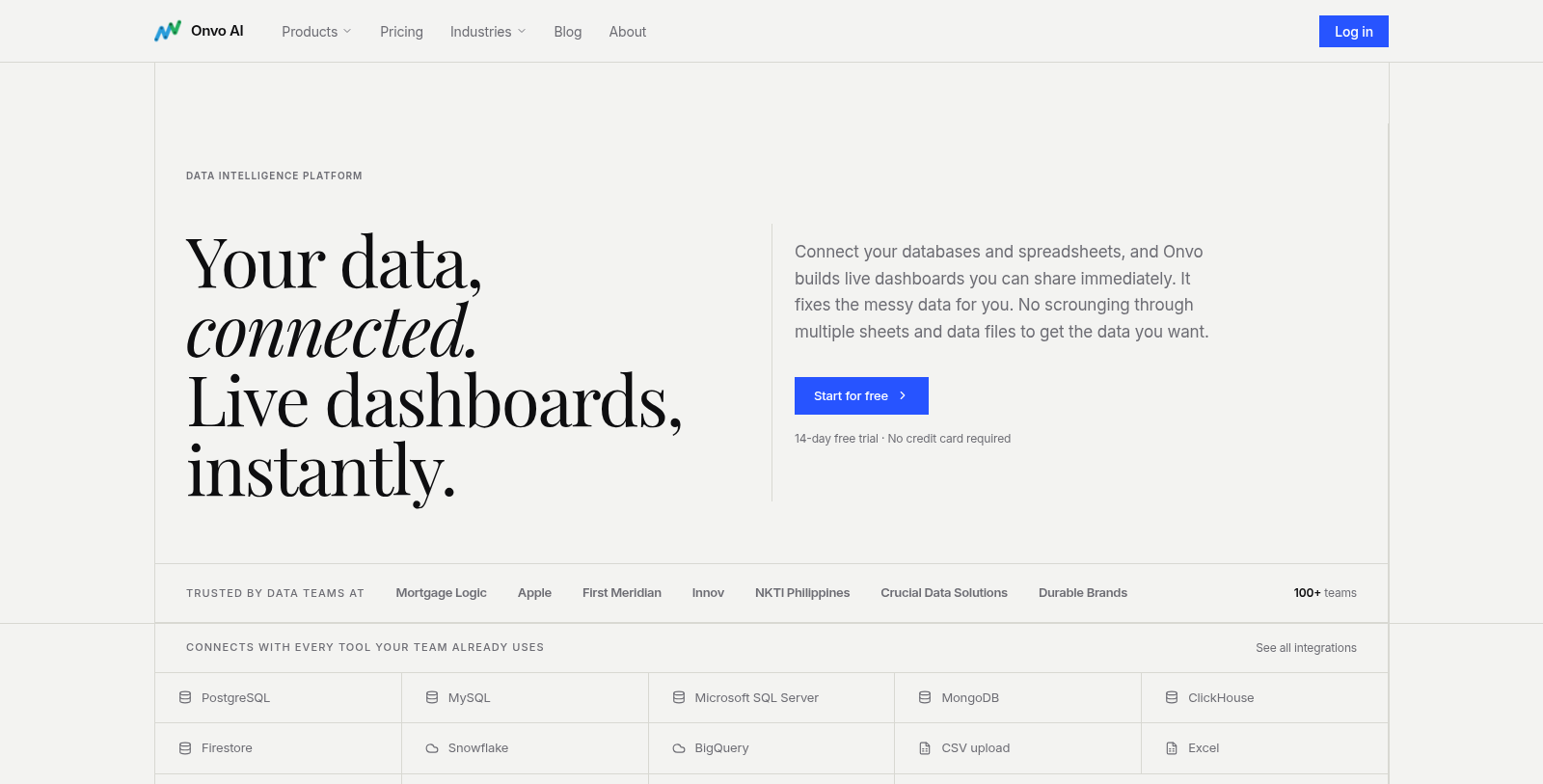
Screenshot of Onvo AI
What is Onvo AI?
Onvo AI is a data intelligence platform that builds live dashboards from your own data. You connect a source such as PostgreSQL, MySQL, SQL Server, MongoDB, Snowflake, BigQuery, Google Sheets, Excel, Airtable or a CSV upload, and Onvo creates charts without SQL or code.
The service detects problems such as merged cells, mixed date formats and broken rows and fixes them before building, showing what changed. Data can refresh hourly, daily or on a custom schedule, and dashboards can be exported as PDF or sent as scheduled reports.
An AI analyst answers plain-English questions about the connected data, and brand colours and terminology can be set once. Onvo also offers embedded analytics for adding dashboards to your own product. A 14-day free trial is offered without a credit card.
Pros & Cons
Pros
- Connects to databases, spreadsheets and CSV files without SQL
- Detects and fixes merged cells, mixed date formats and broken rows
- Refreshes data hourly, daily or on a custom schedule
Cons
Frequently Asked Questions
How much does Onvo AI cost?
We have no pricing information available now, so please check the Onvo AI's website.
Does Onvo AI have a lifetime deal?
According to our latest information, this tool does not seem to have a lifetime deal at the moment, unfortunately.
Which data sources does Onvo AI support?
You can connect PostgreSQL, MySQL, SQL Server, MongoDB, Snowflake, BigQuery, Google Sheets, Excel, Airtable or a CSV upload. Onvo then builds charts from that data without SQL or code. The connection steps are described on the website, so follow those for your specific source.
How does Onvo handle messy data?
Before building a dashboard, Onvo detects problems such as merged cells, mixed date formats and broken rows, then fixes them. It shows what changed, so you can review the adjustments before relying on the charts. This saves manual cleanup before the charts are built.
Can I share dashboards or send them on a schedule?
Dashboards can be shared, exported as PDF or sent as scheduled reports. Data can refresh hourly, daily or on a custom schedule, so the figures stay current without manual updates. Brand colors and terminology can be set once so the dashboards match your organization's style.
Can I ask questions about my data in plain English?
Yes. An AI analyst answers plain-English questions about the data you have connected. Onvo also offers embedded analytics for putting dashboards inside your own product, so your users can see the same figures. A 14-day trial is offered without a credit card.
Notice: This website uses affiliate links to earn commissions from sales. Please read their ToS when signing up somewhere.