Streamlabs

Tools for live streamers to manage broadcasts, engage viewers, and customize stream appearances.
Streamlabs.com
Is this your tool?
Follow for updates & deals
Get alerts for Streamlabs discounts, feature releases & pricing changes
Similar Tools

Foreplay
Analyze ad performance and streamline creative processes without extra ad spending.

KWatch.io
Monitor social media conversations in real-time.

ZipTie
Monitor brand visibility and optimize performance across major AI search platforms

Taplio
Create and schedule engaging LinkedIn posts while tracking analytics for optimal audience reach.

Mentions
Analyze and improve your brand's visibility across AI-generated responses and sentiment analysis.

Streamlabs Media Gallery

Streamlabs (review) video
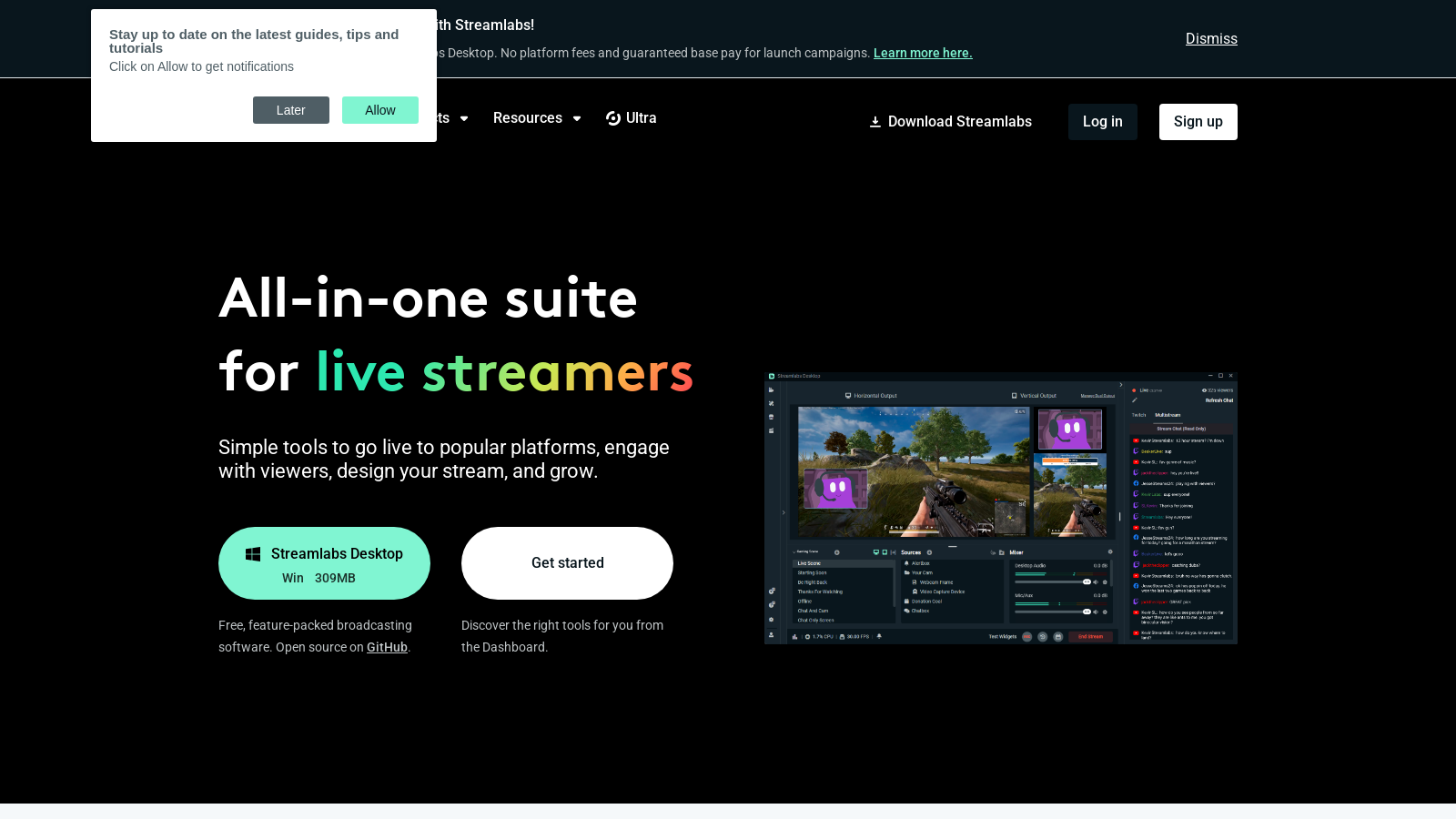
Screenshot of Streamlabs
What is Streamlabs?
Streamlabs offers an all-in-one suite designed specifically for live streamers and content creators, providing innovative tools that enhance audience connection, stream monetization, and follower growth. Whether you're just starting out or are a seasoned professional, Streamlabs presents a mix of free and premium solutions tailored to meet your streaming needs. With a user-friendly interface and continuous improvements based on feedback, Streamlabs is committed to enriching the streaming experience for all creators.
What is Streamlabs? Streamlabs is a leading platform that equips live streamers with a diverse array of intuitive tools for seamless live streaming. Users can broadcast effortlessly to popular platforms, including Twitch, YouTube, TikTok, and Facebook. Recent updates have significantly improved support for console and mobile streaming, allowing for greater flexibility and wider reach in audience engagement. A notable feature now available is the ability to go live directly on TikTok from desktop, enhancing streaming possibilities for creators. In addition, new support articles in the Help Center provide comprehensive information on this feature, ensuring users can utilize it effectively.
Key Features of Streamlabs
Offering a live streaming software free of charge on both Windows and Mac platforms, Streamlabs Desktop comes equipped with essential tools that allow users to go live in minutes. Streamers can customize broadcasts with professional overlays and themes, enhance viewer engagement through alerts, and utilize multiple applications that enrich their streaming experience. Recent user interface improvements have streamlined functions, making it easier for both new and experienced users to navigate. The updated Help Center is filled with FAQs, tutorials, and support articles to assist users at any stage of their streaming journey, ensuring that they have access to the best resources and information.
Multistreaming Capabilities
Streamlabs empowers users with multistreaming capabilities, enabling them to broadcast to multiple platforms simultaneously. This essential feature allows streamers to expand their audience effortlessly. By activating the multistreaming option, users can simultaneously broadcast on platforms like YouTube, Twitch, and Facebook. Updates have enhanced the stability of broadcasts and the management of streaming settings across devices, with dedicated guides available in the Help Center for further assistance.
Custom Overlays and Themes
The visual aspect of streaming is critical; therefore, Streamlabs provides an extensive library of free overlays and themes to personalize broadcasts. Users can tailor these assets to reflect their unique brand and style, making their streams visually captivating. This flexibility is vital for streamers aiming to establish a recognizable brand identity in a competitive landscape.
Flexible Pricing Plans
Streamlabs operates on a freemium model, offering an outstanding range of free tools accessible to all users. Beyond the free offerings, premium subscription options such as Streamlabs Ultra are available for those looking to elevate their streaming experience. Recent adjustments to the pricing structure have refined clarity regarding the features associated with each subscription, ensuring users understand what they receive. For instance, Streamlabs Ultra includes advanced functionalities like personalized tip pages, increased video storage, priority support, and exclusive access to all creator tools, which allows users to maximize their streaming potential. The streamlined FAQ section assists users in navigating the pricing model, ensuring transparency regarding what each subscription entails. Additionally, users can access priority support if they are subscribed to Streamlabs Ultra, significantly enhancing the help available for any issues or queries that arise.
Community Support and Development
Streamlabs transcends mere software by embodying a vibrant community of content creators eager to share knowledge and experiences. The platform continually updates its tools and features based on user input, creating an ever-evolving environment catered to the needs of streamers. A robust resource hub filled with tutorials, support articles, and informative guides empowers creators to maximize their use of the platform. Furthermore, the dedicated Help Center guarantees that users, from beginners to veterans, can easily find information on various streaming topics, including how to go live on TikTok from desktop and integrations with other services.
Notable Achievements
Since its inception, Streamlabs has distributed over 1.4 billion in tips to live streamers, underscoring its commitment to supporting users and enhancing the live streaming community. This dedication is further emphasized through various charitable initiatives, showcasing their strong community focus.
New Features and Updates
Recently unveiled functionalities have significantly improved the user experience, particularly through enhanced alerts for donations and tips, which promote engaging expressions of gratitude toward supporters. The refreshed user interface now makes navigation easier and more intuitive, and significant improvements in the Help Center effectively address common inquiries. Moreover, the FAQs section has been expanded to cover more questions about Streamlabs ID and Ultra membership, providing users with detailed answers regarding account management and feature access. Furthermore, recent updates in the API offer developers deeper customization options, enhancing tool integration within the streaming ecosystem. Ongoing updates introduce new features designed to optimize the customer experience, continuing to prioritize user feedback for future functionality enhancements.
Integration with External Tools
Streamlabs supports integration with a wide array of external tools and platforms beyond live streaming, greatly broadening functional capabilities for users. This versatility significantly benefits content creators looking to streamline workflows and enhance production quality. Integration tools for merchandise sales, chat enhancements, and various payment processing options comprehensively address the needs of modern creators, enriching the streaming landscape.
Streamlabs Ultra
With the introduction of Streamlabs Ultra, users gain access to enhanced features and tools designed for serious content creators. This subscription service provides not only priority support but also a more integrated experience across devices, consolidating all creator tools in one place for a seamless workflow. Users can manage their subscriptions easily, and those with only certain product needs can explore tailored options as outlined in their FAQs. The inclusion of additional FAQs clarifies many queries related to Streamlabs ID and Ultra membership, ensuring a smoother transition for users seeking knowledge about the services.
Conclusion
In conclusion, Streamlabs presents an extraordinary opportunity for live streamers to elevate their performance and forge meaningful connections with their audiences. With a comprehensive array of features—from exceptional free tools to advanced functionalities available through an Ultra membership—Streamlabs empowers users to enhance their passion for streaming while nurturing a supportive content creation community. Their unwavering dedication to innovation and user engagement solidifies their position as a leading name in the live streaming industry.
Pros & Cons
Pros
- Multistreaming allows broadcasting to various platforms simultaneously with easy toggling.
- User-friendly, all-in-one suite catering to various creator needs from streaming to editing.
- No platform fees for tips, maximizing earnings for content creators.
Cons
- Some advanced features are only available with the paid Ultra subscription.
Frequently Asked Questions
Streamlabs is available at no cost.
According to our latest information, this tool does not seem to have a lifetime deal at the moment, unfortunately.
Streamlabs supports a variety of platforms for live streaming, including Twitch, YouTube, Facebook, and Trovo, and allows custom RTMP destinations. This flexibility enables creators to reach audiences across multiple platforms simultaneously.
Yes, you can use Streamlabs on mobile devices! Streamlabs offers a mobile app that allows you to stream games and your camera directly from your smartphone or tablet. This is ideal for live streaming on the go.
Streamlabs Ultra offers professional-level features, including access to over 60 app add-ons, customizable tip pages, the ability to add multiple guests or cameras, and watermark-free, high-quality recordings. Additionally, Ultra users enjoy higher-tier monetization tools and advanced community management features.
To start multistreaming with Streamlabs, activate the multistream feature in Streamlabs Desktop. You can choose to broadcast to multiple platforms, such as Twitch, YouTube, and Facebook, simultaneously. This allows you to expand your reach and engage with a larger audience effortlessly.
A Streamlabs ID is a centralized login that provides access to all Streamlabs tools, including Streamlabs Desktop, Talk Studio, and the Web Suite. Having a Streamlabs ID simplifies the user experience, enabling creators to navigate easily between different tools and access their pro benefits with an Ultra subscription.
Streamlabs does not take a cut from tips made through its platform. Once a tip is made, it is processed directly through the payment processor to the creator's account, ensuring that most of the funds go directly to the user. The only fees you may encounter are standard processing fees from the payment service used.
Streamlabs provides a suite of analytics tools to help content creators understand their audience and improve their streams. These tools include performance metrics for streams, viewer engagement stats, and more, enabling creators to make informed decisions about their content strategy.
While using Streamlabs, you may encounter common issues, such as connectivity problems during streaming, audio or video lag, or difficulties with overlays not displaying correctly. For troubleshooting, it is recommended to check the official support articles available on the Streamlabs website or reach out to their support team for assistance.