













UX Pilot

Automatically generate wireframes and high-fidelity UI designs for faster UX/UI projects.
Uxpilot.ai
Is this your tool?
Follow for updates & deals
Get alerts for UX Pilot discounts, feature releases & pricing changes
Similar Tools
Pixlio AI
Create and edit professional images using advanced AI models and intuitive editing tools.

Dreamina
Generate personalized images and videos from text prompts with an intuitive AI creative platform.

Stability AI
Create and manipulate high-quality images, audio, video, and 3D content with advanced generative models.
Motiff
Generate custom user interfaces using text prompts or reference images for efficient design workflows.

Wondershare Filmora
Edit videos easily with AI tools for clipping, enhancing, and creating engaging content.

UX Pilot Media Gallery

UX Pilot (review) video
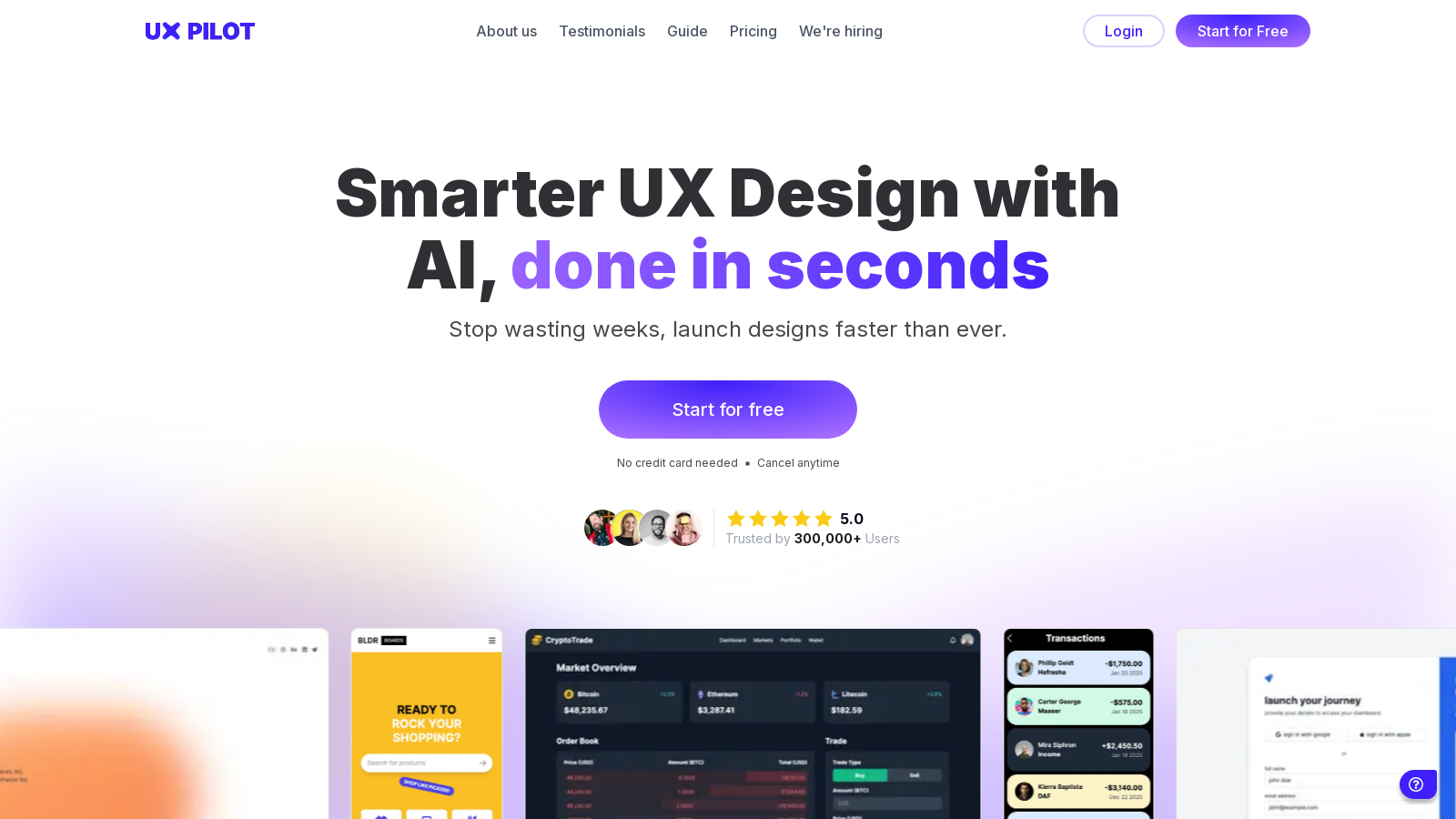
Screenshot of UX Pilot
What is UX Pilot?
UX Pilot is your innovative AI co-pilot for UX design, crafted to streamline the design process and deliver outstanding results in seconds. With the ability to generate high-fidelity wireframes and pixel-perfect UI designs, UX Pilot significantly cuts down the time traditionally spent on repetitive design tasks, allowing teams to launch projects faster than ever before.
Core Features of UX Pilot
UX Pilot excels in producing high-fidelity designs that not only meet professional standards but are also tailored to adhere to platform-specific design guidelines. Its advanced AI Designer ensures that interfaces created for both mobile and desktop platforms are user-friendly and visually captivating.
AI Wireframer
The AI Wireframer feature enables users to generate flexible wireframes for both desktop and mobile devices in mere seconds. This allows designers to explore a multitude of UX design concepts quickly, showcasing the platform's efficiency and innovation.
Integration with Figma
Seamless integration with Figma is another highlight of UX Pilot. Designers can generate UI screens directly through the platform and smoothly transfer these designs to Figma, or even create them within Figma itself using the intelligent design plugin. This capability enhances the workflow, allowing designers to refine their concepts fluidly and benefiting from the comprehensive features both tools provide.
Enhanced Collaboration and Iteration
Designed not just for individual users, UX Pilot promotes collaboration among various team members. The AI-powered chat interface facilitates easy interactions with designs, empowering users to make quick modifications and refinements based on immediate feedback. This approach ensures a more inclusive and efficient design iteration process, enabling all involved parties—designers, developers, and stakeholders—to actively participate in shaping the user experience.
Scalable Prototyping and Development
One of the remarkable features of UX Pilot is its capability for scalable prototyping. Users can generate a series of connected screens based on specific design requirements, allowing rapid visualization and prototyping of entire user journeys. Additionally, tools that produce ready-to-use source code dramatically reduce the gap between design and development, streamlining the implementation phase.
Cost-Effective Solutions
UX Pilot stands out by offering a range of pricing plans tailored to diverse user needs. The platform features a free tier, enabling users to explore its innovative capabilities without any initial investment. As users' projects evolve and their need for more advanced features or increased screen generation capacity grows, they can opt for various paid plans that align with their specific requirements. This thoughtful construction of subscription options ensures continued accessibility without compromising on value.
Why Choose UX Pilot?
UX Pilot is designed with exceptional user experiences at the forefront. Rather than providing mere generic templates, the platform offers intelligent controls that adjust the AI output according to user preferences, cultivating a tailored design experience that resonates with your vision. Additionally, UX Pilot equips designers with data-driven insights to validate their design decisions, significantly enhancing user satisfaction levels.
With the transformative power of artificial intelligence, UX Pilot not only saves valuable time but also fosters creativity, enabling teams to manifest their ideas effectively and efficiently. The platform's myriad of features, such as allowing for unlimited design variations, intelligent design controls, and sophisticated prototyping capabilities, position UX Pilot at the forefront of UX design tools.
Pros & Cons
Pros
- Generates high-fidelity UI designs and wireframes in seconds, streamlining workflows.
- Seamlessly integrates with Figma, allowing for direct design customization and collaboration.
- Offers AI-driven features for predictive insights, enhancing design workflows and decisions.
Cons
- No refund policy for subscriptions, which may deter potential users.
Frequently Asked Questions
UX Pilot is available at no cost.
According to our latest information, this tool does not seem to have a lifetime deal at the moment, unfortunately.
UX Pilot enables you to create various types of designs, including wireframes, high-fidelity mockups, and predictive heatmaps for both mobile and desktop platforms. The AI-powered tools assist in everything from initial concepts to detailed prototypes, making it easy to visualize complex user flows or single screens effectively.
Yes, UX Pilot allows you to customize AI-generated designs. You can modify colors, fonts, and other elements to match your specific branding needs. Additionally, the designs can be directly imported into Figma for further customization, enhancing collaboration with your team.
Absolutely! UX Pilot is designed to facilitate iterative design processes. You can generate multiple versions of designs, refine them based on feedback, and continuously improve your concepts. This enables smoother collaboration and quicker responsiveness to design changes.
UX Pilot features seamless integration with Figma, allowing you to create UI screens using the AI UI Generator and transfer them effortlessly to Figma. This integration helps streamline your workflow, enabling real-time collaboration and design refinement within your team's preferred environment.
You can cancel your subscription any time by logging into your account, clicking on your avatar, selecting 'Account Settings', and then 'Manage Plan'. From that section, you can easily cancel your subscription, ensuring you retain control over your account management.
Yes, once you are subscribed to a paid plan, you have the option to purchase additional credits. These extra credits do not expire, providing you with flexibility and control over your usage, especially during intense project periods when additional screens may be required.
Data security is a top priority at UX Pilot. They utilize Google Cloud encryption with 256-bit AES to ensure data is encrypted both at rest and in transit. Furthermore, rest assured that your data will not be used to train AI models, maintaining the confidentiality of your information.
UX Pilot offers a responsive support system. If you have any issues or need assistance, you can reach out to their support team at support@uxpilot.ai. They are dedicated to helping users navigate any challenges that may arise during the design process and ensure a seamless experience.



