Warp

AI-powered development environment that integrates agents for efficient coding, debugging, and deployment.
Warp.dev
Is this your tool?
Follow for updates & deals
Get alerts for Warp discounts, feature releases & pricing changes
Similar Tools

Happy Coder
Manage coding sessions and control Claude Code from your mobile device with voice commands.

Zencoder
Automates coding tasks and enhances collaboration for developers with customizable AI agents.

Factory
AI platform that automates software development tasks, speeding up coding, documentation, and incident response.
Continue
Open-source AI code assistant for customizable autocomplete and dynamic coding interactions.

Claude Chrome Extension
Automates tasks and manages workflows directly within your browser for enhanced productivity.

Warp Media Gallery

Warp (review) video
Screenshot of Warp
What is Warp?
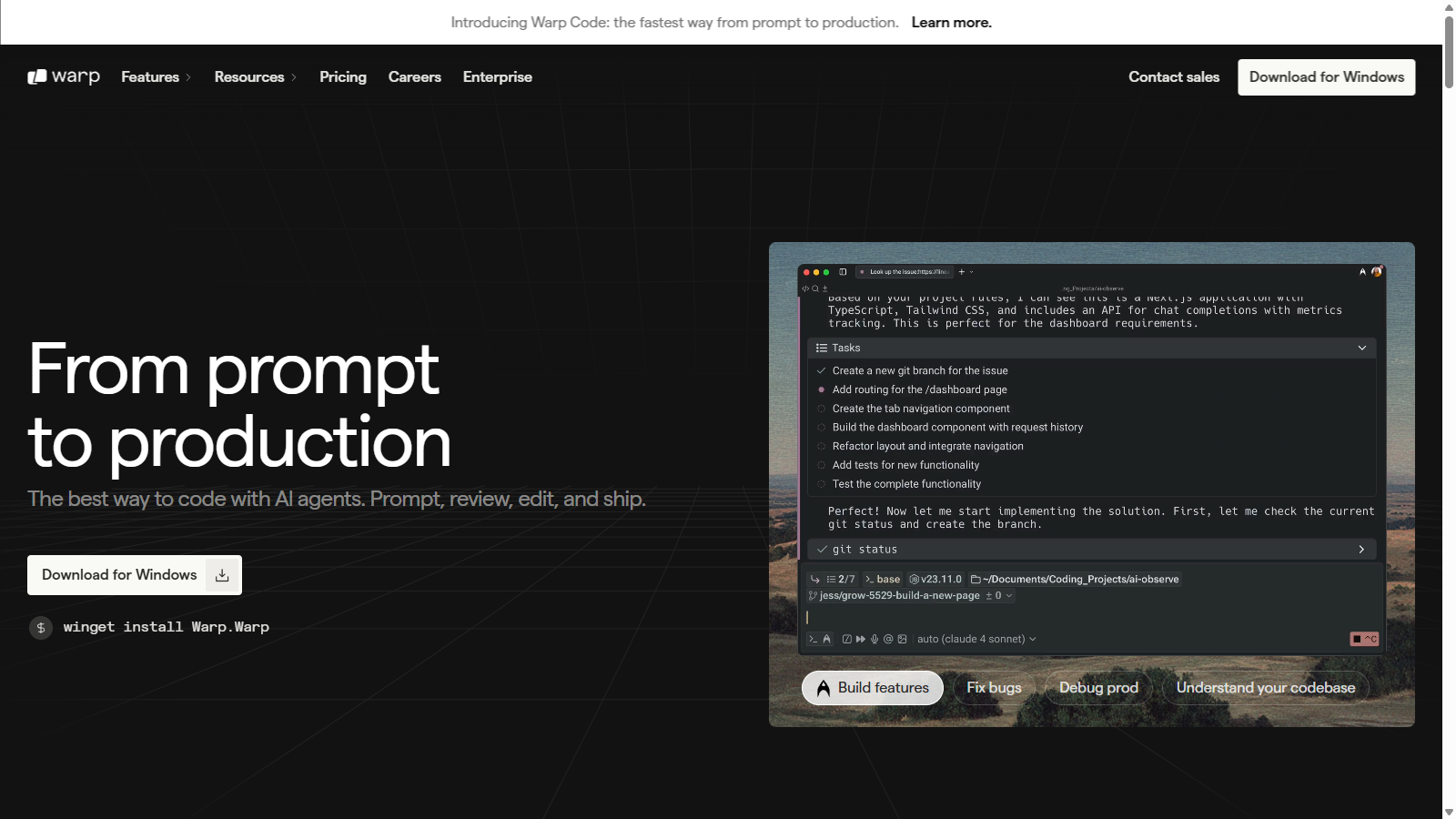
Warp is revolutionizing the software development landscape with its innovative Agentic Development Environment (ADE). This powerful platform enables developers to harness the capabilities of AI agents, which efficiently tackle complex development tasks, ultimately enhancing productivity and fostering creative freedom. Built directly into the terminal, Warp facilitates a seamless transition from idea to execution, commonly referred to as 'prompt to production.'
Introducing Warp Code, the latest enhancement that streamlines the coding process even further. This suite of features makes it the fastest path for developers to ship agent-generated code efficiently. With Warp Code, developers can now start with a prompt, guiding their AI agents to complete tasks like debugging, feature building, and even deployment—all within a single application. This paradigm shift signifies a move toward coding by prompt instead of manual coding.
Many developers using Warp report that they save an average of one hour a day. They do this by taking full control of their terminal workflows, steering AI agents intelligently, and completing detailed tasks with a unified approach. The IDE combined with advanced command-line functionality allows coding, debugging, and deployment to occur in real time. Features such as context-aware coding and comprehensive feedback loops further enhance the developer experience, ensuring that coding evolves into a more collaborative effort with AI.
Features of Warp
- Multithreading AI Agents: Warp allows users to run multiple agents concurrently, efficiently managing various complex tasks and encouraging robust collaboration.
- Contextual Awareness: The platform’s AI agents have an in-depth understanding of the entire codebase, facilitating smarter coding and more effective decision-making processes.
- Code Editing and Review: Developers benefit from a lightweight code editor and an intuitive code review panel, which allow for quick refinements to agent-generated outputs, ensuring a high standard of quality.
- Integration with Leading AI Models: Warp incorporates a variety of AI models, including GPT-5 and Claude Opus, allowing developers access to cutting-edge tools as they build.
- Dynamic Feedback Loops: By utilizing agent steering, users can give specific instructions and context—like images or URLs—enabling Warp’s agents to craft relevant code tailored to the project requirements.
- Enhanced Editing Tools: Warp now features a built-in lightweight code editor with syntax highlighting, tabbed file views, and powerful search capabilities making it easier to manage tasks directly.
Using Warp is simple and intuitive. Developers initiate tasks with a prompt, directing agents to build functionalities, troubleshoot bugs, or engage in debugging sessions. Throughout these tasks, Warp offers real-time feedback, creating a dynamic workspace for ongoing improvements and iterations. Developers can review, edit, and deploy code entirely within Warp, minimizing the need to switch between multiple tools and environments.
Security and privacy are paramount in Warp’s design. The platform employs a Zero Data Retention policy, ensuring that no user data is stored or leveraged for model training. This distinction is crucial in maintaining developers' confidence, particularly those concerned about data privacy.
Security and Privacy
Warp prioritizes user privacy, employing stringent data protection measures. The Zero Data Retention policy means that Warp does not utilize customer-generated data for training purposes with any external model providers. Enhanced control over analytics and telemetry settings means developers can disable tracking with a single click, reinforcing Warp’s commitment to user privacy.
In summary, Warp embodies a modern approach to development, transitioning developers into the role of 'tech leads' directing automated agents while preserving the artistic essence of coding. The intertwined future of software development and AI is burgeoning, and Warp is at the forefront of this transformation.
Pros & Cons
Pros
- Warp provides a powerful AI-driven coding agent, outperforming others in coding benchmarks.
- The platform allows seamless execution of development tasks with full lifecycle support from a single app.
- Users report an average savings of one hour per day by leveraging multiple agents in parallel.
Frequently Asked Questions
Warp is free to start, with paid plans from 0 to 225 USD per month.
According to our latest information, this tool does not seem to have a lifetime deal at the moment, unfortunately.
Warp offers a comprehensive suite of features for developers, including the ability to run multiple AI agents in parallel, a coding agent with context-aware capabilities, code review panels, and a lightweight code editor. Additionally, Warp integrates with external data sources through MCP servers, enabling developers to access tools directly from the terminal while maintaining project documentation with WARP.md files. Its modern interface enhances usability, bringing together IDE and CLI functionalities for a streamlined coding experience.
Warp emphasizes data privacy through its Zero Data Retention policy, ensuring that no user data is retained by external model providers. All data sent to AI features is encrypted, and users can opt out of telemetry to have more control over their data. Warp is also SOC 2 Type 2 compliant, following strict security measures to protect user information. For enterprise users, additional controls for data management and compliance are available.
Yes, Warp allows for integration with various tools via its MCP (Multi-Context Prompt) servers, which connect to services like GitHub, Figma, and Sentry. This enables Warp to fetch data and provide context for coding tasks directly within the development environment. Additionally, you can set up agent profiles and use slash commands for efficient workflow management, enhancing collaboration and productivity across your team.
Warp's pay-as-you-go feature enables users on Pro, Turbo, Business, and Lightspeed plans to continue utilizing premium AI models even after reaching their monthly limit of AI requests. Users can enable this feature in the settings under 'Billing and Usage', and any additional AI requests will incur a charge based only on the overage usage. This provides flexibility, allowing teams to manage their AI usage efficiently.
If you are an individual developer requiring more than 2,500 AI requests per month, the Warp Turbo plan is a suitable choice, offering up to 10,000 requests monthly. For even higher demands, the Lightspeed plan allows for up to 50,000 requests. Both plans support pay-as-you-go overages, providing a robust solution for developers who rely heavily on AI capabilities for their tasks.
To enhance your experience with Warp, consider customizing your workflow with agent profiles tailored to specific tasks, utilizing MCP for integrating external knowledge. Regularly update your WARP.md files to document project requirements and improve agent performance. Engage with Warp's community through forums for tips and best practices, and make use of the extensive documentation available to refine usage and maximize productivity.
Yes, Warp is designed to be cross-platform compatible, supporting macOS, Windows, and Linux. You can easily download the appropriate version for your system, whether it's through package managers like Homebrew for macOS or through executable files for Windows and Linux distributions. This compatibility ensures that a wide range of developers can utilize Warp for their development needs.
Warp facilitates collaboration through features like Warp Drive, which allows teams to share Notebooks, workflows, and commands seamlessly. This enables asynchronous collaboration, where developers can easily revisit commands, share insights, and work on workflows together. Real-time session sharing is also available, enhancing teamwork even when team members are located in different environments.