







Upstream

AI-powered
AI email client for Gmail that sorts your inbox and drafts replies in your own voice
Upstream.doOpens in new tabIs this your tool? Claim this page
Claim Your Tool Page
Free to claim • Premium features available
- Verified Badge – Show users your tool is legitimate with a verified checkmark that builds instant credibility.
- Edit Your Profile – Update descriptions, screenshots, pricing, and keep your listing accurate and up-to-date.
- Boost Visibility – Get featured placements, priority listing in categories, and promotional badges to stand out.
- Respond to Reviews – Engage with your users by responding to feedback and building trust with potential customers.
Follow for updates & deals
Get alerts for Upstream discounts, feature releases & pricing changes
Similar Tools

Inbox Zero
Open-source AI email assistant that sorts your inbox, drafts replies and bulk unsubscribes

Toki
AI executive assistant that handles emails, scheduling, bookings and important matters for you

Pally
AI personal assistant you text, handling email, calendar, reminders, research and errands

OpenAssistantGPT
No-code platform for building RAG chatbots and AI agents trained on your website and files

Omnifact
GDPR-compliant enterprise AI platform with a privacy filter, hosted in Germany or on-premises

Mendable
Platform to train an AI chat assistant on your docs and data and embed it for customer support

Kroolo
AI workspace for projects, docs, chat and enterprise search with role-based AI agents

Cedric
AI employee that lives in Slack, Telegram or Discord, joins meetings and does work across your tools
New Tools

Text Generator
OpenAI-compatible API giving access to many AI text, vision and speech models through one endpoint

RambleFix
Turns spoken voice notes into polished emails, notes and summaries on web, iPhone and Mac

QuickCreator
AI content team of agents that researches, writes and optimizes SEO articles in your brand voice

Linfo.ai
Summarizes articles, YouTube videos and documents into takeaways, outlines and mind maps

Brain Pod AI
AI platform for writing, images and chat, now evolving into Charigent with AI characters and workflows

AutoBlogging.Pro
Generates SEO-optimized blog articles with GPT models and publishes them to WordPress automatically

Vsub
Turns a script or voiceover into narrated, illustrated faceless videos using your own style template

VideoToPage
Turns YouTube videos, uploads and recordings into blog posts, articles and social posts

Upstream Media Gallery
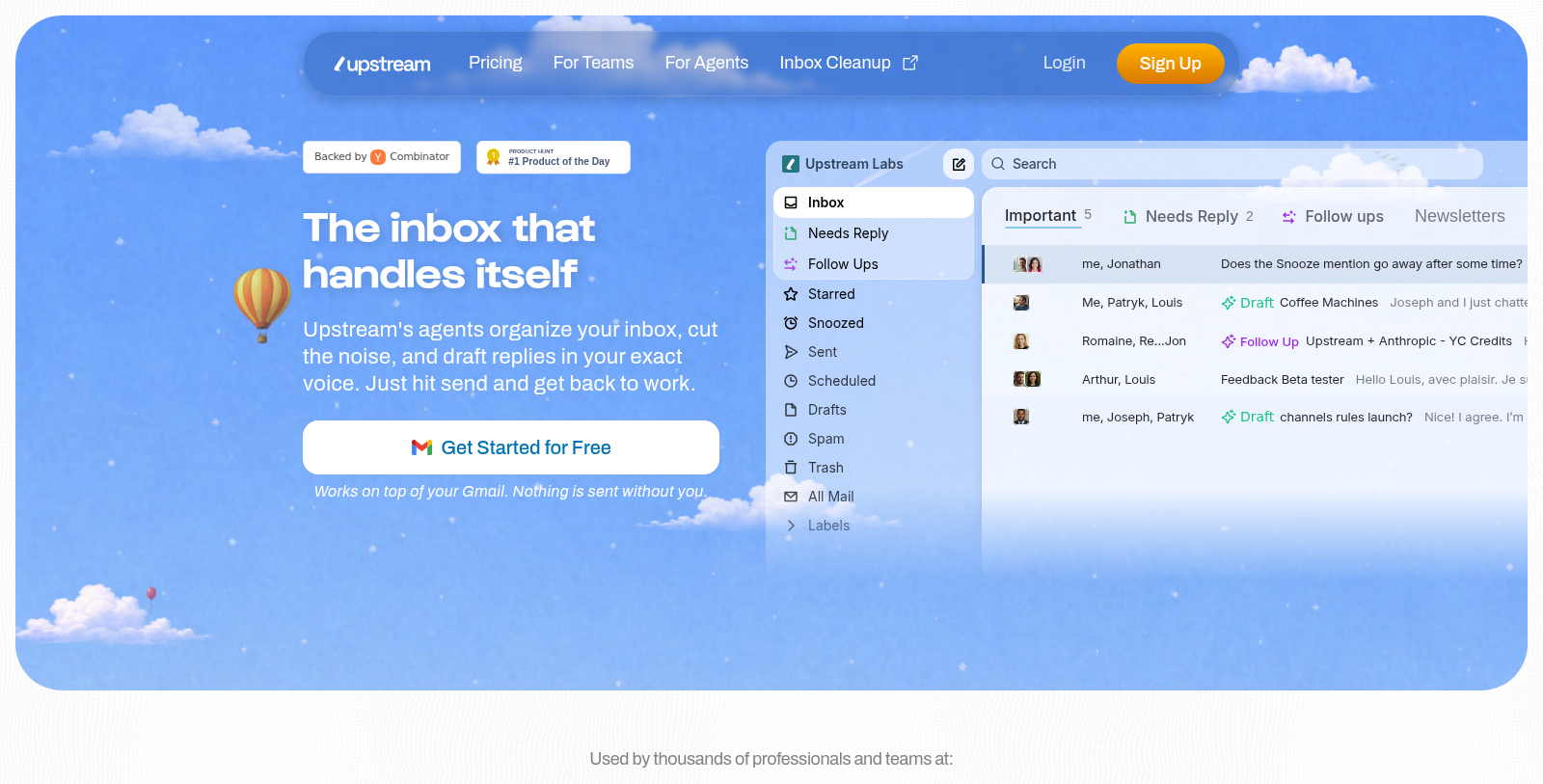
Screenshot of Upstream
What is Upstream?
Upstream is an AI email client built on top of Gmail. Its agents organize the inbox, reduce noise and draft replies in the user's own voice, while nothing is sent without the user's confirmation.
The interface offers split inboxes such as Important, Needs Reply, Follow ups, Newsletters and VIP, along with smart follow-up reminders, snooze, scheduled sending and labels. Teams can use shared channels, comments and search to collaborate on email.
The Core plan is free and includes AI drafts, smart follow-ups, custom voice for up to three audiences and up to five team seats. Paid Pro and Max plans add unlimited AI drafts, private channels, multiple accounts, personal AI agents, team-wide automations and enterprise security.
Pros & Cons
Pros
- Split inboxes such as Important, Needs Reply, Follow ups, Newsletters and VIP.
- Nothing is sent without the user's confirmation.
- Drafts replies in the user's own voice and tone.
Cons
- Runs on top of Gmail, so it is built around Google's email service.
Frequently Asked Questions
How much does Upstream cost?
Upstream is available at no cost.
Does Upstream have a lifetime deal?
According to our latest information, this tool does not seem to have a lifetime deal at the moment, unfortunately.
How does Upstream organize my inbox?
Upstream uses its agents to sort your Gmail inbox into split views such as Important, Needs Reply, Follow ups, Newsletters and VIP. The agents also work to reduce noise, so less relevant messages take up less of your attention. For the full list of views and how to set them up, see the official Upstream website.
Can Upstream send emails without my approval?
No. Upstream states that nothing is sent without your confirmation. Its AI drafts replies in your own voice and tone, and you decide whether a draft goes out. Smart follow-up reminders can flag conversations that still need a response. For the exact approval steps, consult the official Upstream website.
How do follow-up reminders work in Upstream?
Upstream includes smart follow-up reminders that help you keep track of emails waiting for a reply. A dedicated Follow ups view groups these conversations in one place. You can also use snooze to hide a message until later, or scheduled sending to queue a message for a set time. Reminder timing details are best confirmed on the official Upstream website.
Can a team work on email together with Upstream?
Yes. Upstream lets teams use shared channels, comments and search to collaborate on email. Comments let people discuss messages with each other, and search helps everyone find the emails they need. Setup details for shared channels are best confirmed on the official Upstream website.
Does Upstream work with my existing Gmail inbox?
Upstream is an email client built on top of Gmail, so it works with your Gmail inbox. Features such as split inboxes, labels, snooze and scheduled sending are part of the client. For supported account types and setup requirements, see the official Upstream website.
Notice: This website uses affiliate links to earn commissions from sales. Please read their ToS when signing up somewhere.