







Teacherbot

AI-powered
AI quiz maker for teachers with live classroom games and one-click Kahoot import
Teacherbot.ioOpens in new tabIs this your tool? Claim this page
Claim Your Tool Page
Free to claim • Premium features available
- Verified Badge – Show users your tool is legitimate with a verified checkmark that builds instant credibility.
- Edit Your Profile – Update descriptions, screenshots, pricing, and keep your listing accurate and up-to-date.
- Boost Visibility – Get featured placements, priority listing in categories, and promotional badges to stand out.
- Respond to Reviews – Engage with your users by responding to feedback and building trust with potential customers.
Follow for updates & deals
Get alerts for Teacherbot discounts, feature releases & pricing changes
Similar Tools

RambleFix
Turns spoken voice notes into polished emails, notes and summaries on web, iPhone and Mac

Video Highlight
AI summaries, transcripts and chat for YouTube videos and your own recordings, with a searchable archive

MockFlow
Online whiteboard and wireframing tool with an AI assistant for diagrams and product design
Toki
AI executive assistant that handles emails, scheduling, bookings and important matters for you

Pally
AI personal assistant you text, handling email, calendar, reminders, research and errands

OpenAssistantGPT
No-code platform for building RAG chatbots and AI agents trained on your website and files

Omnifact
GDPR-compliant enterprise AI platform with a privacy filter, hosted in Germany or on-premises

Mendable
Platform to train an AI chat assistant on your docs and data and embed it for customer support
New Tools

Text Generator
OpenAI-compatible API giving access to many AI text, vision and speech models through one endpoint

QuickCreator
AI content team of agents that researches, writes and optimizes SEO articles in your brand voice

Linfo.ai
Summarizes articles, YouTube videos and documents into takeaways, outlines and mind maps

Brain Pod AI
AI platform for writing, images and chat, now evolving into Charigent with AI characters and workflows

AutoBlogging.Pro
Generates SEO-optimized blog articles with GPT models and publishes them to WordPress automatically

Vsub
Turns a script or voiceover into narrated, illustrated faceless videos using your own style template

VideoToPage
Turns YouTube videos, uploads and recordings into blog posts, articles and social posts

Teacherbot Media Gallery
Screenshot of Teacherbot
What is Teacherbot?
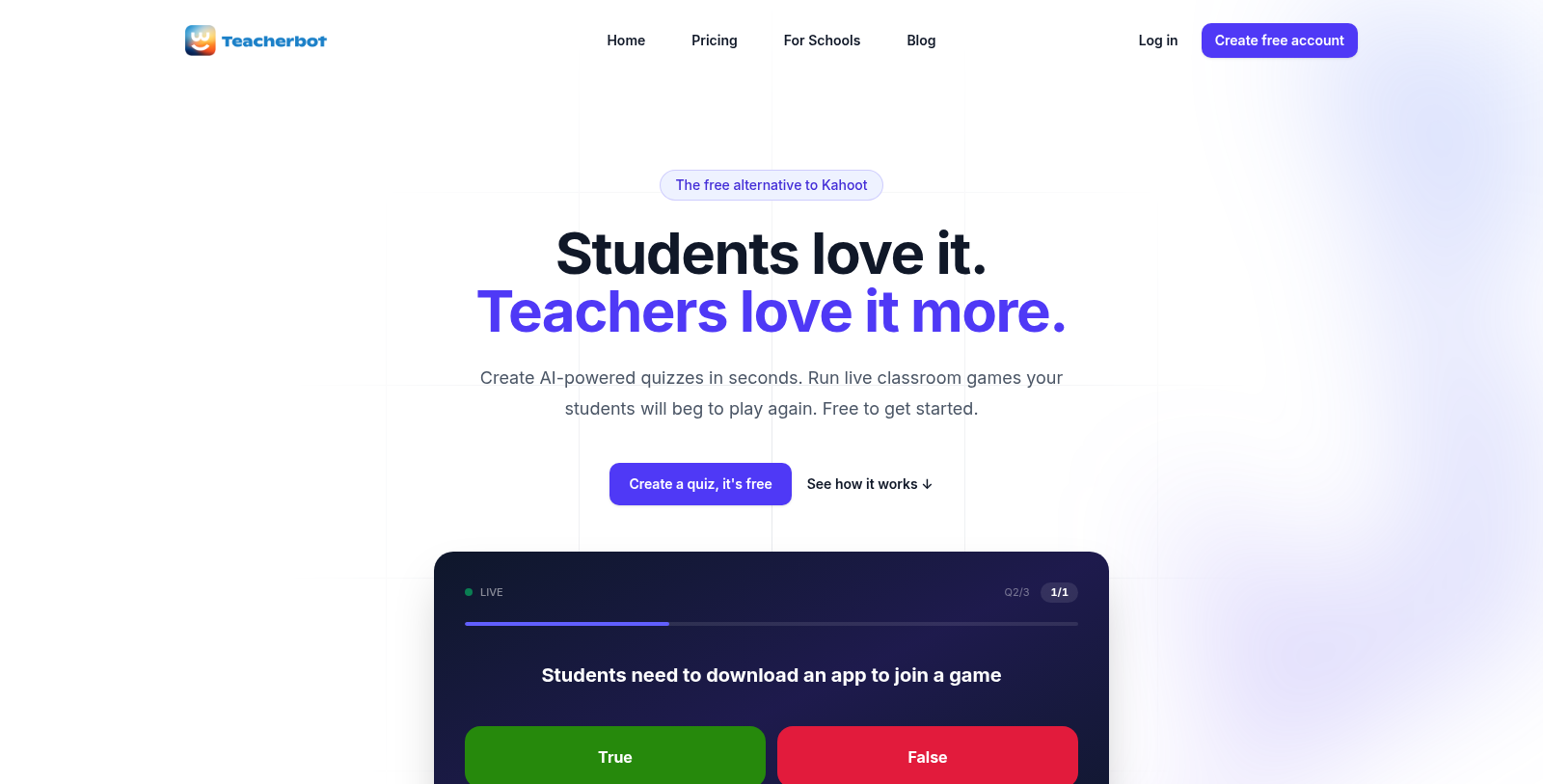
Teacherbot is a quiz platform for teachers. You describe a topic, paste lesson notes or upload a document, and the AI drafts a complete quiz with age-appropriate questions that you can edit before playing. A template gallery is also available.
Quizzes run as live classroom games: students join from a phone, tablet or laptop with a game code and a nickname, with no app download or student accounts. The game shows a leaderboard and countdown timer, and teachers get post-game analytics. Question types include multiple choice, true/false and open-ended, and existing Kahoot quizzes can be imported.
The free plan includes 5 quizzes and 3 AI generations per month and 30 students per game. The Plus plan is listed from 4.99 GBP per month and adds unlimited quizzes and AI generation, private quizzes and 100 students per game. A per-user Schools plan is also offered.
Pros & Cons
Pros
- Drafts complete quizzes from a topic, lesson notes or an uploaded document
- Students join with a game code and nickname, without accounts
- Imports existing Kahoot quizzes and offers post-game analytics
Cons
- Entry tier allows 5 quizzes and 3 AI generations per month
Frequently Asked Questions
How much does Teacherbot cost?
Teacherbot is available at no cost.
Does Teacherbot have a lifetime deal?
According to our latest information, this tool does not seem to have a lifetime deal at the moment, unfortunately.
How does Teacherbot create a quiz?
You describe a topic, paste lesson notes or upload a document, and the AI drafts a complete quiz with age-appropriate questions. You can edit the draft before playing it. A template gallery is also available if you want a starting point.
How do students join a game?
Students join from a phone, tablet or laptop using a game code and a nickname. No app download or student accounts are needed. The game shows a leaderboard and a countdown timer, so each round runs with the same steps for everyone.
Which question types can I use?
Teacherbot supports multiple choice, true/false and open-ended questions. Existing Kahoot quizzes can be imported, so older material can be reused. After a game, teachers get post-game analytics to see how the class performed. Each question can be reviewed before a game starts, since the quiz stays editable until you play it.
How many students can join a game?
The entry tier allows 30 students per game, while the Plus plan raises that to 100 and adds unlimited quizzes, unlimited AI generation and private quizzes. A per-user Schools plan is also offered. Check the official website for current limits before you plan a large class.
Notice: This website uses affiliate links to earn commissions from sales. Please read their ToS when signing up somewhere.